Back in April, Jon Seager, Canonical's VP of Engineering, spoke with The Pragmatic Engineer (paywalled), telling them that Ubuntu inside Windows Subsystem for Linux (WSL) is growing faster than native Ubuntu desktop installs. He expects WSL to pull ahead within months.
Jon was speaking on the topic of how AI is reshaping Ubuntu when the topic of WSL came up, where he pointed out that:
In a year, the growth in our WSL numbers is significantly higher than the growth in Desktop usage numbers. WSL enables Windows users to “install” Ubuntu for use within their Windows environment.
Once installed, users interact with Ubuntu through the Terminal app, and what you’re running literally is Ubuntu. Your home directory is mounted with Ubuntu and you can pull windows out of this terminal to your desktop; as in actual windows as on-screen windows.
I expect to see more Ubuntu WSL users than “native” Ubuntu users over the coming months. This is especially true for anyone doing ML or AI work. We’re already hearing from lots of devs who have no choice but to get a Windows machine from their employer, but then find themselves needing to do AI or ML work. With WSL, this is a lot simpler.
Canonical doesn't seem bothered
Ubuntu Pro, Canonical's paid security and support subscription, already covers WSL instances the same way it covers native installs. Subscribers get to take advantage of up to 15 years of CVE patching, toolchain coverage for Python, Go, and Rust, and fleet management.
Simply speaking, a WSL user on Ubuntu Pro and a data center running Ubuntu Server are the same kind of customer to Canonical; the company gets paid either way.
And, as you saw earlier, Jon also points to why demand keeps climbing. Plenty of developers don't get a say in their work laptop, and once AI or ML work lands on their plate, WSL becomes the easiest way to get a working Linux environment without a fight over IT policy.
Craig Loewen, WSL's product manager at Microsoft, called the Ubuntu Pro arrangement a "fantastic partnership" when it launched, further stating that:
This work will benefit enterprise developers who use WSL to build production Linux solutions.
What does it mean for native Linux?
This is where it gets tricky if you are rooting for the Linux desktop specifically. If WSL quietly satisfies the demand that would otherwise push developers toward dual-booting or switching entirely, does that take pressure off IT departments and hardware vendors to ever approve native Linux at all?
Canonical isn't asking that question, but its own VP describing the shift like a win makes the case for native Linux adoption weaker. Running Ubuntu on bare metal will still be better than WSL for anyone who wants full hardware control, maximum performance, and a Linux-first setup.
But if the fastest-growing way to use Ubuntu is inside a Big Tech operating system, then that's something worth thinking about.
Whether you're a developer, system administrator, or simply someone who spends a lot of time in the terminal, juggling multiple terminal sessions can be messy and frustrating.
A terminal multiplexer helps you keep everything organized, letting you manage several sessions from a single interface while making your workflow much more efficient.
While tmux and GNU Screen are the names most Linux users are familiar with, there are many more similar terminal multiplexer tools available. As someone who like to explore new tools, I spent some time and came up with this list for you.
📋
Many terminal emulators let you split your screen into panes, but splitting a screen isn't the same as multiplexing it. For this list, I am focusing on tools that offer real session value beyond arranging windows.
Zellij
Zellij describes itself as a terminal workspace rather than just a multiplexer, with an emphasis on delivering a polished experience from the moment you launch it.
It aims to provide sensible defaults while still leaving plenty of room for customization.
Zellij
One of the things that sets Zellij apart is its focus on usability. Built-in layouts, a plugin system, and collaborative sessions are all part of the experience, but the project's philosophy is that you shouldn't have to trade simplicity for advanced functionality.
This makes it approachable for newcomers while still offering enough flexibility for users who want to tailor their workspace.
While this is not a ranking list, Zellij is the first one on this list because I have used it on a daily basis for the past several months.
TUIOS
While most terminal multiplexers focus on helping you manage terminal sessions, TUIOS takes that idea a step further by presenting itself as a terminal window manager.
TUIOS tries to bring concepts you'd expect from a tiling window manager, such as workspaces, automatic tiling, and window management, into your existing terminal.
TUIOS
The workflow is centered around a modal interface inspired by Vim, letting you switch between managing windows and interacting with terminal applications.
Alongside features like a command palette and workspace organization, TUIOS also supports automation through tape files, making it suitable for users who want to build repeatable terminal workflows instead of just juggling multiple shells.
Wezterm
You probably know WezTerm as a feature-rich terminal emulator. But there's more to it than meets the eye.
WezTerm includes a built-in multiplexer, allowing you to create and manage persistent sessions without relying on a separate tool.
Wezterm as a Terminal Multiplexer
It integrates multiplexing directly into the terminal and supports local domains. While it lets you connect to remote domains over SSH and other tmux like features, this requires you to spend some time configuring.
Kitty + Abduco
If you're already using Kitty as your terminal emulator, you don't necessarily have to switch to a traditional multiplexer. Pairing it with abduco gives you a lightweight way to keep terminal sessions running in the background while letting Kitty handle everything on the frontend.
0:00
/0:30
Kitty with Abduco
It's a simple combination that sticks to the Unix philosophy of using small tools that do one job well.
The primary job of abduco is to detach and reattach terminal sessions, leaving the rest to your terminal emulator.
Kitty complements this nicely with features like tabs, splits, and a polished interface, giving you a workflow that feels familiar while still providing session persistence.
tmate
Rather than reinventing the multiplexer experience, tmate builds on tmux and adds secure session sharing, making it easy to collaborate, troubleshoot problems, or provide remote assistance without asking someone to install extra software.
0:00
/0:46
Tmate
The biggest addition is the ability to generate a connection string that others can use to join your session.
By default, these shared sessions are relayed through tmate's public servers, although you can host your own relay if you prefer to keep everything under your control. If you never need to share your terminal, however, plain tmux is likely the better fit.
Boo
At first glance, boo might look like just another GNU Screen alternative. In reality, it's a fairly different take on terminal multiplexing.
Built on Ghostty's terminal emulation library, boo keeps track of the actual terminal state, allowing it to recreate a session exactly as you left it, even after you've detached and reattached.
0:00
/0:46
Boo
The project also leans into automation. Besides keeping sessions alive, it includes commands that let scripts and AI agents inspect or interact with detached sessions without needing a live terminal connection.
Okena
Okena combines terminals, tabs, panes, and projects into a single interface, with a strong focus on helping you pick up exactly where you left off.
Close the application, reopen it later, and your workspace is restored much like you never left.
Okena
That persistence model is what makes Okena different. Unlike tmux or GNU Screen, it doesn't keep sessions running in the background after the application closes, nor is it designed for detached SSH workflows or remote session management.
Instead, the emphasis is on restoring your local workspace, making it feel more like a modern development environment than a server-backed multiplexer.
Seance
Seance, built with GTK4 and libadwaita, takes a desktop-first approach to terminal session management. It feel more like a modern Linux application than a traditional keyboard-driven multiplexer.
It offers a clean interface with configurable key bindings, workspace management, and session persistence across restarts, so you can reopen the application and continue where you left off.
However, it isn't designed around detached server sessions or remote SSH workflows. Instead, it focuses on providing a polished experience for managing terminal workspaces on your local Linux desktop.
Wrapping Up
As you can see, there's no shortage of ways to organize your terminal workflow. Some of these tools have been around for decades, while others are reimagining what a terminal workspace can look like. The thing is that there's no single "right" choice. It all comes down to how you work.
Whichever you choose, learning to use a terminal multiplexer is one of those skills that pays off over time. Once it becomes part of your workflow, your muscle memory, there is no going back to normal terminal sessions.
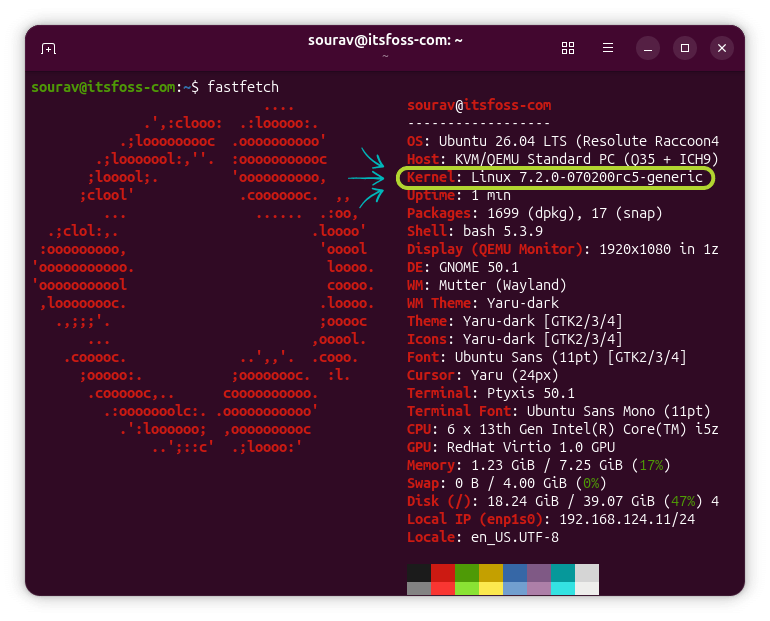
The newest point release for Linux is here a few months after the last one, and the time in-between was not spent idly. Scheduler work that took over a year finally came together, several pieces of hardware got proper support, and a series of 2023 MacBooks can finally boot Linux.
During all this, Linus Torvalds' transition from treating AI as noise for years to slowly warming up to it has been something of a wildcard entry.
Anyhow, let's see what this point release has to offer.
What's new in this release?
AMD's platform driver changes lean heavily on Zen 6 prep. The Hardware Feedback Interface (HFI) driver adds v3 ranking table support for dynamic core rankings, and the power management controller driver adds support for Family 1Ah Model 80H SoCs (a Zen 6-focused change, basically).
What Ubuntu's OEM kernel had been carrying out of tree is now in. The long-awaited AMD ISP4 driver completes webcam support for the HP ZBook Ultra G1a and other upcoming Ryzen laptops.
For Intel, most of this round's EDAC work targets next-gen Xeon Diamond Rapids chips, adding sub-memory channel awareness and Rank Retry Logic to preserve data integrity during memory errors. Nova Lake H and Panther Lake H gain in-band ECC error reporting through the IGEN6 driver.
Linux 7.2 also continues clearing out old i486 chunks that started disappearing in 7.1 and makes TSC and CX8 support unconditional on x86. TDX modules can now update at runtime, similar to CPU microcode, so security fixes no longer force a full reboot on TDX-enabled systems.
Another highlight of this kernel release has been Cache Aware Scheduling, which was merged after more than a year of work, landing behind the CONFIG_SCHED_CACHE option.
Without cache awareness, the scheduler can end up scattering related tasks across zones on chips with multiple last-level caches (LLCs). This feature groups those tasks onto cores within the same LLC instead.
Laptop support also sees some improvements that include new ASUS ROG Strix G16 2025, Zephyrus G14 2023/2025, and TUF Gaming F16 support. Lenovo laptops gain more configurable attributes along with WMI battery charge limiting, and Microsoft's Surface Pro 12-inch gets platform driver support.
A few smaller changes round things out:
Nouveau adds support for the NVIDIA GA100 compute accelerator via GSP.
Btrfs large folio support left experimental status and is now on by default, and huge folios up to 2M arrive as a new experimental option.
Networking brings more Wi-Fi Aware and WiFi 8/UHR groundwork, plus 10Gbit and EEE support in the Realtek R8152 driver.
Apple M3 MacBooks can boot the mainline kernel for the first time, though only to a serial console so far. The Asahi Linux devs worked hard to deliver this.
A new USB4STREAM protocol that lets two machines move data directly over a USB4 or Thunderbolt cable.
Well, this last week of the release was - once again - bigger than I would have wished for, but hey, with the whole "new normal" thing, if I delayed releases for that reason we'd probably never have a release at all.
There are a number of fairly late reverts - the drm scheduling reverts stand out, but there's a few other ones in here too. It may not be pretty, but it's the correct way to deal with "oh, that code wasn't ready and caused problems". People will be trying that again later.
Is it for you?
It's good to get excited about a new kernel release, but compiling the kernel or installing a new one is usually considered for intermediate to expert levels of skill. If this release fills some gap you faced with earlier kernels, then you should definitely go for it.
GNOME-Entwickler Tobias Bernard stellt Ideen und Mock-ups für Design und Funktionalität der GNOME Shell vor. Erste Anpassungen könnten bereits mit GNOME 51 umgesetzt werden.
Das NAS- und Homeserver-Betriebssystem Unraid wird mit Ausgabe 8 den Unterbau von Slackware zu uCore vollziehen. Zudem wird ein natives Backup-Tool die Notwendigkeit von Plugins für diesen wichtigen Job ersetzen.
Notebook-Ausrüster Kubuntu Focus finanziert KDE Plasma 6.6 LTS für drei Jahre mit mehr als 100.000 US-Dollar. Die Software wird derzeit bereits mit Kubuntu 26.04 LTS und auf den Geräten von Kubuntu Focus ausgeliefert.
Die Open-Source-Remote-Desktop-Software RustDesk kündigt die Unterstützung des unbeaufsichtigten Zugriffs unter Wayland an. Ein Preview-build für Debian steht für Tests bereit.
If you remember that desktop picture widget for GNOME I wrote about last year, but found it a bit too basic for your personalisation preferences, you weren’t alone. Another user felt it could lacked enough flexibility, so forked and improved it. Picture Desktop Widget Remake improves on the original. It lets add multiple picture widgets to your Ubuntu desktop, and assign each one a different folder to pull images from, at random. Plus, you can set the size, position, border radius and aspect ratio of each widget individually. Each photo frame has its own on/off button in Preferences, so you […]
Raspberry Pi Imager 2.0.11 flashing tool for Raspberry Pi devices is now available for download with support for newer multi-frame compressed images, more reliable writes to SD cards, and other changes.
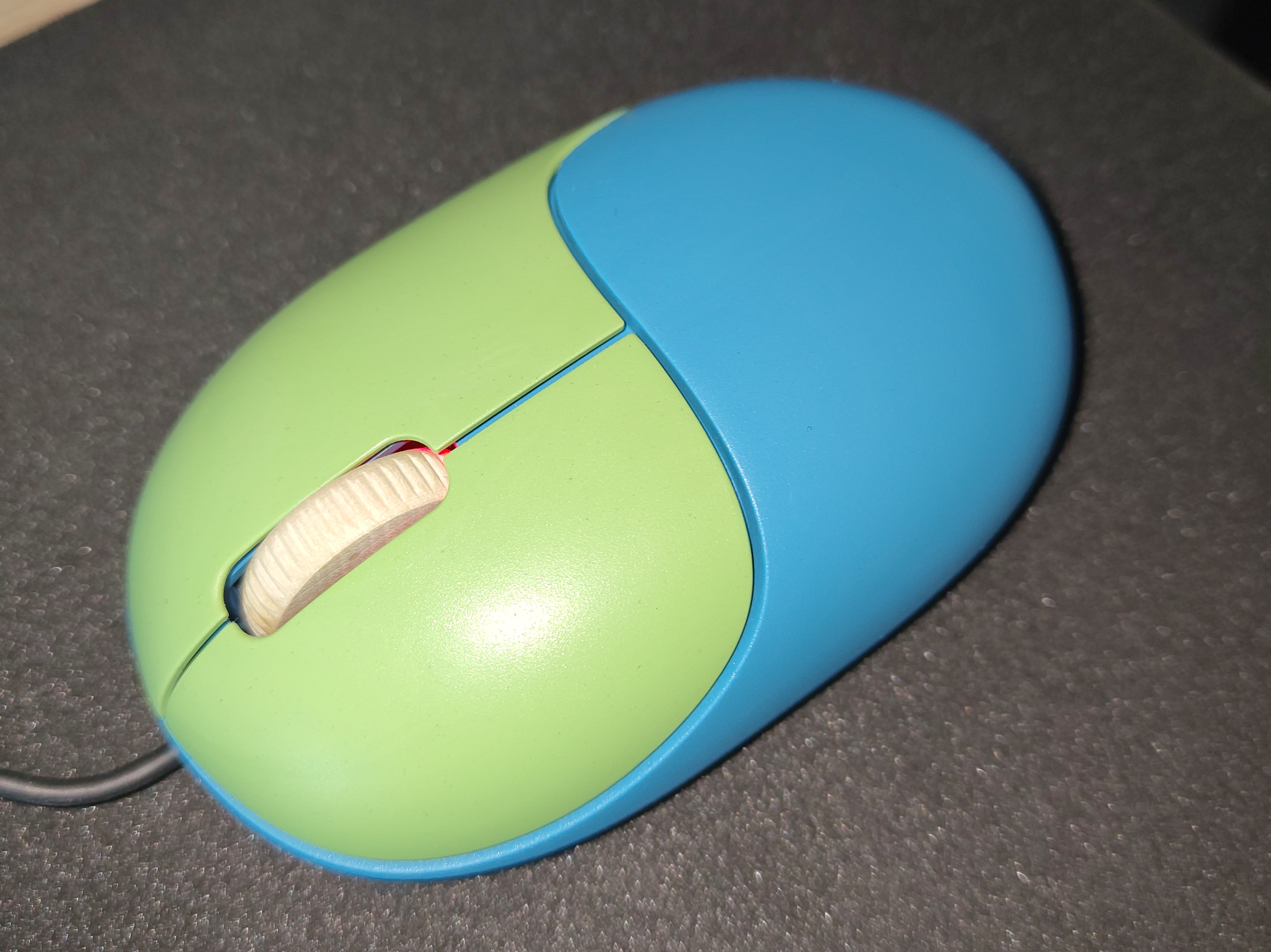
Die Fairmaus ist ein gelungenes Lötprojekt mit guter Hardware, aber die katastrophale Anleitung voller Fehler trübt den sonst positiven Gesamteindruck.
Die FrOSCon ist neben den Chemnitzer Linuxtagen der wichtigste deutsche Treffpunkt der Linux- und Open-Source-Szene. Sie öffnet am 15. und 16. August zum 21. Mal ihre Pforten.
GeForce NOW’s native Linux app has exited beta after seven months of testing, with official support for Ubuntu 24.04 LTS and later. The app is a frontend for Nvidia’s game streaming service, with more than 4,500 PC titles running in the cloud on Nvidia servers. Users get GeForce RTX-class performance, ray tracing and DLSS without the need to own the relevant hardware. In a blog post to announce its ‘graduation’ from beta, Nvidia say GeForce NOW for Linux has picked up “performance, stability and polish” improvements thanks to community feedback during the beta test period. The company also touches on […]






 If you remember that desktop picture widget for GNOME I wrote about last year, but found it a bit too basic for your personalisation preferences, you weren’t alone. Another user felt it could lacked enough flexibility, so forked and improved it. Picture Desktop Widget Remake improves on the original. It lets add multiple picture widgets to your Ubuntu desktop, and assign each one a different folder to pull images from, at random. Plus, you can set the size, position, border radius and aspect ratio of each widget individually. Each photo frame has its own on/off button in Preferences, so you […]

 GeForce NOW’s native Linux app has exited beta after seven months of testing, with official support for Ubuntu 24.04 LTS and later. The app is a frontend for Nvidia’s game streaming service, with more than 4,500 PC titles running in the cloud on Nvidia servers. Users get GeForce RTX-class performance, ray tracing and DLSS without the need to own the relevant hardware. In a blog post to announce its ‘graduation’ from beta, Nvidia say GeForce NOW for Linux has picked up “performance, stability and polish” improvements thanks to community feedback during the beta test period. The company also touches on […]