

Unraid 8 wechselt von Slackware zu Fedora
ChatGPT desktop app is now available for Linux (in preview)
 OpenAI has announced a preview release of the official ChatGPT Desktop app for Linux. Compared to using ChatGPT in a browser tab, the GUI desktop app can run Codex in your local repos, hook into and control other apps via extensions, handle ChatGPT Work-related tasks and probe your local files without you having to upload things elsewhere. In an email, OpenAI said that ‘Linux has been one of the most-requested platforms’ for its desktop app, and with this launch it’s finally available on all major operating systems. ChatGPT desktop app for Linux joins Anthropic’s Claude desktop app for Linux, which entered […]
You're reading ChatGPT desktop app is now available for Linux (in preview), a blog post from OMG! Ubuntu. Do not reproduce elsewhere without permission.
Run Hermes on Raspberry Pi, Control It from Your Laptop
My agent harnessing journey started with Nanoclaw. Which is super simple to setup and use. It works for a few simpler tasks through Telegram.
But I wanted something to work on my main computer. Out of all claw like agents, I find Hermes the most suited.
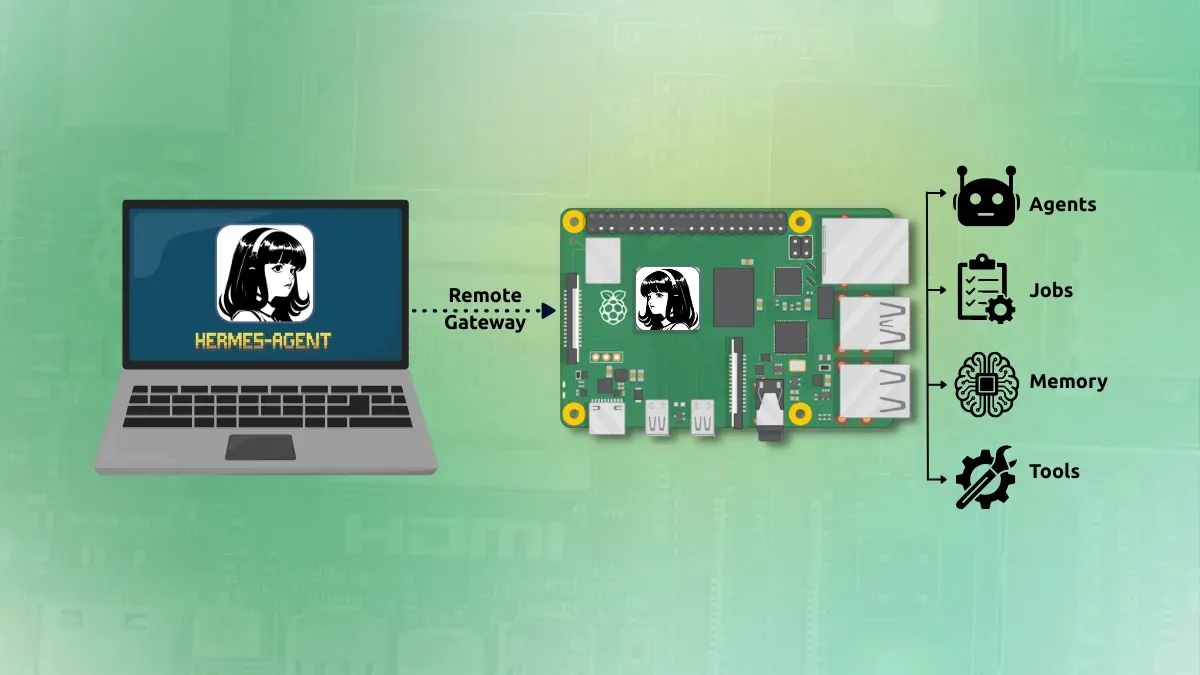
So I installed Hermes on a Raspberry Pi running on Pironman 5 Pro Max. And I installed Hermes desktop on my Asus Zenbook laptop, my primary system.
The advantage is that the Raspberry Pi remains the always-on Hermes machine. I can close Hermes Desktop or shut down the laptop without needing Hermes itself to run on the laptop (for scheduled tasks). Also, Hermes agents won't have unrestricted access to my system. A safer approach, in my opinion. At least, that's the idea I am going with.
The basic architecture is:
Laptop
└── Hermes Desktop
        │
        │ Remote Gateway
        ▼
Raspberry Pi
└── hermes serve
    ├── Agents
    ├── Jobs
    ├── Memory
    └── Tools
Let me show you how you can use the Hermes agent via the remote gateway feature.
Step 1: Start the Hermes Gateway on the Raspberry Pi
Open a terminal on the Raspberry Pi or SSH into it.
You need to add the following in the ~/.hermes/.env file of hermes:
HERMES_DASHBOARD_BASIC_AUTH_USERNAME=admin
HERMES_DASHBOARD_BASIC_AUTH_PASSWORD=YOUR_STRONG_PASSWORD
HERMES_DASHBOARD_BASIC_AUTH_SECRET=YOUR_RANDOM_SECRET
The 'random secret' can be generated with.
openssl rand -base64 32These credentials will be used from the Hermes desktop. Now start Hermes's backend with:
hermes serve --host 0.0.0.0 --port 9119
You may see a message like this:
Headless backend (hermes serve): web UI disabled — use `hermes dashboard` for the browser UI.
This is normal. hermes serve does not provide a browser interface. It starts the backend that Hermes Desktop connects to.
Keep this process running while testing the connection.
Step 2: Verify that Hermes is listening
Open another terminal tab to access the Raspberry Pi, and run:
ss -ltnp | grep 9119
You should see something containing:
0.0.0.0:9119
This means Hermes is listening for connections on port 9119.
Step 3: Install Hermes Desktop on the pc
Hermes provides an official script for installing the Hermes Desktop:
curl -fsSL https://hermes-agent.nousresearch.com/install.sh | bashDuring installation, Hermes may ask to choose a terminal backend:
Select terminal backend:

Local
Docker
Modal
SSH
Daytona
...
Keep current (local)
For this setup, you can leave this as:
Keep current (local)
The Terminal Backend setting is separate from the Remote Gateway setting. The gateway is what connects Hermes Desktop to Hermes running on your Raspberry Pi.
I also left out the model selection. Whatever the remote Hermes server uses will be used here, too.
Step 4: Use remote gateway on Hermes
Start Hermes Desktop from the terminal:
hermes desktopThat's the way it runs for the moment. Ironical to run a desktop GUI app from the terminal.
Anyways, inside Hermes Desktop, click on the settings and go to gateway and find the remote gateway option:
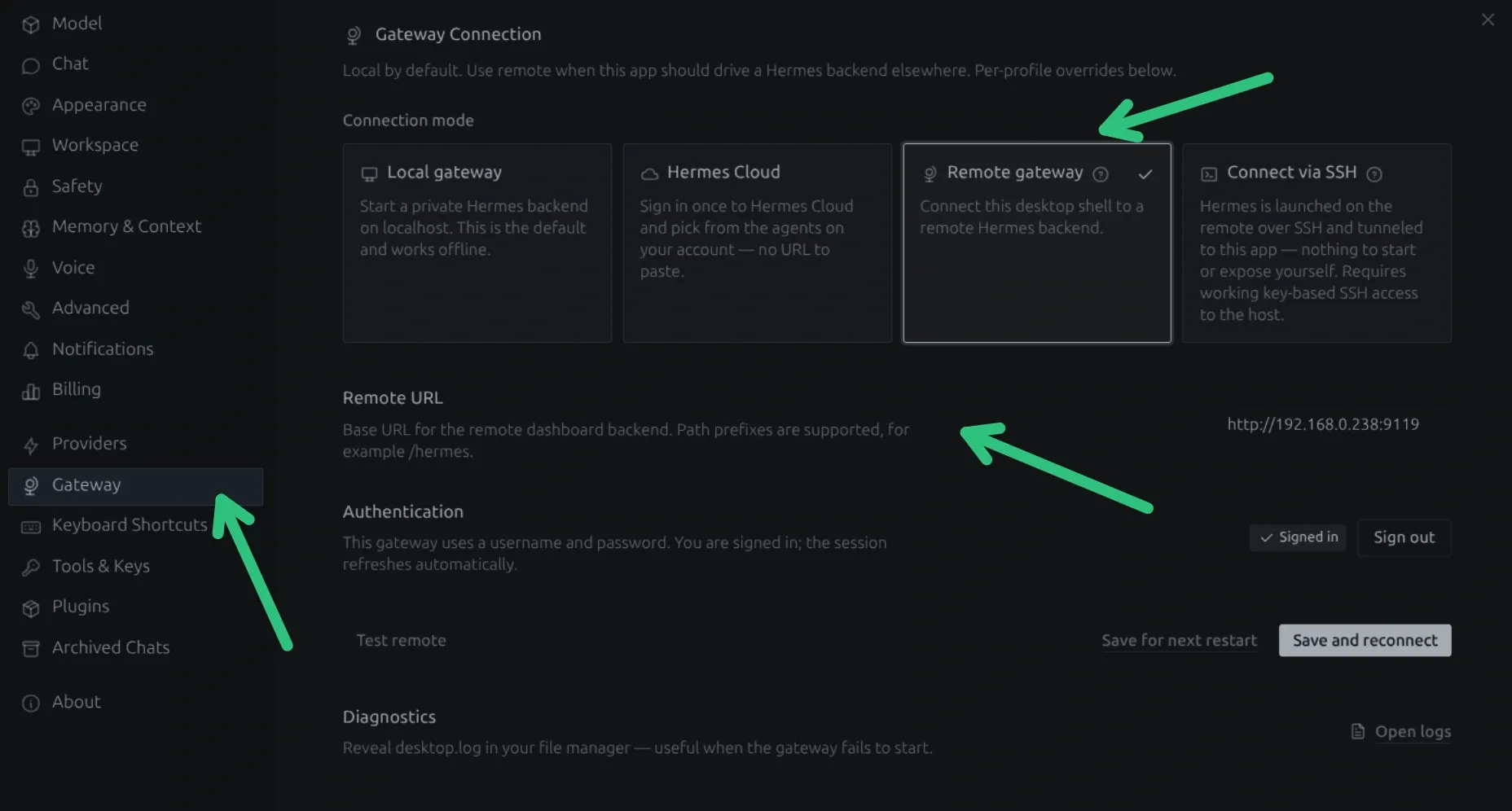
In the Remote URL field, enter the address of the device running the Hermes backend with the port 9119:
http://<IP of Pi>:9119
Then save/apply the setting and reconnect.
Hermes Desktop should now connect to the Hermes backend running on your Raspberry Pi.
Hermes Desktop becomes the interface for interacting with the Hermes instance on the Raspberry Pi.
Step 5: Make the gateway permanent
If things are working fine so far, it is time to make things permanent. Because keeping this running on the remote Hermes server is not a wise move.
hermes serve --host 0.0.0.0 --port 9119
Because if I close that terminal or reboot the Raspberry Pi, the gateway will stop.
For an always-on Raspberry Pi setup, running hermes serve as a systemd service works better.
No need to SSH into the Pi and manually launch Hermes every time. It will be automatically start thanks to the systemd service.
Get the Hermes executable path with:
which hermesAnd then create the systemd service:
sudo nano /etc/systemd/system/hermes-server.serviceHere's the file I used. You should replace the EnnvironmentFile and ExecStart values as per your setup.
[Unit]
Description=Hermes Agent Backend
After=network-online.target
Wants=network-online.target

[Service]
Type=simple
User=pi
EnvironmentFile=/home/pi/.hermes/.env
ExecStart=/home/pi/.local/bin/hermes serve --host 0.0.0.0 --port 9119
Restart=always
RestartSec=5

[Install]
WantedBy=multi-user.target
Once you have saved the service file, run it in this fashion:
sudo systemctl daemon-reload
sudo systemctl enable --now hermes-server
Check the status of the newly created systemd service:
systemctl status hermes-serverConclusion
I am yet to fully utilize Hermes on desktop with the remote gateway method. Portability could be an issue if I move out of my home network, but even in that case, there are ways to SSH into Raspberry Pi from outside network.
I'll be sharing more of my local AI exploration and experiences. Do subscribe to Local AI Weekly newsletter for that.

Hermes desktop gateway setting
openJiuwen’s Agent Swarm: When AI Agents Finally Work as a Team

Over the past two years, the AI agent space has gone through wave after wave of "engineering paradigm shifts". From Prompt Engineering to Context Engineering, and on to Harness Engineering, each iteration has focused on making individual agents smarter and more reliable.
However, complex tasks in the real world are never completed by a single person.
For example, multi-disciplinary medical consultations require experts from various fields working in tandem.
Similarly, large-scale software engineering projects demand product managers, frontend engineers, backend developers, and QA testers pushing forward together.
And yet, AI industry is still trying to build an "all-powerful" single agent rather than a well-coordinated team of agents.
This is precisely the problem openJiuwen aims to address.
What is openJiuwen?
openJiuwen is an open-source AI agent platform jointly built by Huawei Laboratories, Huawei Cloud, and the Terminal Xiaoyi team, released under the Apache 2.0 license. Its goal is to help developers build production-grade AI agents and enable large-scale multi-agent collaboration.
In May 2026, the openJiuwen community released a major component: JiuwenSwarm. It marks the first engineering implementation of "Coordination Engineering", moving the focus from "making a single agent smarter" to "making multiple agents collaborate efficiently."
In collaboration with Huawei's Terminal Tablet & PC Product Line, Software Department, and other teams, openJiuwen launched the HarmonyOS PC version of JiuwenSwarm. This means JiuwenSwarm shares the exact same technical DNA with the HarmonyOS ecosystem right from the architectural foundation.
What makes JiuwenSwarm different?
At the core of JiuwenSwarm is the Agent Swarm mechanism, which enables multiple AI agents to autonomously divide labor, dynamically negotiate, and collaborate efficiently.
Below are its key features.
Heterogeneous model routing for different tasks
JiuwenSwarm supports routing members to different models, providing appropriate model capabilities for different roles, thus allocating heavy-reasoning models to complex logic and lightweight models to simple tasks. This reduces system load and improves overall execution quality. Developers simply declare the role-to-model mapping in a configuration file, and the system automatically manages scheduling.
JiuwenSwarm has already achieved seamless integration with platforms like HarmonyOS Xiaoyi and Lark (Feishu). Developers can build JiuwenSwarm-mode agents that are invokable directly via HarmonyOS devices.
Layered memory architecture
Paired with a layered persistent memory system, JiuwenSwarm retains full-dimensional records across sessions, including operation history, enterprise profiles, and policy guidelines. Through a cross-Swarm experience inheritance mechanism, the experience accumulated by one Swarm can be directly inherited by another.
Distributed deployment
JiuwenSwarm supports distributed Agent Swarms. The Leader Agent and swarm members can run across different processes, different nodes, or even entirely different servers. This capability is especially critical for tasks requiring access to isolated environments, such as intranet databases.
This architecture naturally adapts to the multi-device distributed scenarios of HarmonyOS PC. In the HarmonyOS PC "Agent PC" environment, the PC acts as the home base for the Leader Agent, while HarmonyOS devices like phones and tablets act as Teammate Agent nodes, working together without needing extra adaptation.
With the Channels mechanism supporting platform integrations like Xiaoyi out of the box, developers can build multi-agent applications for the HarmonyOS PC ecosystem straight away.
Observability and self-evolution
JiuwenSwarm provides an intuitive interactive interface, helping users track Swarm running states, task progress, and member workloads in real time.
Simultaneously, its experience closed-loop mechanism captures task breakdown paths, role allocation strategies, tool invocation sequences, and result evaluations, converting them into reusable "task templates." The next time a similar task arises, the Swarm can skip the planning phase and jump straight into execution.
In enterprise office scenarios, OfficeClaw has already leveraged JiuwenSwarm to achieve automated collaboration across content generation, document processing, and knowledge search.
Meanwhile, the Swarm Skills Hub has attracted contributions from numerous developers, fostering a virtuous ecosystem loop.
Where it's headed
In openJiuwen's commercialization roadmap, the native HarmonyOS agent system represents one of the largest and strategically most significant deployment cases.
With JiuwenSwarm now open source, developers can directly build multi-agent applications for the HarmonyOS PC ecosystem using this framework.
The project is officially open for the community on GitHub under the Apache 2.0 license.

openJiuwen Agent Swarm
I Found a Simple Open WebUI Alternative for Running Ollama Models in a Web Browser
Running local AI models has become surprisingly accessible. Install Ollama, pull a model, and you can start chatting with it in minutes. That's exactly how I began my journey with local AI.
Using an LLM directly in terminal is okayish but it limits your ability. That's why there are so many frontends available for Ollama, providing you with a graphical, chatGPT-like interface. This way, you can easily revisit an earlier answer, copy code snippets, or have an extended discussion with a model.
Of the so many GUIs, Open WebUI is like the de facto Ollama front-end. I don't know about you but I find it difficult to set up.
I also looked at options like LibreChat, AnythingLLM, and LobeChat. They all felt geared toward users who wanted an all-in-one AI platform rather than a lightweight companion for a local Ollama UI.
This is the 'problem' that I think OrionChat solves...by its simplicity.
OrionChat: Web-based chat interface for Local LLMs
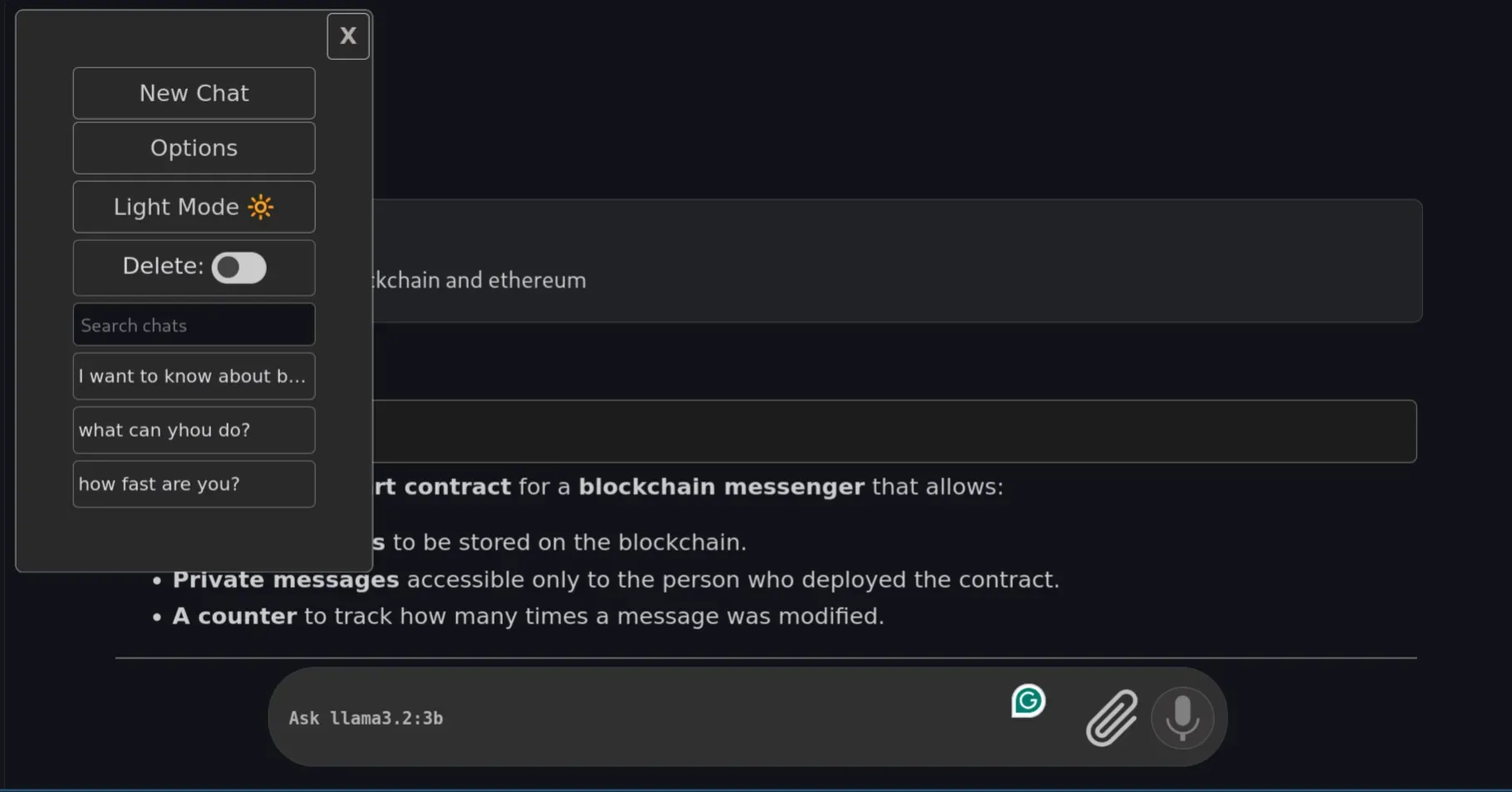
OrionChat is a free, open-source, web-based chat interface. It isn't built exclusively for Ollama. Instead, it can also talk to OpenAI, Google Gemini, Claude, Groq, Cerebras, and a few other providers.
But for this piece, I only care about one thing: how well it works as a front end for models running locally through Ollama.
It doesn't attempt to become an entire AI platform, no automation, agents, scheduled tasks. Instead, it provides a clean chat interface, model selection, and a responsive interface.
Once the models are downloaded, OrionChat simply detects them. I particularly liked this design because it doesn't introduce another layer of model management.
Installing OrionChat
Getting OrionChat running took me less than five minutes. There's no need to even run a Docker daemon.
Step 1: Clone the repository
Clone and move into the project folder.
git clone https://github.com/EliasPereirah/OrionChat.git
cd OrionChat
Step 2: Serve the files
Python makes this trivial if you already have it installed, which most Linux systems do:
python -m http.serverStep 3: Open OrionChat
Head to http://localhost:8000 in your browser. OrionChat's interface should load right away.
Letting Ollama talk to OrionChat
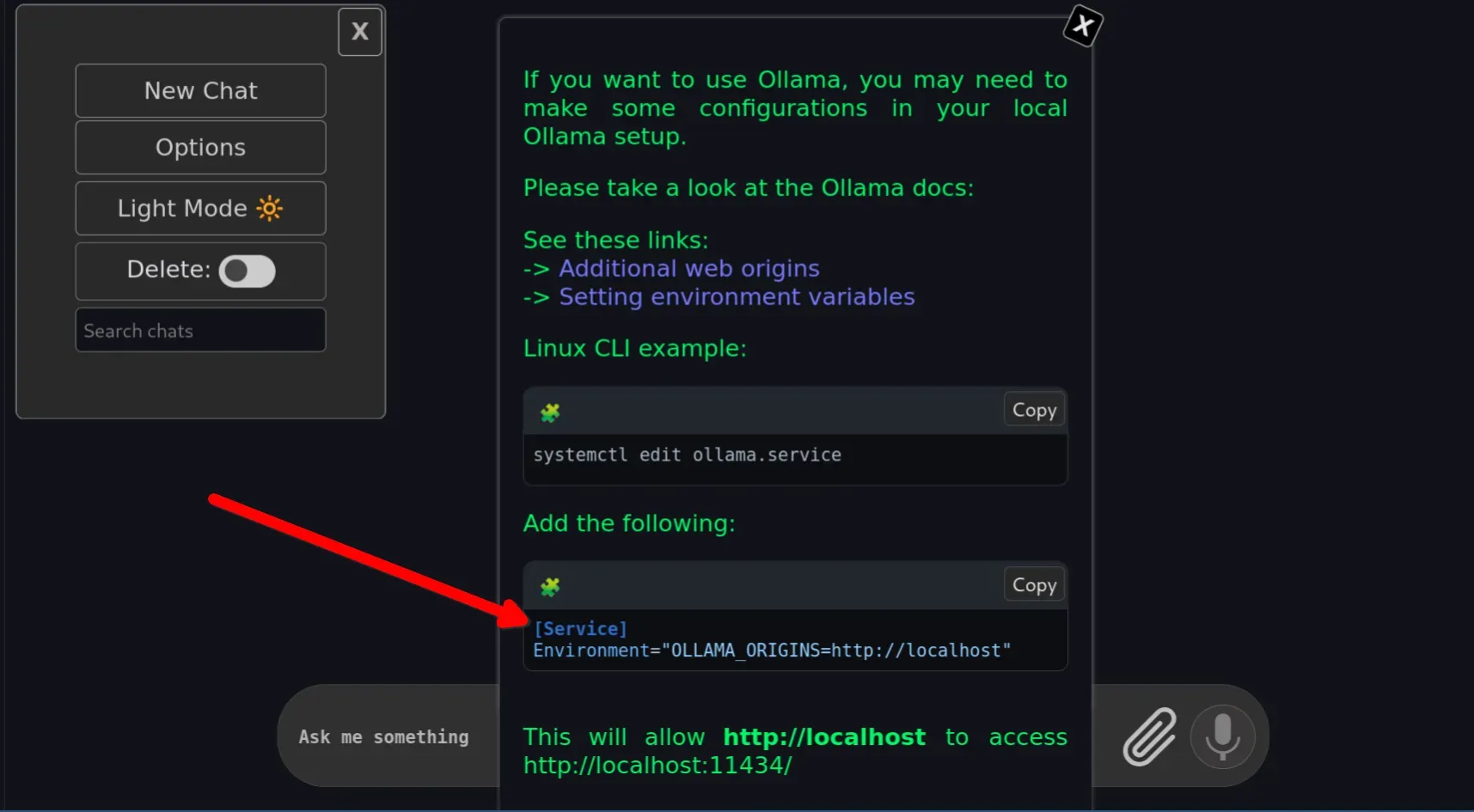
This is the part I actually got stuck on the first time. By default, Ollama only accepts requests from its own trusted origins, and a browser-based frontend like OrionChat doesn't automatically qualify. Every request gets silently blocked until you explicitly allow it.
Step 1: Check how you're running Ollama
If you installed Ollama via the official install script, it's almost certainly running as a systemd service. If you just launch it manually with ollama serve, skip to Step 3.
Step 2: Edit the Ollama service
You need to add the origin override to ollama.service systemd unit file.
sudo systemctl edit ollama.serviceIn the editor that opens, add this under the [Service] section:
[Service]
Environment="OLLAMA_ORIGINS=http://localhost"
Save, then reload and restart Ollama:
sudo systemctl daemon-reload
sudo systemctl restart ollama
Step 3: Or, if you run Ollama manually
Skip the systemd steps entirely and just set the variable inline when you launch it:
OLLAMA_ORIGINS=http://localhost ollama serveStep 4: Confirm it worked
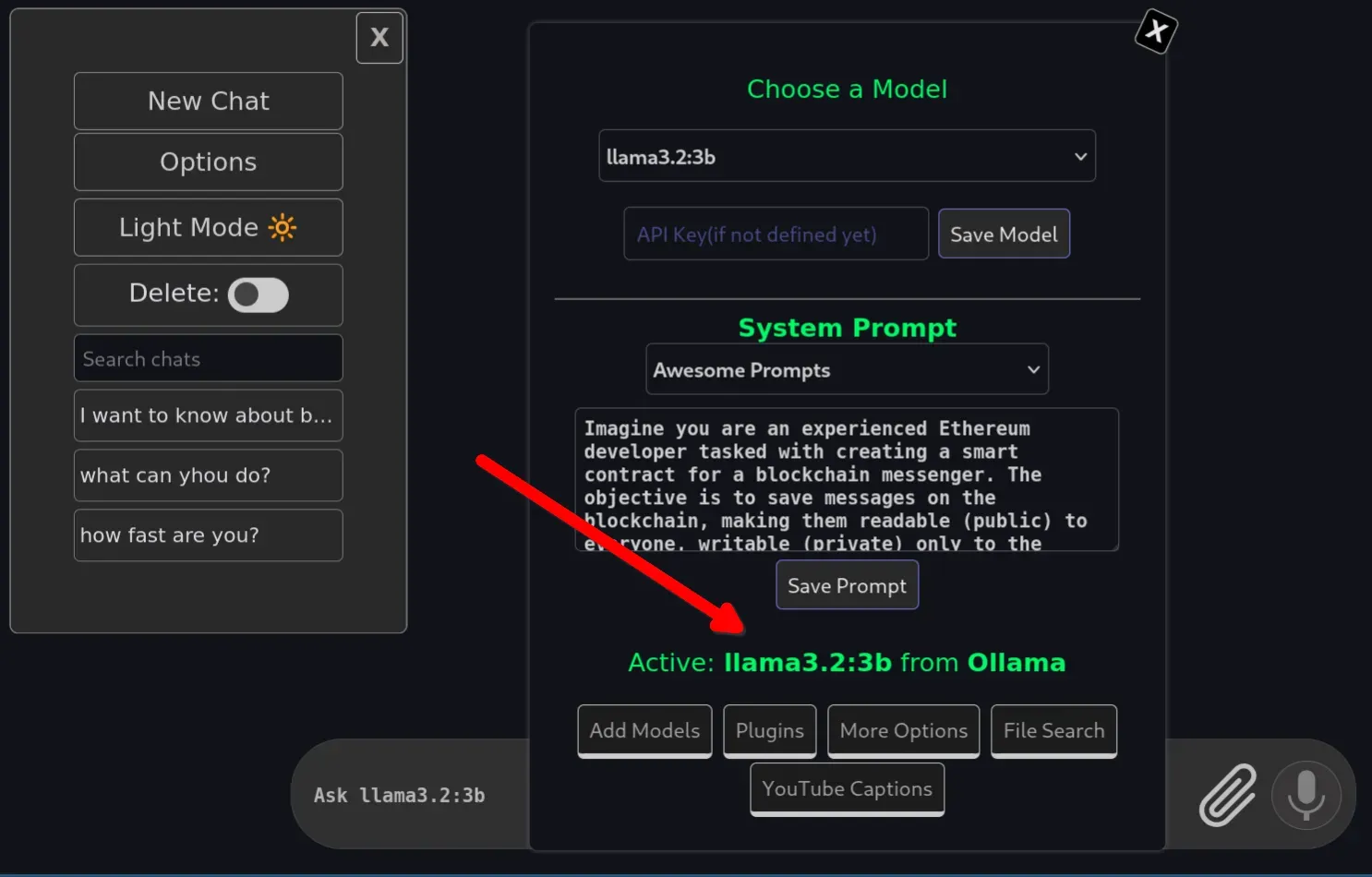
Refresh the OrionChat tab in your browser. It should now connect to Ollama and start listing your locally installed models. You can choose your default Ollama model and start prompting.
It provides an option to upload files and to use the microphone with Ollama models. This is a really nice feature you can't use in CLI mode.
My wxperience running Ollama models with OrionChat
Want to go from Gemma to Qwen? A couple of clicks. Want to try Mistral instead? Select it and keep going. For someone who regularly experiments with different models, this alone is worth the five-minute setup.
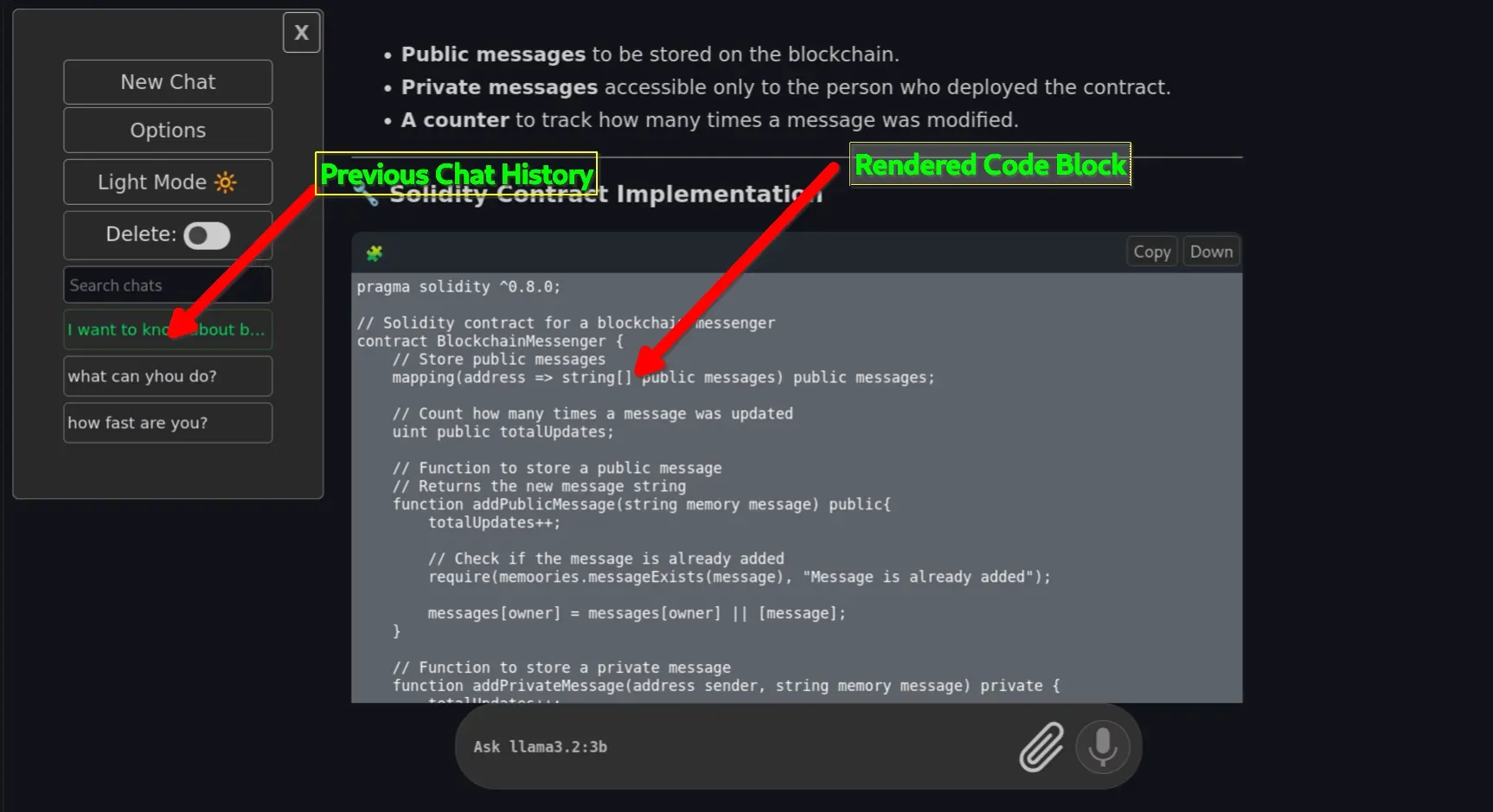
Starting a conversation feels exactly like using any modern AI chatbot. Code blocks render properly. Markdown formatting looks clean. Tables show up as tables instead of a mess of pipe characters. Long conversations stay easy to navigate because everything lives in an actual interface instead of a scrolling terminal buffer.
Copying responses feels natural too, no highlighting text in a terminal and fighting with line wrapping. For anyone who asks a lot of questions to local LLMs, that alone noticeably improves the day-to-day experience.
Also, unlike other Ollama UI alternatives, OrionChat is not an Electron wrapper hiding a browser inside your app menu. It lives in a web browser ;)
Final Thoughts
Ollama already made running local models easy, and for quick tests, the terminal is perfectly adequate. But if you're talking to local models for hours every week, a proper interface makes a real difference.
OrionChat hits a sweet spot for me. It doesn't require a complicated deployment, and doesn't try to become an all-in-one AI platform. It focuses on doing one thing well: giving Ollama a pleasant place to live outside the terminal.
After using it for a while, I found myself opening OrionChat first and reaching for the CLI only when managing or updating models themselves.
If you've been relying purely on the Ollama CLI and occasionally wish it felt a bit more like ChatGPT, OrionChat is worth the five minutes it takes to try.
If OrionChat isn't quite your fit, Open WebUI, Enchanted, Chatbox, LibreChat, and NextChat are all solid alternative Ollama frontends, each trading off simplicity against features differently. Worth trying a couple to see which matches your workflow.

I Found a Simple Open WebUI Alternative for Running Ollama Models in a Web Browser
Jellyfin verliert Projektleiter und Kernteam-Mitglied
Mozilla Thunderbird 153 Is Out with Various New Features and Many Fixes

Mozilla Thunderbird 153 open-source email client is now available for download with new features, improvements, and numerous bug fixes. Here’s what’s new!
The post Mozilla Thunderbird 153 Is Out with Various New Features and Many Fixes appeared first on 9to5Linux - do not reproduce this article without permission. This RSS feed is intended for readers, not scrapers.
Firefox 153 enables containers, GTK rounded corners by default
 Mozilla has released Firefox 153 with built-in containers, QR code generation and more quick actions in the address bar. This is the final “monthly” stable release before Mozilla moves to a faster release cadence, putting out new stable versions of Firefox every two weeks. On an unrelated note, Firefox has decided to resume activity on X (formerly Twitter) after a year of no activity. Like all updates, you can get this one for Windows, macOS and Linux, as well as for Android and iOS (mobile versions have different features and are not covered in this post). Containers now enabled by […]
You're reading Firefox 153 enables containers, GTK rounded corners by default, a blog post from OMG! Ubuntu. Do not reproduce elsewhere without permission.
This theme makes Discord look more at home on Ubuntu
 The official Discord desktop app supports Linux but it doesn’t make much effort to fit in, which is why alternative clients are popular – not least because they can be themed. Discord GNOME Theme by developer ~ricewind012, is so named because, basically, that’s what it is: a custom theme that restyles Discord to look more like Adwaita and follow the GNOME HIG (well, as close as Discord’s CSS allows). A reminder: Ubuntu’s Yaru theme is based (heavily) on upstream Adwaita, so while this theme won’t give an exact match on Ubuntu, it’s closer than stock. As it’s all CSS, it […]
You're reading This theme makes Discord look more at home on Ubuntu, a blog post from OMG! Ubuntu. Do not reproduce elsewhere without permission.
Flathub’s AI slop ban looks like it was the right call
 When Flathub banned AI-coded app submissions last month, some critics warned the platform was denying the future by dismissing a new wave of “vibe-coded” software as out-and-out “slop”. Well, new data suggests otherwise, as nearly three-quarters of the rejected apps are already dead, existing only a few months. Linux developer Evangelos Paterakis, developer of Tuba, Turntable and others, did the digging, looking at 120 code repositories whose pull requests for inclusion on Flathub were rejected because of their heavy AI usage and given an “AI Slop” tag. Of those rejected, 88 are no longer under active development, many having deleted their […]
You're reading Flathub’s AI slop ban looks like it was the right call, a blog post from OMG! Ubuntu. Do not reproduce elsewhere without permission.
mailbox: Preise angezogen, Speicher verdoppelt
Torvalds: Fork it or walk away
Unraid OS 7.3.2: Kritische Sicherheitslücke geschlossen
Claude desktop app for Linux enters beta – here’s how to try it
 Anthropic has released a beta of its Claude desktop app for Linux, launching alongside an apt repo Ubuntu users can add for ongoing updates. According to the official docs, Claude desktop for Linux offers “the same Chat, Cowork, and Claude Code experience as macOS and Windows: parallel sessions, visual diff review, an integrated terminal and editor, and live app preview”. However, not all of the app’s features are yet available. The Linux beta lacks Computer Use, which lets Claude control apps directly, and voice dictation, both present on macOS and Windows. Anthropic says Computer Use support is coming to Linux […]
You're reading Claude desktop app for Linux enters beta – here’s how to try it, a blog post from OMG! Ubuntu. Do not reproduce elsewhere without permission.
Ubuntu 26.04 LTS has fixed its missing video/audio thumbnails
 If you installed Ubuntu 26.04 LTS and noticed video and music files weren’t showing image thumbnails in the file manager, a packaging oversight was to blame, not anything you did. It turns out that Ubuntu’s Default install option (aka minimal install) wasn’t pulling in the gst-audio-thumbnailer and gst-video-thumbnailer packages which generate media thumbnails when you open a folder full of compatible files. A metapackage doesn’t contain software itself, just a list of the packages that need to be installed for, in this case, an Ubuntu desktop experience. Confusingly, both thumbnailers were present in the full install’s meta file, so if […]
You're reading Ubuntu 26.04 LTS has fixed its missing video/audio thumbnails, a blog post from OMG! Ubuntu. Do not reproduce elsewhere without permission.
Tails 7.9.1: Notfall-Release behebt DirtyClone Kernel-Lücke
Ubuntu’s new ‘Myna’ AI offers voice typing – but how?
 Ubuntu is working on speech-to-text AI transcription so you can talk to type. It's powered by project Myna. Here's how it'll work and why it's adding it.
You're reading Ubuntu’s new ‘Myna’ AI offers voice typing – but how?, a blog post from OMG! Ubuntu. Do not reproduce elsewhere without permission.
Control AirPods & Galaxy Buds on Ubuntu with ‘BudsLink’
 BudsLink is a Linux app giving you more control over Bluetooth earbuds from the likes of Apple, Sony, Samsung and Nothing – battery levels, active noise cancellation (ANC) and more, all without needing to use a mobile app. Most Bluetooth audio devices ‘just work’ on Ubuntu and other Linux distributions for listening to audio, but that’s about it. Pair AirPods or Galaxy Buds with your desktop and you’ll find you can’t adjust all of the on-device features you paid for. BudsLink is a GTK4/libadwaita app which can. It lets you control earbud features on your Linux desktop, no need to […]
You're reading Control AirPods & Galaxy Buds on Ubuntu with ‘BudsLink’, a blog post from OMG! Ubuntu. Do not reproduce elsewhere without permission.
Mozilla Thunderbird 152 Email Client Updates GMail OAuth to Use PKCE

Mozilla Thunderbird 152 open-source email client is now available for download with new features, improvements, and numerous bug fixes. Here's what's new!
The post Mozilla Thunderbird 152 Email Client Updates GMail OAuth to Use PKCE appeared first on 9to5Linux - do not reproduce this article without permission. This RSS feed is intended for readers, not scrapers.
