Raspberry Pi Imager 2.0.11 flashing tool for Raspberry Pi devices is now available for download with support for newer multi-frame compressed images, more reliable writes to SD cards, and other changes.
GeForce NOW’s native Linux app has exited beta after seven months of testing, with official support for Ubuntu 24.04 LTS and later. The app is a frontend for Nvidia’s game streaming service, with more than 4,500 PC titles running in the cloud on Nvidia servers. Users get GeForce RTX-class performance, ray tracing and DLSS without the need to own the relevant hardware. In a blog post to announce its ‘graduation’ from beta, Nvidia say GeForce NOW for Linux has picked up “performance, stability and polish” improvements thanks to community feedback during the beta test period. The company also touches on […]
Wireshark 4.6.8 open-source network protocol analyzer is now available for download with updated protocol and capture file support, as well as various bug and security fixes.
Shelly 3.0.4 graphical package manager for Arch Linux distributions is now available for download with a new search experience, initial text-mode UI, improved AppImage integration, and more.
QEMU 11.1 open-source virtualization software is now available for download with Universal Flash Storage (UFS) emulation support, ARM and RISC-V improvements, and more.
OpenAI has announced a preview release of the official ChatGPT Desktop app for Linux. Compared to using ChatGPT in a browser tab, the GUI desktop app can run Codex in your local repos, hook into and control other apps via extensions, handle ChatGPT Work-related tasks and probe your local files without you having to upload things elsewhere. In an email, OpenAI said that ‘Linux has been one of the most-requested platforms’ for its desktop app, and with this launch it’s finally available on all major operating systems. ChatGPT desktop app for Linux joins Anthropic’s Claude desktop app for Linux, which entered […]
Flatpak 1.18.1 Linux application sandboxing and distribution framework is now available for download with various bug and security fixes for the stable Flatpak 1.18 series.
Kagi has released a new beta of Orion for Linux, a WebKitGTK-based port of its popular browser for macOS and IOS. Orion for Linux v0.4.1 builds on the v0.3.0 public beta, released in May, adding more features found on its macOS and iOS versions and improving existing ones. The new beta adds working private windows, a functional (if bare-bones) download manager and a toolbar overflow menu. The overflow menu lets you hide buttons out of the way but without making them hard to reach. Orion’s link preview feature also makes its way to Linux. This isn’t the ‘AI summary’ sort […]
A new bug-fix release of Calibre, the open-source e-book manger, view and converter, is available for download. Calibre 9.13 fixes a number of PDF-related issues, including a conversion error that could occur on Linux distributions shipping an ‘ancient’ version of the libxml2 library, which is mainly older Debian installs. The cause was a clash between Qt’s GPU detection and Calibre’s PDF parser, which both need different versions of libxml2. Calibre now preloads the version it needs before Qt’s check can interfere, per the commit message. A regression in the Calibre 9.x series was causing internal links in PDF documents to […]
Rhythmbox 3.5.0 is out and it now lets you sync podcast subscriptions and listening progress across apps – the standout feature in the music player’s first major release in nine months
If you spent July dodging the summer heatwave, catch up on the best Linux app releases and updates you might have missed last month in this roundup. You likely already know about the Firefox 153 release, with its “new” container tabs confusing those who swear they’ve had ’em for ages. That update also enabled rounded window bottom corners on GTK-based Linux desktops, Ubuntu included. Slick system monitor Mission Center also dropped a big update, so if you like swotting over resource stats, don’t sleep on checking that out. Something you can safely sleep on: Anthropic’s Linux beta of its Claude […]
Wollt ihr Messwerte? Nein! Wollt ihr Experimente? Ja! Dann seid ihr bei dieser App richtig. Hier seht ihr die Sensorenwerte eures Smartphones, eingebettet in sinnvolle Anwendungsfälle.
Der Feed-Reader Newsflash bereitet Texte nicht nur hübsch auf, er bringt auch eine Reihe nützlicher Funktionen für Viel-Leser:innen mit. Es lohnt sich, die Anwendung genauer in Augenschein zu nehmen.
From the Git repo's README to blogs, Markdown is everywhere in the tech world in general.
I have been using Markdown for years. That's what I use for writing the articles here. While I often write directly in the CMS, I also manage personal notes, drafts and work on documentation in dedicated Markdown editors on my computer.
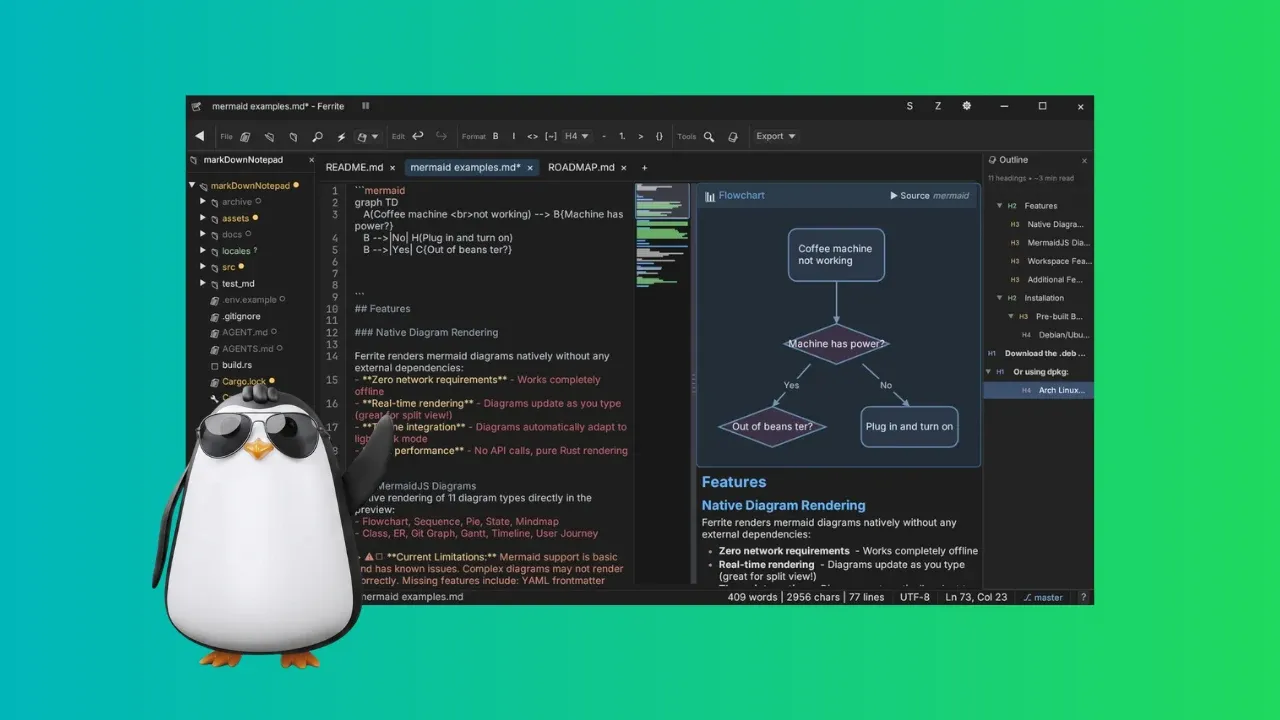
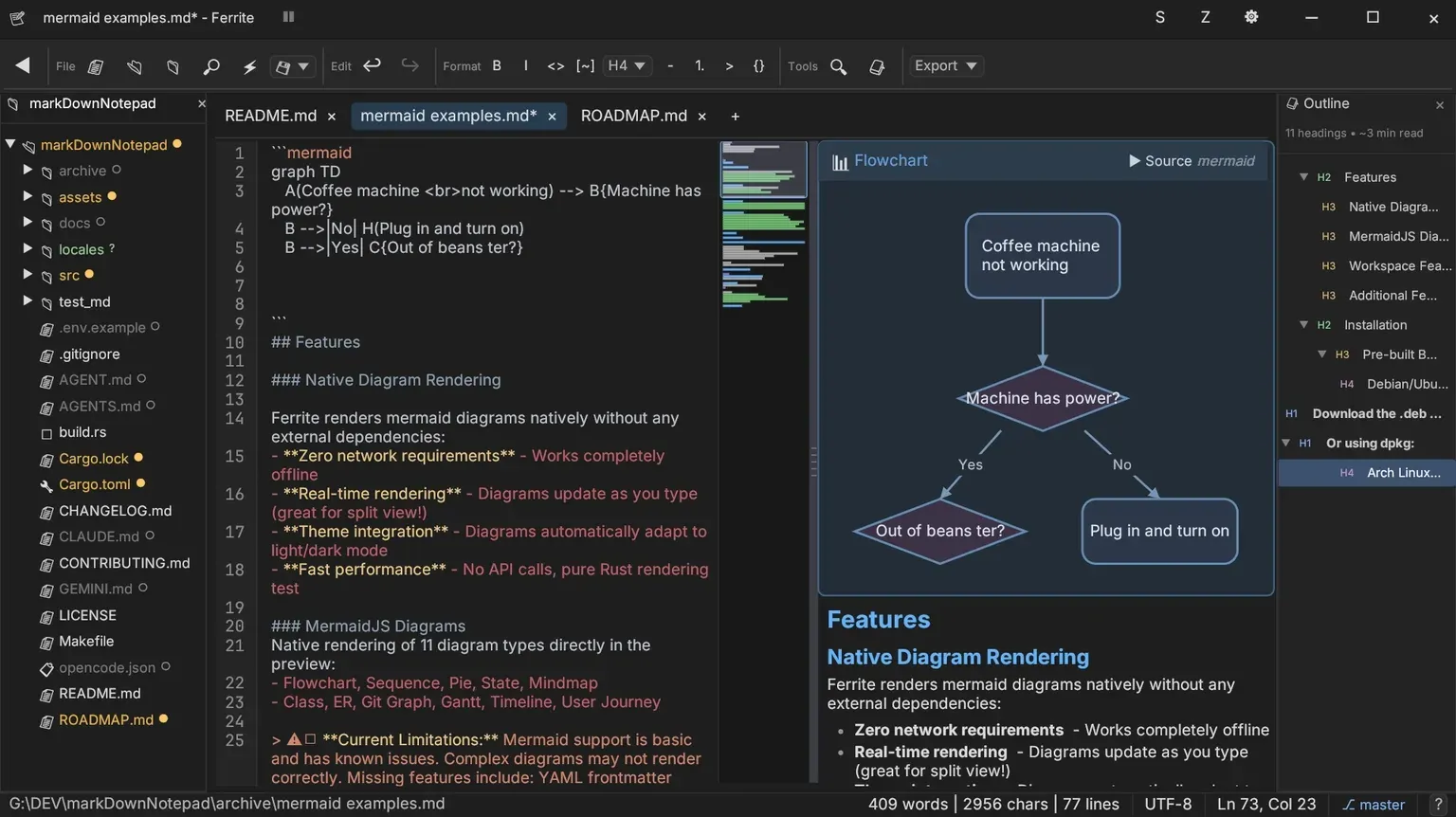
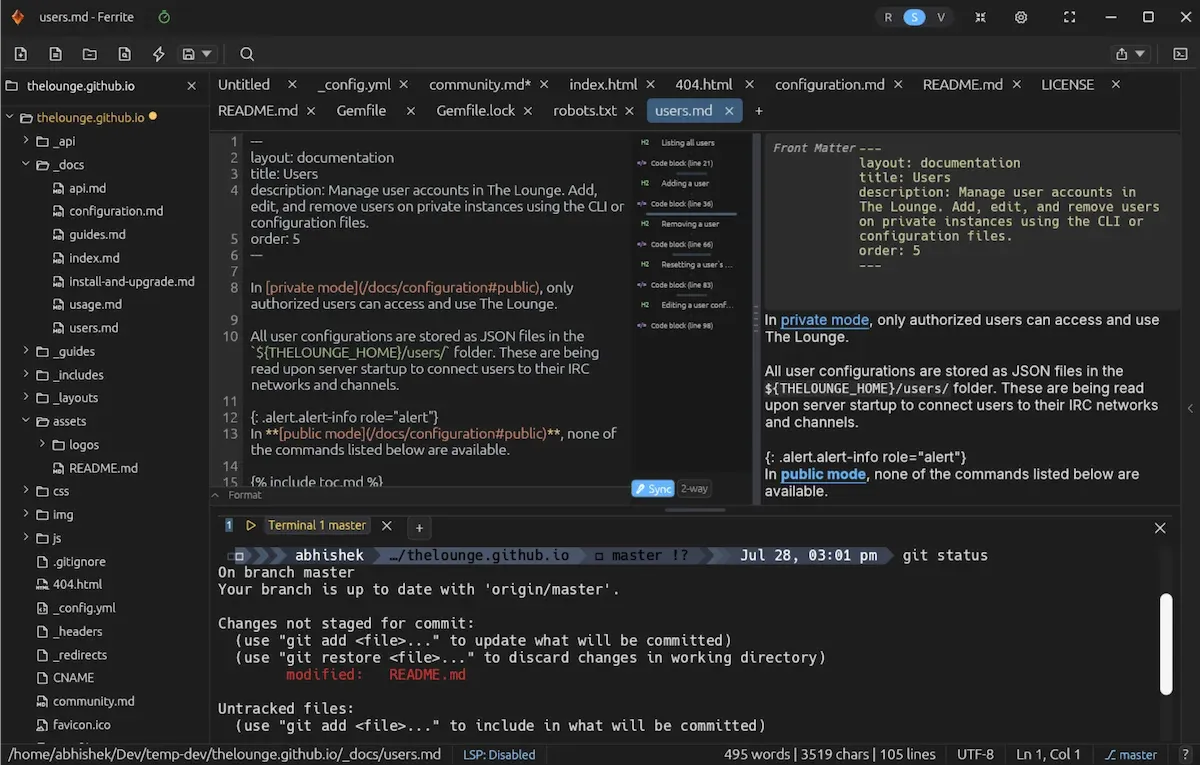
Recently, I came across a new Markdown editor called Ferrite. I tried and found that it mentions all the features I wanted:
Folder view
Dual pane
Focused view
Editor tool bar
Git status
Built-in terminal
There are many more features, like code folding, syntax highlights, mini-map overviews, diagrams, and more.
Basically, Ferrite is like an IDE but for Markdown (or should I say text) files.
🚧
It was later that I realized that the project, though open source, is 100% coded with AI. Read their AI workflow details here. I'm adding this disclaimer because whether to use AI-generated code is a matter of principle for a lot of you.
Meet Ferrite, Markdown editor for developers
Written in Rust, Ferrite a text editor primarily for Markdown but with good support for JSON, YAML, and TOML files. Basically, various text files developers and devops deal with.
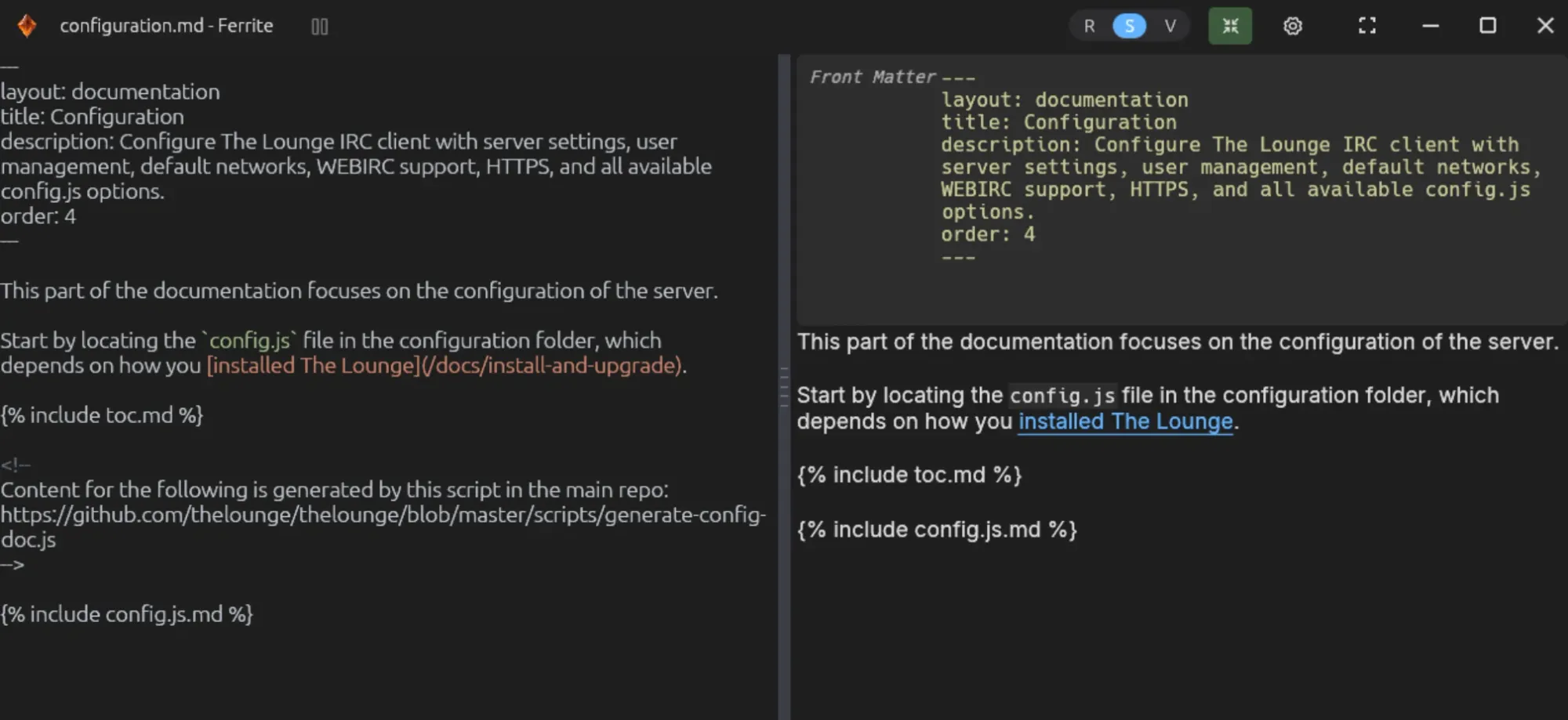
For markdown file, you can view it in raw mode (with synax), rendered view (only shows rendered markdown), and split view (shows raw text and rendered view side by side).
For other files, it just displays them with a mini-map overview and highlighted syntax.
There is zen mode for focused work.
Zen mode removes nice to let you focus on the text
Ferrite also allows you to create flowcharts, wire diagrams, mind maps etc.
In fact, Ferrite has a huge list of features. You can export files as PDF and HTML, run shell and Python codes from the editor itself, has a command palette, supports Wikilinks, can view PDF and CSV files and much more.
Basically, it's a Markdown editor specially created for developers.
Why I liked it
Lately, I found myself in situations where I had to edit technical documentation hosted on GitHub. The flow is standard. I fork the repo, clone it on my system, checkout to a new branch, make my changes, push it to my forked repo and then create a pull request to the upstream branch.
This is the usual code contribution flow, applies to collaborative documentation, too.
Now, since this is a dev-like workflow, a text editor that behaves like IDE is perfectly suited for this.
Built in terminal is useful for my workflow
Ferrite's built-in terminal gives me instant access to the command line for quick commit and push. It also shows the locally modified files if you are in a git repo.
For this kind of workflow, though I could use VS Code with extensions, it's an overkill. And I prefer to separate code and text files.
I used Ghostwriter, but it's a simple Markdown editor and I found myself switching between tools. This is when I came across Ferrite and it looked like it could be the perfect fit as it ticked (almost) all the checkboxes for me.
It's not perfect
Like most things in life, Ferrite is not perfect as well. I came across a few quirks after regularly using it for the past few days.
There is a dedicated button to sync the raw and rendered views when you are in the split view mode. This way you should be able to scroll on one side and see the impact on the side pane.
This feature works, but not perfectly. There is a lag that cannot be unnoticed.
0:00
/0:03
Sync issue between raw and rendered views
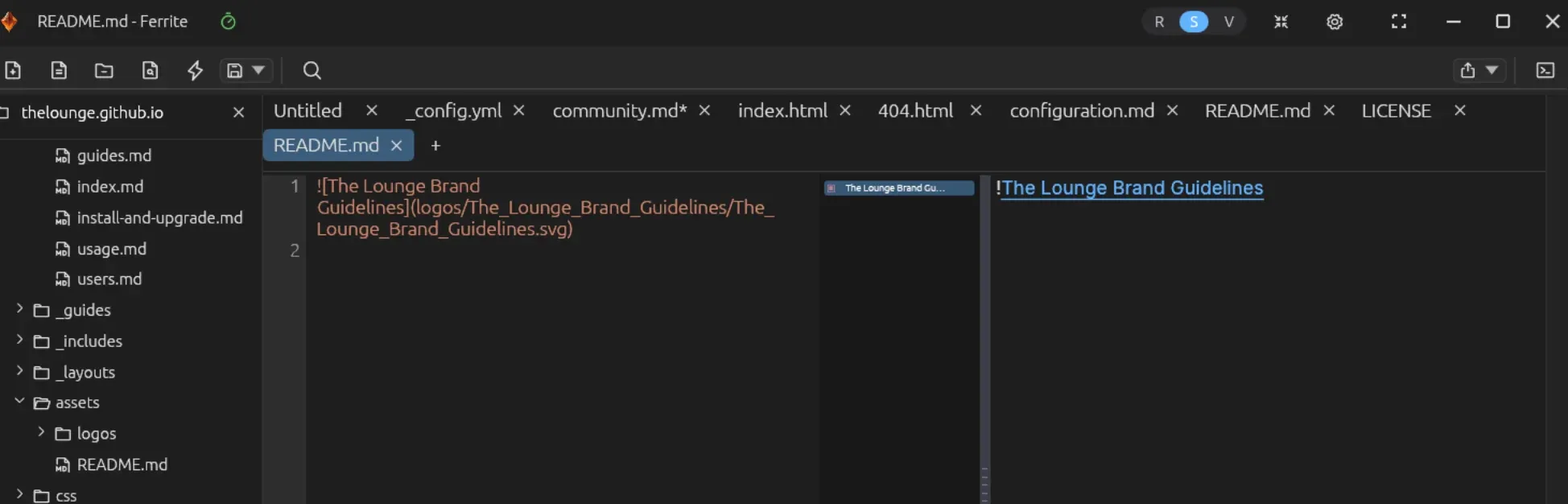
Then, it doesn't display images in the rendered view. This is a huge disappointment for me.
Take a look at the screenshot below:
Ferrite cannot display images?
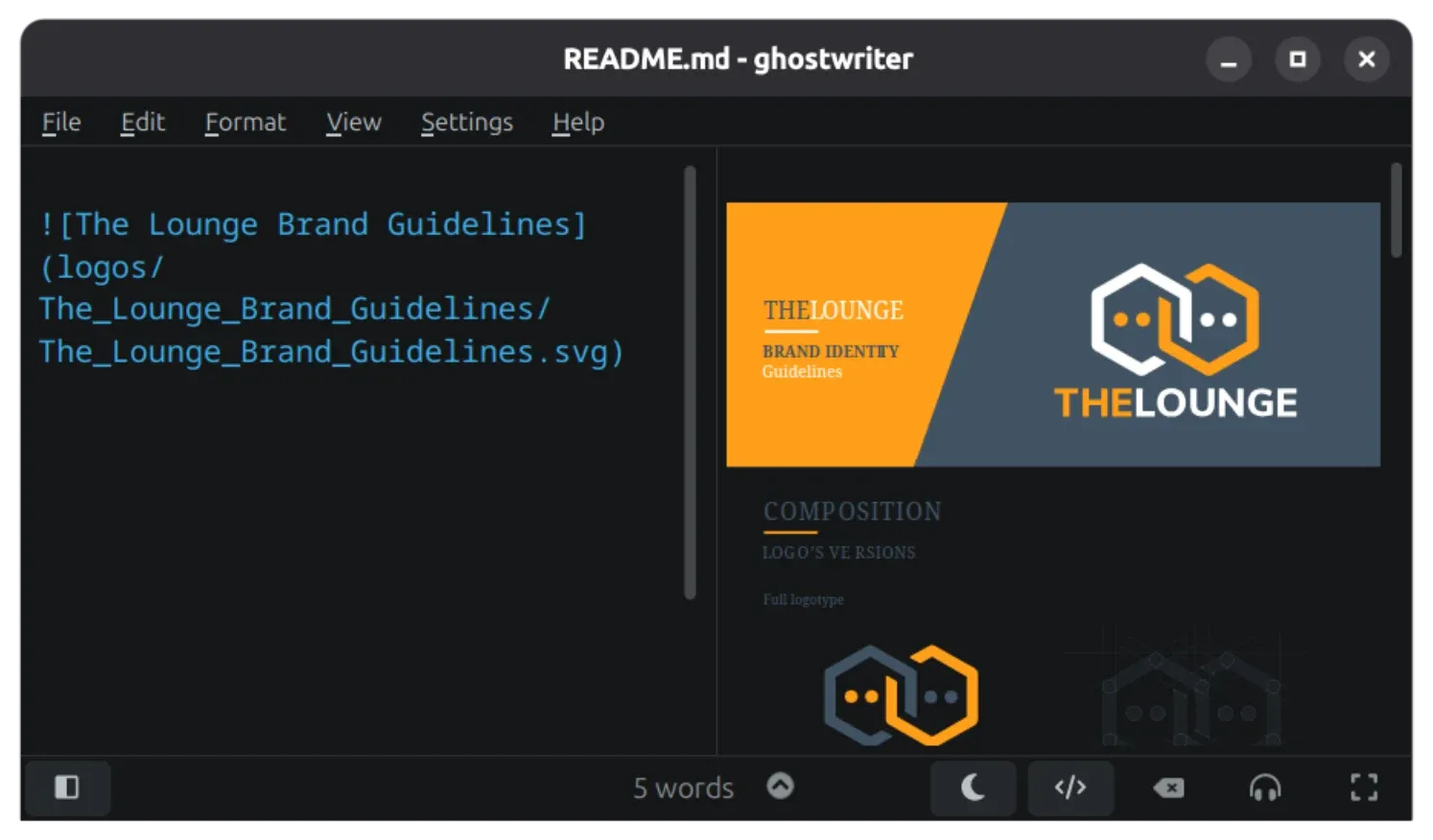
I understand that relative path is crucial for image display in Markdown. But those paths were correct and the image was displayed properly in the Ghostwriter editor:
Ghostwriter displays the images correctly
Also, Ferrite has way too many features. It's like an IDE and if you have ever used an IDE you would know that IDE gradually become too complex with all kinds of settings and tweaks and busy interface.
Sometimes, simplicity also becomes a feature.
Should I use it or not?
Frankly, I did not notice the "100% AI developed" when I started using Ferrite last week. I liked what I saw, used it and fit very well for my current needs. I made notes, something I often do when I try a new tool, so that I can write articles and reviews on those tools later.
And when I started writing this article and went through the details, I learned that the project mentions explicitly that it is fully developed with AI.
That puts me in a dilemma. On one hand, it seems like a good piece of software. 1.7K GitHub stars are proof of its popularity. On the other hand, "100% AI" label is kind of offputting.
What would you do?
I Really Want to Love This Markdown Editor, But One Thing Holds It Back
Have you ever wished for a file manager that shows you nothing but audio files that you can play, and then play them within the manager itself? Yeah, I haven't either. But if you had, I might have discovered the application for you. Here comes SonicTree.
SonicTree: The Simple Music Player
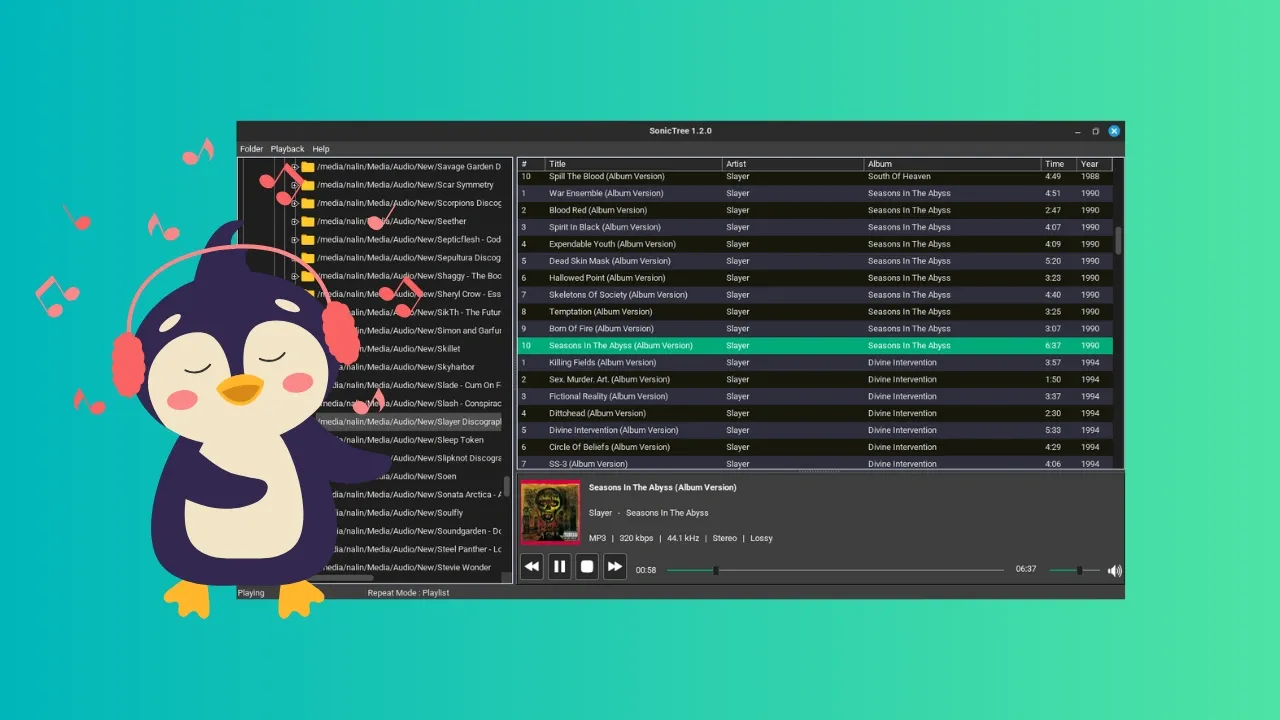
SonicTree is an as-simple-as-it-gets kind of music player in the middle of all the fancy, all extensive ones we've recently seen (like the high-fidelity player Astra). It offers you an easy experience: a file-explorer, a list of playable audio files, playback of said audio files, and a simple playing menu at the bottom.
Most music players automatically categorize your music files based on the metadata of the file. This one desn't and that's its unique feature. If you are someone who has meticulously organized music files into folders of your own criteria, you might like SonicTree.
There's nothing much more or much less to it, but let us explore the features in detail.
Interface
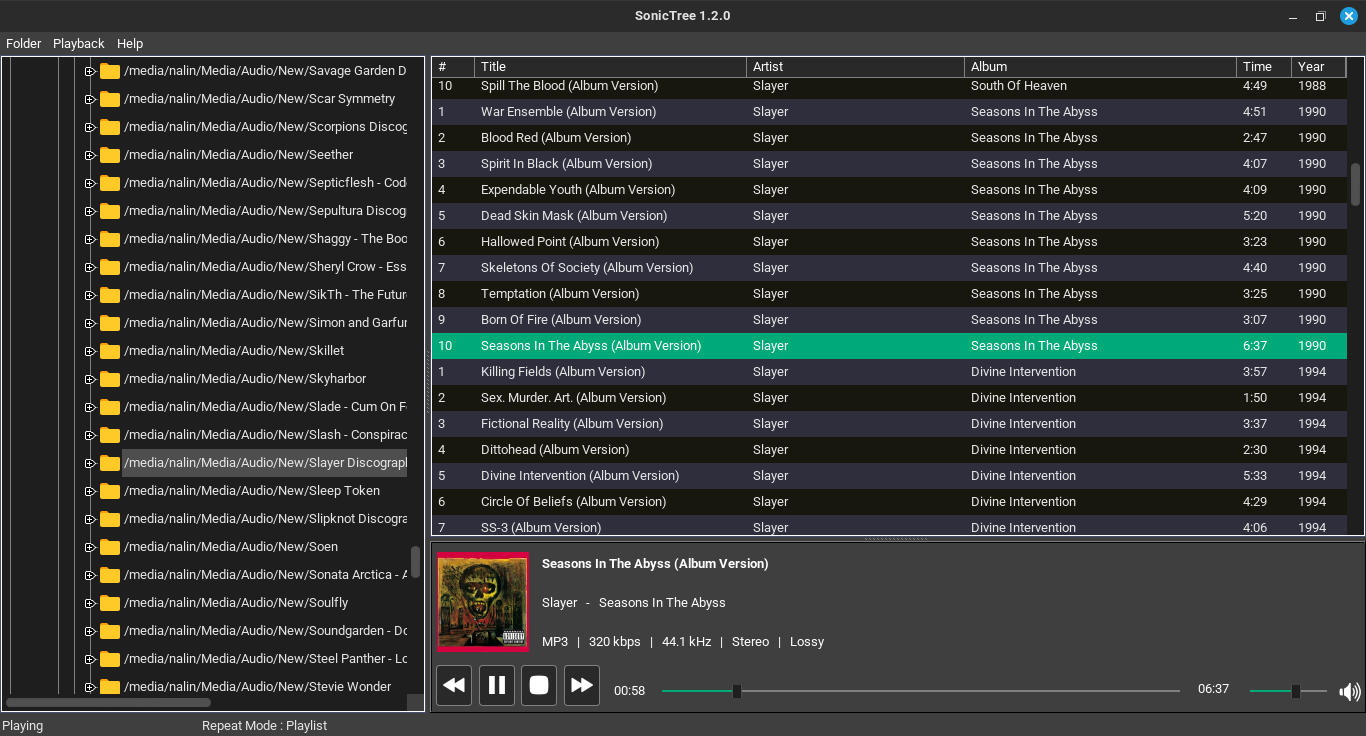
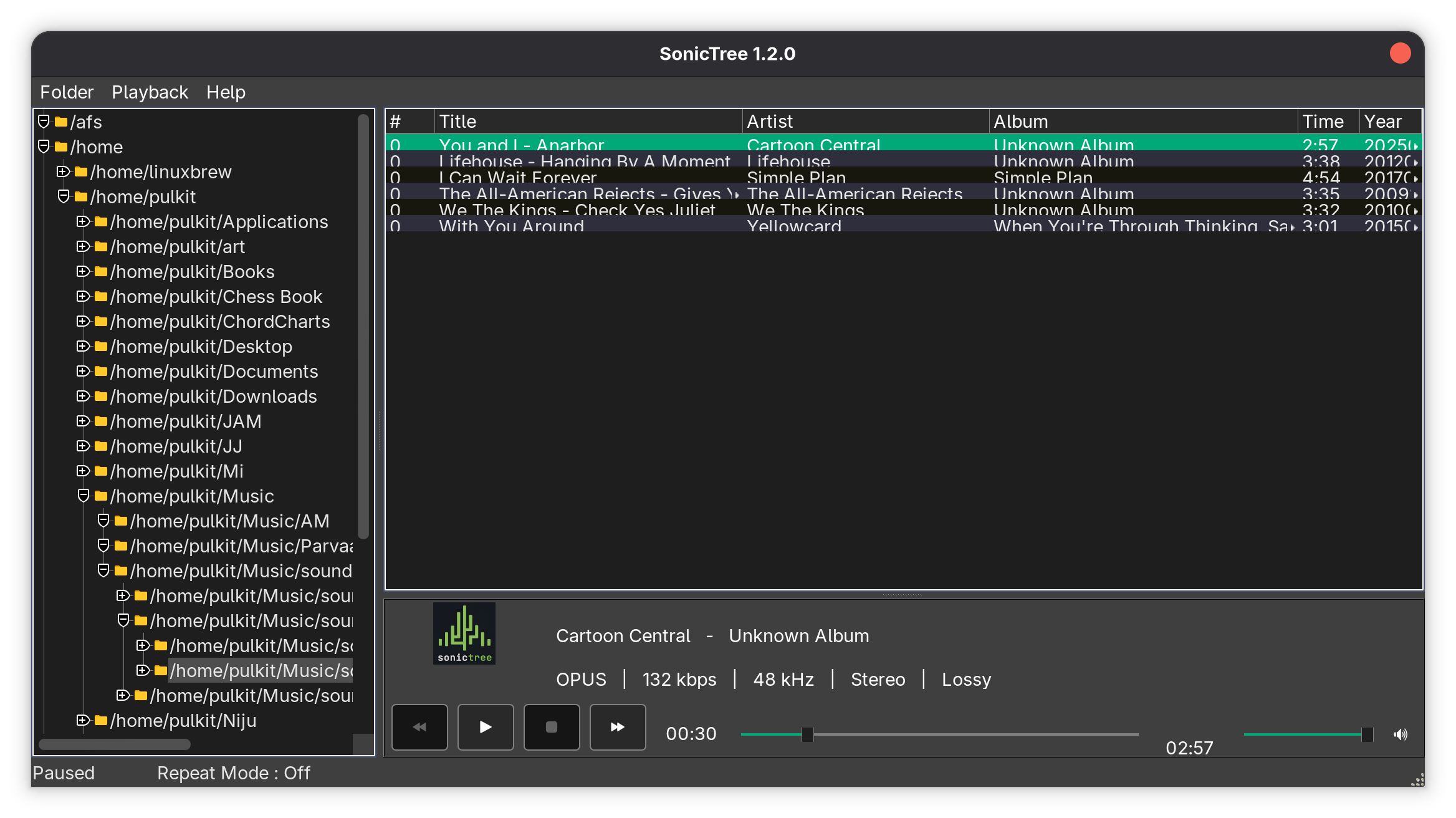
SonicTree has a file-explorer on the left that is shown in a (surprise, surprise) tree structure. You can expand directories into subdirectories, and double clicking on any directory lists all the playable audio files on the big canvas on the right.
Besides the file title, there's also the track number, artist name, album name, duration and year of release.
On the bottom of this canvas, there's the playerback interface. It shows the song and artist name, the album cover, a seek for the song as well as the volume, buttons for playing, pausing, next track and previous track, and technical information of the song such as the filetype, bitrate, frequency, stereo settings and whether it is lossless or lossy.
On the top, there are two menus, one that rescans the folders, and one that can be used to change the repeat status to off, single track, or playlist.
The interface, though, looks very dated and clunky by modern application standards in 2026. The design looks like something from the early 2000s era and not in a chic way, and the song listings quite literally overlap on each other (at least on my system). The looks can be worked upon and straightened out a bit to bring it to the present, in my opinion.
Performance
SonicTree boasts low strain on the hardware of the system, and gapless playback, and on that counts it delivers well. It seems to barely have an impact on the system, taking about 50 MB RAM and 02-0.5% CPU usage (numbers may vary depending on your system). The playback is indeed gapless, seamlessly switching between tracks without a delay.
The playback of files is usually alright. I've tried MP3, WAV, M4A and OPUS audios, and they all work flawlessly. But these are all lossy formats. When I tried a lossless FLAC audio, it didn't play at all. That might be a dealbreaker for a lot of people, as mostly the point of an offline music player is to play lossless audio. But I can't really say that they don't deliver because on their website, they don't really list formats that are playable.
Navigation
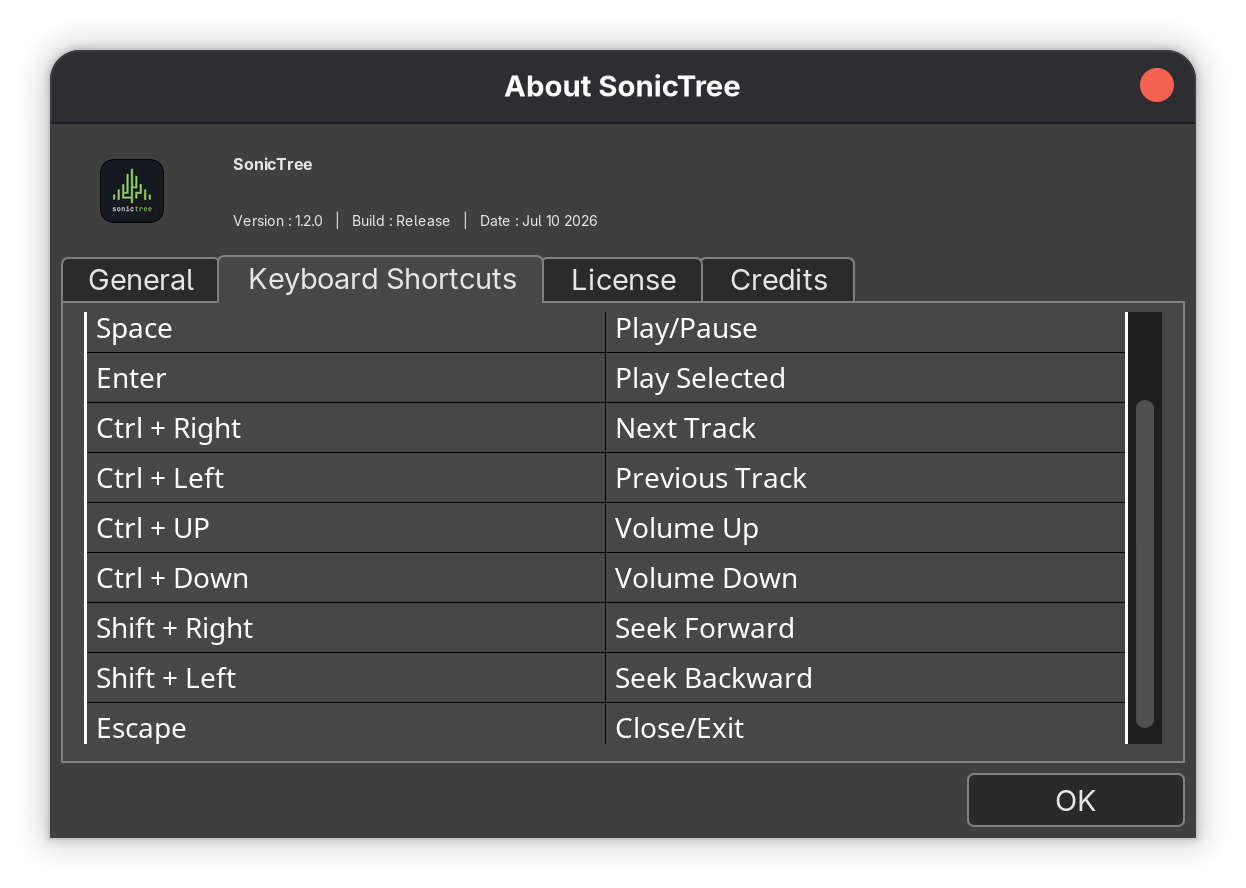
As for the navigation, the seeks and the buttons on the GUI are the obvious choice, but there's a simple set of keyboard shortcuts as well that do the job. Space to toggle the playing, Enter to select the song from the list to play, Ctrl+Left or Right Arrows to change the track, Ctrl+Up or Down Arrows to increase/decrease volume, Shift+Right/Left to seek through the song, and finally, Esc to exit.
Get SonicTree
SonicTree can be downloaded from its official page on SourceForge.net, and is available only as an AppImage:
SonicTree doesn't offer much. It looks a little awkward, a little out of time, but it gets the job done. It is essentially for people who like managing their music files in their own way, in their own folder structure. Can't say if I can count it among the list of best music players for Linux.
The shortcomings can't really be pointed out, as they didn't really claim to cover it all in the first place. But since this is still a very early version, perhaps more improvement will be seen in the later ones.
OBS Studio 32.2 open-source video recording and live streaming software is now available for download with a new filter to compose SDR into HDR, dynamic bitrate support for multitrack video, and more.



 GeForce NOW’s native Linux app has exited beta after seven months of testing, with official support for Ubuntu 24.04 LTS and later. The app is a frontend for Nvidia’s game streaming service, with more than 4,500 PC titles running in the cloud on Nvidia servers. Users get GeForce RTX-class performance, ray tracing and DLSS without the need to own the relevant hardware. In a blog post to announce its ‘graduation’ from beta, Nvidia say GeForce NOW for Linux has picked up “performance, stability and polish” improvements thanks to community feedback during the beta test period. The company also touches on […]


 OpenAI has announced a preview release of the official ChatGPT Desktop app for Linux. Compared to using ChatGPT in a browser tab, the GUI desktop app can run Codex in your local repos, hook into and control other apps via extensions, handle ChatGPT Work-related tasks and probe your local files without you having to upload things elsewhere. In an email, OpenAI said that ‘Linux has been one of the most-requested platforms’ for its desktop app, and with this launch it’s finally available on all major operating systems. ChatGPT desktop app for Linux joins Anthropic’s Claude desktop app for Linux, which entered […]
 Kagi has released a new beta of Orion for Linux, a WebKitGTK-based port of its popular browser for macOS and IOS. Orion for Linux v0.4.1 builds on the v0.3.0 public beta, released in May, adding more features found on its macOS and iOS versions and improving existing ones. The new beta adds working private windows, a functional (if bare-bones) download manager and a toolbar overflow menu. The overflow menu lets you hide buttons out of the way but without making them hard to reach. Orion’s link preview feature also makes its way to Linux. This isn’t the ‘AI summary’ sort […]
 A new bug-fix release of Calibre, the open-source e-book manger, view and converter, is available for download. Calibre 9.13 fixes a number of PDF-related issues, including a conversion error that could occur on Linux distributions shipping an ‘ancient’ version of the libxml2 library, which is mainly older Debian installs. The cause was a clash between Qt’s GPU detection and Calibre’s PDF parser, which both need different versions of libxml2. Calibre now preloads the version it needs before Qt’s check can interfere, per the commit message. A regression in the Calibre 9.x series was causing internal links in PDF documents to […]
 Resources 51 beta, the system monitor Ubuntu now uses, adds AMD NPU stats, PowerPC CPU temps and alternative memory-usage metrics.
 Rhythmbox 3.5.0 is out and it now lets you sync podcast subscriptions and listening progress across apps – the standout feature in the music player’s first major release in nine months
 If you spent July dodging the summer heatwave, catch up on the best Linux app releases and updates you might have missed last month in this roundup. You likely already know about the Firefox 153 release, with its “new” container tabs confusing those who swear they’ve had ’em for ages. That update also enabled rounded window bottom corners on GTK-based Linux desktops, Ubuntu included. Slick system monitor Mission Center also dropped a big update, so if you like swotting over resource stats, don’t sleep on checking that out. Something you can safely sleep on: Anthropic’s Linux beta of its Claude […]