Ubuntu maker Canonical announced today the general availability of Enterprise Store as a new way to manage software behind firewalls and in air-gapped environments.
Linus Torvalds machte kürzlich unmissverständlich klar, dass der Kernel kein Anti-KI-Projekt ist und das auch nicht werden wird. Wer damit ein Problem habe, könne forken oder gehen.
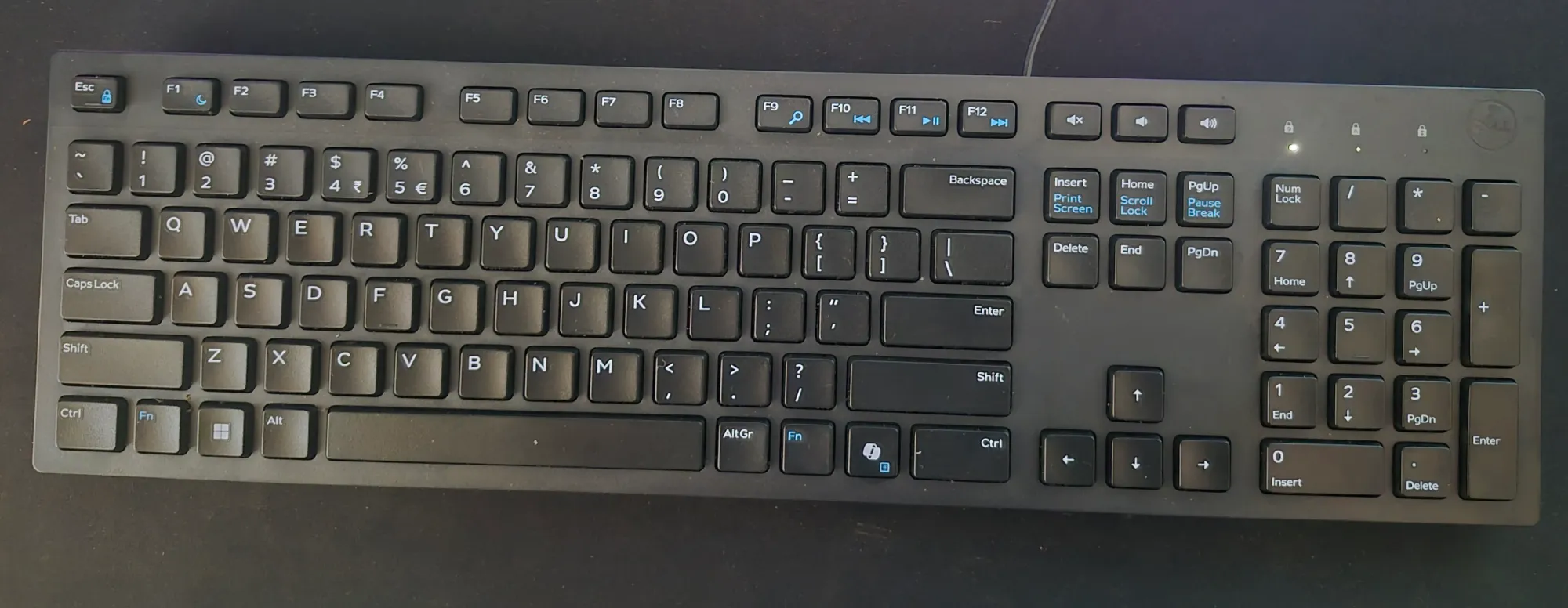
I recently bought an external Dell keyboard that came with a dedicated Copilot key. Since I don't use Microsoft's Copilot, the key was doing nothing useful.
My new Dell Keyboard comes with a CoPilot key
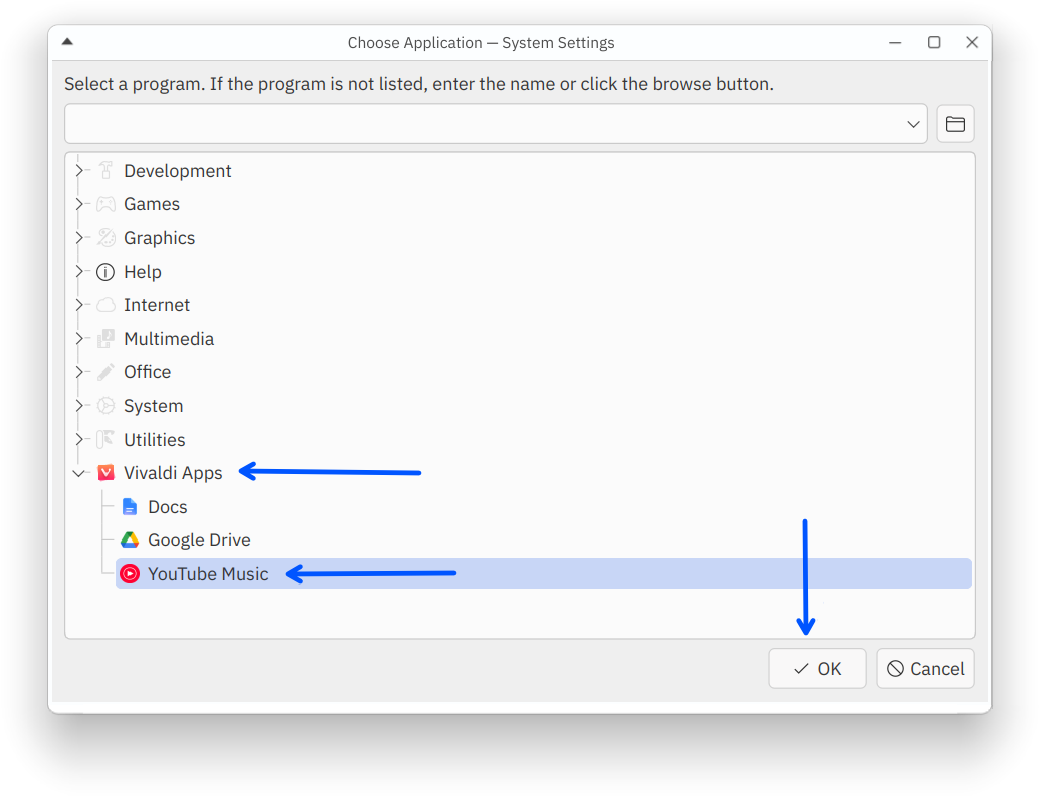
So, I decided to map it to the YouTube Music web app. There is no such app, but I created it as a PWA using Vivaldi.
In theory, it seems like a trivial thing, but making the Copilot key launch that web app came up as a decent challenge. And hence this tutorial.
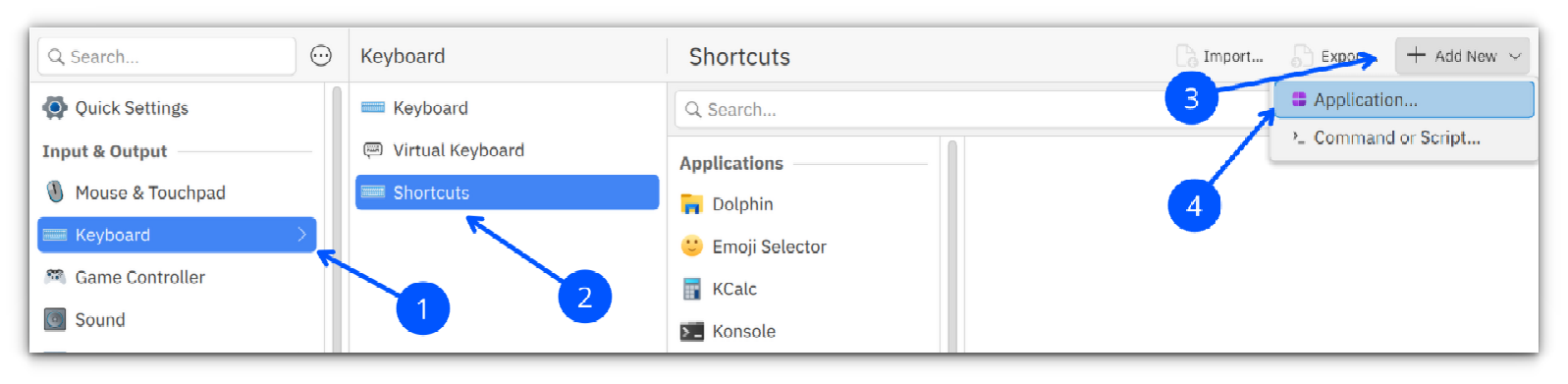
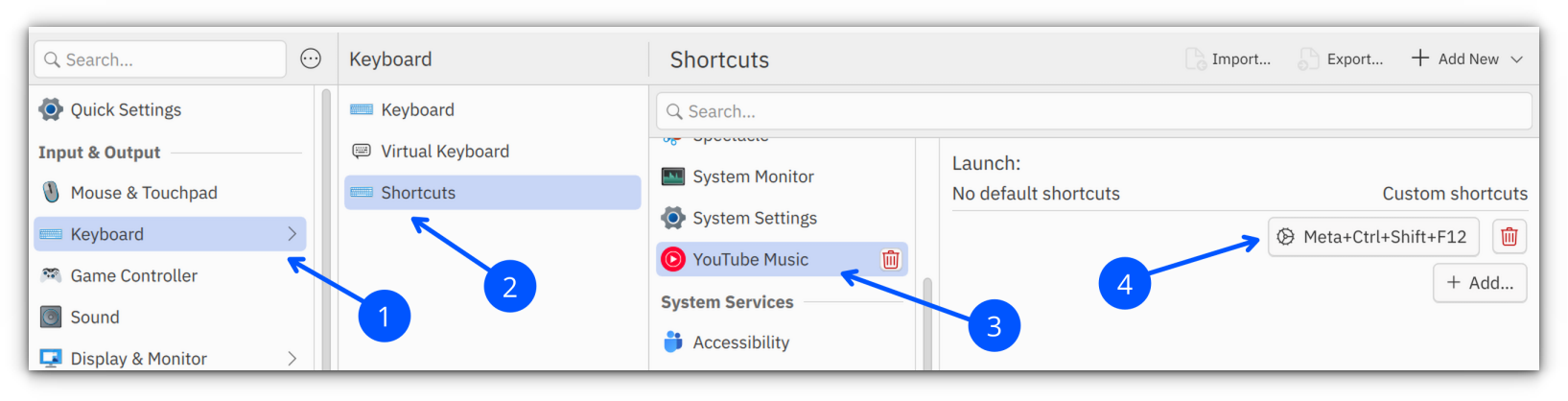
My first attempt was using KDE's System Settings → Keyboard → Shortcuts. I created a shortcut for the YouTube Music PWA and tried assigning the Copilot key to it.
Unfortunately, KDE only detected the key as Meta+Shift and completely ignored the function key that was part of the key combination.
After a bit of searching, I came across a Reddit post that suggested using the keyd utility to remap the key at a lower level. That turned out to be exactly what I needed.
Instead of trying to use the original key combination, I remapped the Copilot key to Ctrl+Alt+Shift+F12. It is a key combination that is rarely used, making shortcut conflicts highly unlikely.
Why KDE Can't Detect the Copilot Key
On my keyboard, pressing the Copilot key actually sends Meta+Shift+F23.
The problem is that KDE's shortcut recorder only captures the Meta+Shift modifiers and ignores the F23 key entirely. As a result, it is impossible to assign the Copilot key directly through the graphical settings.
The solution is to intercept the key before KDE receives it and translate it into another shortcut that KDE can recognize normally. This is exactly what keyd does.
It is also available in the official repositories of Ubuntu 26.04 and above.
Enable and start the service:
sudo systemctl enable --now keyd
Verify that it is running:
sudo systemctl status keyd
Identify Your Keyboard
First, identify the vendor and product ID of your external keyboard.
Run:
sudo keyd monitor
Locate your external keyboard in the output and note its vid:pid value. Make sure you choose the external keyboard instead of your laptop's built-in keyboard.
device added: aaaa:bbbb:cccccccc Dell KB216 Wired Keyboard Consumer Control (/dev/input/event9)
device added: aaaa:bbbb:cccccccc Dell KB216 Wired Keyboard System Control (/dev/input/event8)
device added: aaaa:bbbb:cccccccc Dell KB216 Wired Keyboard (/dev/input/event7)
device added: dddd:eeee:ffffffff Keychron Keychron K8 Pro Keyboard (/dev/input/event6)
Verify the Copilot Key
To see what the Copilot key actually sends, run:
sudo keyd monitor
Now press the Copilot key.
You should see output similar to:
leftmeta down
leftshift down
f23 down
f23 up
leftshift up
leftmeta up
This confirms that the key sends the combination:
Meta + Shift + F23
Create the keyd Configuration
Create a configuration file for your external keyboard.
Before I end this this tutorial, let me share a few things that you should know about using this method.
Hot plugging: keyd automatically detects when the keyboard is connected or disconnected through udev. You don't need to restart the service after plugging in the keyboard.
Mouse remapping: keyd only handles keyboard input. If you need to remap mouse buttons, consider tools such as input-remapper or xremap.
Disable the remapping: If you want to temporarily restore the original keyboard behavior, simply stop the service:
sudo systemctl stop keyd
With that, you should be able to make some good use of CoPilot key on Linux.
Canonical’s Snap Store will be shutting down for database maintenance at the weekend, meaning users won’t be able to install or update snaps until it’s back online. The planned downtime is expected to last for four hours, starting on Sunday, 5 July 2026 at 22:00 UTC and ending on Monday, 6 July at 02:00 UTC. During the maintenance you will not be able to install or update snaps. If there’s an app you’ve been wanting to try, or your IoT or core device runs automated tasks during the affected window, you’ll want to plan accordingly To make that planning less […]
Calibre 9.11 open-source e-book manager is now available for download with support for exporting annotations as a standalone web page in the HTML format and other changes.
June was sweltering, but the summer heat didn’t slow down open-source software developers. Last month delivered a wave of app updates, including the release of Firefox 152 with its streamlined settings, HandBrake resolved its Linux WebM handling and the Audacity 4.0 beta made a brand-new design available for public scrutiny (mainly of the “much better” variety). But underneath those highs – yes, I’m determined to make this heat theme work – a quiet simmer of smaller maintenance updates rolled out too… Cine gained Watch History I spotlighted the Cine Linux video player earlier this year. It’s an MPV-based player with […]
Qt Creator 20 open-source IDE (Integrated Development Environment) is now available for download with AI support, new Zen mode for distraction-free coding, and many other enhancements.
Mit der Veröffentlichung von Linux 7.1 erhält der Kernel einen neuen NTFS-Treiber mit voller Schreibunterstützung und neuen Userspace-Werkzeugen. Linux 7.2 wird für Mitte bis Ende August erwartet.
digiKam 9.1 open-source professional photo manager is now available for download with support for Pixel motion photos, timezone support with registered item time-stamps, and more. Here’s what’s new!
Proton has confirmed it is working on a Proton Drive client for Linux desktops. The announcement slipped out as part of a broader platform update. Proton has rebuilt Drive around a new shared SDK, with a single codebase powering its official apps on Windows, macOS, iOS, Android and web (rather than separate implementations as before). It’s this unified approach that makes it easier for the Swiss-based company to add new features and integrations across all its official apps – and make an official client for Linux, which is being build on the SDK “from the ground up”, they say. Not […]
Inkscape 1.4.4 open-source SVG (Scalable Vector Graphics) editor is now available for download with a new palette, performance improvements,and bug fixes. Here’s what’s new!
GIMP 3.2.4 open-source image editor is now available for download with improvements to Text and Crop tools, PDF export, PSD import, and more. Here's what's new!
Mir 2.26 compositor is now available for download with initial implementation of the Wayland frontend in the Rust, as well as many other Wayland improvements.
Bei den heutigen RAM-Preisen ist guter Rat teuer. Wer jetzt nicht kaufen möchte, kann mit zRAM mehr aus seinem vorhandenen RAM herausholen. Wir erklären, wie's geht.
Motorola und die GrapheneOS Foundation arbeiten zusammen an der Entwicklung von Smartphones, die mit dem Android-Custom-ROM GrapheneOS ausgeliefert werden.
Calibre 9.4 open-source e-book manager is now available for download with "reading stats" to the E-book viewer to show reading progress, a nicer Edit book UI, and other changes.
Calibre 9.3 open-source e-book manager is now available for download with improved support for the Hanvon N10 e-reader and other changes. Here's what's new!





 Canonical’s Snap Store will be shutting down for database maintenance at the weekend, meaning users won’t be able to install or update snaps until it’s back online. The planned downtime is expected to last for four hours, starting on Sunday, 5 July 2026 at 22:00 UTC and ending on Monday, 6 July at 02:00 UTC. During the maintenance you will not be able to install or update snaps. If there’s an app you’ve been wanting to try, or your IoT or core device runs automated tasks during the affected window, you’ll want to plan accordingly To make that planning less […]
 June was sweltering, but the summer heat didn’t slow down open-source software developers. Last month delivered a wave of app updates, including the release of Firefox 152 with its streamlined settings, HandBrake resolved its Linux WebM handling and the Audacity 4.0 beta made a brand-new design available for public scrutiny (mainly of the “much better” variety). But underneath those highs – yes, I’m determined to make this heat theme work – a quiet simmer of smaller maintenance updates rolled out too… Cine gained Watch History I spotlighted the Cine Linux video player earlier this year. It’s an MPV-based player with […]


 Proton has confirmed it is working on a Proton Drive client for Linux desktops. The announcement slipped out as part of a broader platform update. Proton has rebuilt Drive around a new shared SDK, with a single codebase powering its official apps on Windows, macOS, iOS, Android and web (rather than separate implementations as before). It’s this unified approach that makes it easier for the Swiss-based company to add new features and integrations across all its official apps – and make an official client for Linux, which is being build on the SDK “from the ground up”, they say. Not […]


