🔒
Es gibt neue verfügbare Artikel. Klicken Sie, um die Seite zu aktualisieren.
✇It's FOSS

Flipper One is a Pocket-sized Linux Cyberdeck

Von: Pulkit Chandak

Pocket-sized computer tools are the definition of cool, recruiting many people over to the developer side of things, including your humble writer.

A project like Flipper One, which is intended to be a device that features the full mainline Linux kernel in a small package with a full range of connectivity, not to be used as a full-fledged computer (not all the time, at least) but rather a cyberdeck that can be used for development, experimentation and last but not the least, pentesting, is such a dream come true.

With its radical philosophy of complete openness, both in terms of hardware and software, and the ability to do whatever is possible with the hardware on board, it is a project that would have sent my 14 year-old self into a hyperventilating fit. So what exactly can it do? And how do you fit into the picture? That's exactly what we will tell you today.

Flipper One at a glance

Flipper One hasn't been released yet, but there are some ambitious features that have been planned for it. While Flipper Zero was more of an offline access tool, with emphasis on NFC, RFID infrared, UART and so on, Flipper One is intended to be a network connected Linux system. So obviously, we start with:

Connectivity

Flipper One self proclaims as a "Swiss Army knife for IP networks across all OSI layers", which include:

  • 5G modem
  • Wi-Fi 6E
  • Two Gigabit Ethernet ports
  • Upto 5 Gbps wired connectivity over USB-C Ethernet

All this results in Flipper One being usable as anything from a multi-hotspot bridge, an inline Ethernet sniffer, a VPN gateway, or a USB Wi-Fi/Ethernet adapter for another device.

Hardware

The hardware is a particularly interesting aspect of Flipper One, as it is has a completely custom, unique build. We will describe the technical aspects later, focusing first on the build of the device. It has a small monochrome 256x144px display, designed to show all necessary information from the custom software onboard, a touchpad, a 5-button D-pad, a back button, an app-switching button, and 5 buttons used for further navigation to power, edit, run or escape programs, and to view other options. Oh, there's a push-to-talk button as well for a pre-installed offline AI assistant. Fancy, eh?

As for the ports, it has the following:

  • Two USB-C, one multipurpose, one only for power
  • USB-A
  • HDMI
  • Two Ethernet
  • 3.5mm audio jack
  • MicroSD card slot
  • Nano SIM card slot
  • M.2 expansion module

Now finally onto the hardware on board:

  • A main Rockchip RK3576 chip
  • A secondary low-powered Raspberry Pi RP2350B MCU
  • 8 GB RAM
  • 64 GB internal storage
  • 7000 mAh battery (tentatively)

As an ARM based device, the processing is comparable to the power offered by a Raspberry Pi 5, handling basic operations rather well.

Software

Here's where things get really interesting. The Flipper team intends Flipper One to be able to support the mainline Linux kernel, and has gone to the massive undertaking of having absolutely no proprietary binary blobs in any of their software. This includes the operating systems as well as the firmware. They're building FlipperOS, a layer on top of Debian, which you can do anything to.

There's also FlipperCTL, which has been created as a response to full-fledged Linux operating systems being awkward and uncomfortable on small screens. It is, therefore, a UI designed for a screen as small as that, controlled by a D-pad and a few buttons. The idea then, is to wrap utilities like ping, nmap and traceroute into this FlipperCTL interface.

Abilities

Apart from the use cases already mentioned, like as a pentesting tool or a networking agent, it can also be used as a survival desktop or a thin client, using the USB-C port to connect to a monitor. The exact details of the OS haven't been decided yet, but something slick like KDE Plasma with something resourceful like Kali Linux to suit all pentesting needs is the way Flipper is planning to go. It is also being planned as a hacker's TV media box, to be used as a media platform using Kodi or something similar. This would turn any HDMI input taking monitor into your personal media box, a luxury that is quite underrated in situations like a strange hotel room.

Not to forget, the presence of both a CPU and an MCU is by design, as the intention is to have the device functioning at low power, with the LCD and buttons, even without the main CPU running. Even when Linux is off, the device can run simple programs off of the MCU.

So what can you do?

But where do you come in? Well, the entire device is still under development and needs contributions from anyone who can provide it to be completed. Flipper has made a Developer Portal for Flipper One, where the entire development process is to be made open. That means half-baked task tracking, documentation, internal discussions, debates and everything.

You don't need to be a software developer, strictly, you could be a designer, just work on documentation, 3D models, so on and so forth. So, what all can you contribute to?

  • Hardware: PCBs, antennae, chips, processors, connectors and everything in between (literally).
  • Mechanics: Designing, enclosure, plastic/metal parts, mounting parts and so on.
  • Linux: Firmware for the RP2350 microcontroller, relating to practically every component that the software will interact with.
  • Interface: UI/UX design, visuals and graphics.
  • Docs: Documentation, wikis, guides, progress made on the portal itself.
  • Testing: This one you can find out for yourself.

Conclusion

Flipper's team has taken up a humongous task, trying to make this entire project totally open, the hardware design plans, the software blobs barring no small proprietary bits, and has shown courage admitting the need for help finishing the project. The Developer Portal is a great approach, inviting all the people from across the globe to contribute in any way that they possibly can. And with a beautiful passion project such as this? I'm expecting they absolutely will want to. I urge the readers to do that as well, if you have some skill and time to contribute.

This kind of project instills hope in user-level innovation after long bouts of polished, corporate products and we're all here for it. Let us know what you think of the device in the comments. Cheers!

Flipper One is a Pocket-sized Linux Cyberdeck

✇It's FOSS

Linux Kernel 7.1 is a Feature Release That Could Be Useful For You

Von: Sourav Rudra

Following Linux 7.0 in April and the stable point releases since, Linux 7.1 is now available as a major feature release in the 7.x series.

You get a bunch of upgrades with this, ranging from a new NTFS driver that landed after four years of development all the way to a bugfix for a long-standing audio issue on the Steam Deck OLED.

And, if you remember our reporting from a few months ago, then this release also formally drops i486 CPU support from the kernel build system.

What's new in this release?

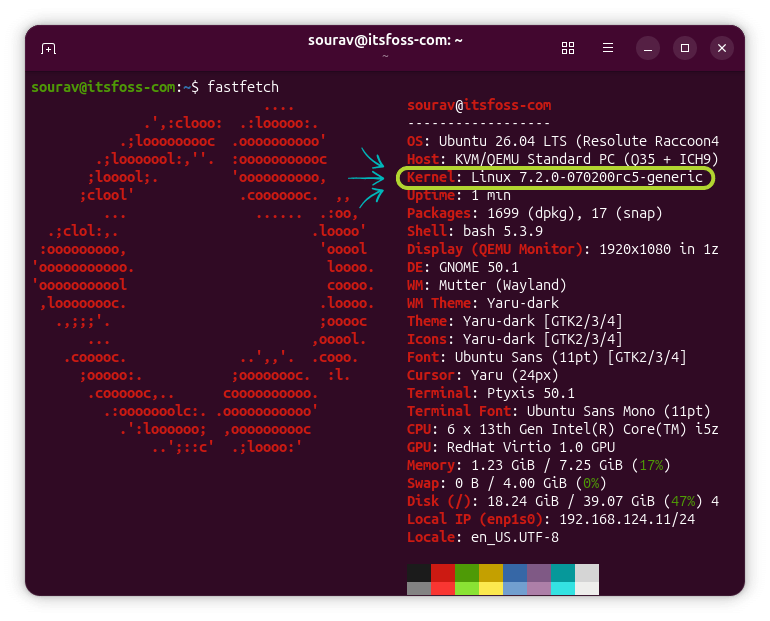
terminal window that is showing the fastfetch output on an ubuntu 26.04 lts system, the line for kernel is highlighted with a green box and blue arrows, inside it linux 7.1.0-070100-generic is written

Intel's Flexible Return and Event Delivery (FRED) is now enabled by default in Linux, having previously required a manual fred=on boot flag. The switch was held back until publicly available hardware could be properly evaluated, and the code has since been tested thoroughly enough to flip from opt-in to opt-out.

Phoronix reports that people running Intel Core Ultra Series 3 "Panther Lake" should see real gains here, particularly on I/O-heavy workloads like databases, networking applications, and audio processing.

The crypto subsystem picks up some Intel QAT additions too. For QAT Gen4 and Gen5 hardware, basic Zstd compression offload is now available. The Gen6 version, intended for the Diamond Rapids platform, gets a native Zstd implementation covering both compression and decompression.

The amd-pstate driver gains CPPC Performance Priority, Dynamic EPP (Energy Performance Preference), and Raw EPP with this release for more granular control over power and performance on modern AMD Ryzen and EPYC hardware.

Similarly, the AMDgpu driver sees several changes this cycle, including SMU 15.0.8 IP support, DCN 4.2 display updates, a new DebugFS interface for monitoring 64-bit PCIe registers, and a fix for a GPU page fault triggering on non-4K page size kernel builds.

And, after four years of work, a new NTFS driver has landed in the mainline kernel. We covered its development last December, when it was still working its way toward integration.

Linus Torvalds called the merge the "ntfs resurrection," though he briefly un-pulled the code over a Git structure issue before accepting a revised pull request. The new driver is available via the⁣ NTFS_FS Kconfig switch, and NTFS3 is still around for now.

Finally, we have the newly introduced support for 12 new SoCs, including Qualcomm's Glymur, Mahua, Eliza, and IPQ5210, Axis ARTPEC-9, Microchip's LAN9691 and PIC64GX, Renesas RZ/G3L, NXP S32N79, Rockchip's RV1103B, and ARM's Zena and Corstone-1000-A320.

Should you install this?

📋
It is to get excited about a new kernel release, But compiling a new kernel or installing a new one is usually considered intermediate to expert zone. For a regular Linux user, it is better to wait for the distro to provide it, unless you have a compelling reason to get the new kernel early.

It depends. If something in this release addresses a gap you had with earlier kernels, it's worth the upgrade. You can download the tarball from the official website and get started installing it on something like Ubuntu.

For the rest of us, it depends on the distribution one is using. Not every distro will be providing this release upgrade. Rolling releases like Arch Linux and more frequently updated distros like Fedora and its derivatives will be picking this up soon.

Others on distros like Debian or Linux Mint likely won't see it on their computers.


Suggested Read 📖: Proton Drive Now Has a CLI

Linux Kernel 7.1 is a Feature Release That Could Be Useful For You

✇Linux News

DietPi 10.5 bringt verbesserte Unterstützung für Raspberry Pi

Von: Ferdinand
Das Hauptaugenmerk bei DietPi 10.5 lag auf Verbesserungen für die Raspberry-Pi-Plattform. Anstelle des alten GPU-Firmware-Treiberstacks tritt nun mit KMS/DRM ein moderner Grafikstack für die Grsfikausgabe.
✇Linux News

Linux 7.1 mit neuem NTFS-Treiber freigegeben

Von: Ferdinand
Mit der Veröffentlichung von Linux 7.1 erhält der Kernel einen neuen NTFS-Treiber mit voller Schreibunterstützung und neuen Userspace-Werkzeugen. Linux 7.2 wird für Mitte bis Ende August erwartet.
✇Linux News

Arch Linux: Angriffe auf das AUR gehen weiter

Von: Ferdinand
Das Arch User Repository (AUR) sah sich am Wochenende weiteren Angriffen ausgesetzt. Eine zweite Welle manipulierter Paketbeschreibungen hält die Entwickler auf Trab.
✇9to5Linux

DietPi 10.5 Enables KMS/DRM Graphics System by Default for Raspberry Pi SBCs

Von: Marcus Nestor

DietPi

DietPi 10.5 distribution for single-board computers is now available for download with KMS/DRM support enabled by default for Raspberry Pi SBCs, better NanoPi K2 support, and other changes.

The post DietPi 10.5 Enables KMS/DRM Graphics System by Default for Raspberry Pi SBCs appeared first on 9to5Linux - do not reproduce this article without permission. This RSS feed is intended for readers, not scrapers.

✇OMG! Ubuntu!

Linux 7.1 brings new NTFS driver, Steam Deck OLED audio fix + more

Von: Joey Sneddon

Linux 7.1 arrives with a rewritten NTFS driver, Apple Silicon battery reporting, and Steam Deck OLED audio fixes alongside massive legacy code removals.

You're reading Linux 7.1 brings new NTFS driver, Steam Deck OLED audio fix + more, a blog post from OMG! Ubuntu. Do not reproduce elsewhere without permission.

✇9to5Linux

Linux Kernel 7.1 Officially Released, Here’s What’s New

Von: Marcus Nestor

Linux kernel 7.1

Linux kernel 7.1 is now available for download with new features, enhanced hardware support through new and updated drivers, improvements to filesystems and networking, and much more.

The post Linux Kernel 7.1 Officially Released, Here’s What’s New appeared first on 9to5Linux - do not reproduce this article without permission. This RSS feed is intended for readers, not scrapers.

✇9to5Linux

Ubuntu Desktop 26.10 “Stonking Stingray” Daily Builds Now Available for Download

Von: Marcus Nestor

Ubuntu Desktop 26.10 Daily

Ubuntu Desktop 26.10 (Stonking Stingray) daily build ISO images are now available for download for early adopters and application developers.

The post Ubuntu Desktop 26.10 “Stonking Stingray” Daily Builds Now Available for Download appeared first on 9to5Linux - do not reproduce this article without permission. This RSS feed is intended for readers, not scrapers.

✇9to5Linux

Ubuntu 25.10 “Questing Quokka” Will Reach End of Life on July 9th, 2026

Von: Marcus Nestor

Ubuntu 25.10

Ubuntu 25.10 "Questing Quokka" will reach end of life on July 9th, 2026, and users should consider upgrading to Ubuntu 26.04 LTS "Resolute Raccoon".

The post Ubuntu 25.10 “Questing Quokka” Will Reach End of Life on July 9th, 2026 appeared first on 9to5Linux - do not reproduce this article without permission. This RSS feed is intended for readers, not scrapers.

✇9to5Linux

Shelly 2.3.3 Package Manager for Arch Linux Improves Flatpak/AppImage Support

Von: Marcus Nestor

Shelly 2.3.3

Shelly 2.3.3 open-source graphical package manager for Arch Linux-based distributions is now available for download with better handling of Flatpak and AppImage bundles, and other changes.

The post Shelly 2.3.3 Package Manager for Arch Linux Improves Flatpak/AppImage Support appeared first on 9to5Linux - do not reproduce this article without permission. This RSS feed is intended for readers, not scrapers.

✇9to5Linux

GStreamer 1.28.4 Adds Support for FLAC Decoding and New Codec Profile Mappings

Von: Marcus Nestor

GStreamer

GStreamer 1.28.4 open-source multimedia framework is now available for download with support for decoding FLAC files and new codec mime/profile mappings for Android, bug fixes, and various other improvements.

The post GStreamer 1.28.4 Adds Support for FLAC Decoding and New Codec Profile Mappings appeared first on 9to5Linux - do not reproduce this article without permission. This RSS feed is intended for readers, not scrapers.

✇9to5Linux

Systemd-Free Peppermint OS Devuan Is Now Based on Devuan 6 Excalibur

Von: Marcus Nestor

Peppermint OS Devuan 6

Peppermint OS Devuan distribution has been updated today to Devuan 6 (Excalibur), based on the Debian 13 (Trixie) operating system series but without the systemd init system.

The post Systemd-Free Peppermint OS Devuan Is Now Based on Devuan 6 Excalibur appeared first on 9to5Linux - do not reproduce this article without permission. This RSS feed is intended for readers, not scrapers.

✇Linux News

Massiver Angriff auf das AUR: Über 400 Pakete kompromittiert

Von: Ferdinand
Wieder einmal war das Arch Linux Community-Paketarchiv AUR Ziel eines Angriffs, bei den über 400 Pakete mit einer Dependency Credential Stealer Malware infiziert wurden.
✇Linux News

Murena veröffentlicht /e/OS 4.0 mit neuen Cloud-Diensten

Von: Ferdinand
Das französische Unternehmen Murena hat Version 4.0 seines »entgoogelten« mobilen Betriebssystems /e/OS veröffentlicht und zwei neue, in Deutschland gefertigte Smartphones vorgestellt.
✇Linux News

Proxmox Mail Gateway 9.1 freigegeben

Von: Ferdinand
Proxmox Mail Gateway ist ein voll ausgestatteter Mail-Proxy zum Schutz von Mail-Servern gegen Spam, Viren, Phishing und Malware. Gerade ist Version 9.1 erschienen.
✇OMG! Ubuntu!

LibreOffice gives its Ribbon-style UI a pop of colour

Von: Joey Sneddon

You’ll be able to customise the look of LibreOffice’s Tabbed UI in the free office suite’s next major release, which his due out in August 2026. LibreOffice 26.8’s Tabbed UI (also known as the Notebookbar and modelled after the Ribbon in Microsoft Office) can show a colourful background when application theming is enabled under Tools > Options > Appearance. A blue shade is used by default but you can pick or set any colour you like. In the ‘Customisations’ section, first selected the Writer, Calc, Impress or Data Notebookbar value, then use the dropdown to chance the colour. Click apply […]

You're reading LibreOffice gives its Ribbon-style UI a pop of colour, a blog post from OMG! Ubuntu. Do not reproduce elsewhere without permission.

✇Linux News

KaOS wechselt von systemd zu Dinit

Von: Ferdinand
Die Distribution KaOS hatte im Frühjahr KDE ins zweite Glied geschickt und trennt sich nun auch von systemd. Die Entwickler betonen, nur so ihre Eigenständigkeit bewahren zu können.
✇Linux News

Hörbücher in Audiobookshelf einpflegen

Von: Ferdinand
Audiobookshelf kann komplette Sammlungen von Hörbüchern unter einer visuell ansprechenden Oberfläche verwalten. Wie man neue Hörbücher einpflegen kann, erfahrt ihr hier.
❌