

 Learn how to upgrade Ubuntu 25.04 to Ubuntu 25.10 'Questing Quokka' using Software Updater or the command line in this guide (with troubleshooting tips).
You're reading How to Upgrade to Ubuntu 25.10 from 25.04, a blog post from OMG! Ubuntu. Do not reproduce elsewhere without permission.
 Ubuntu 25.10 no longer includes the Startup Applications tool, so learn how to autostart scripts and run custom commands at login with .desktop files.
 It's easy to disable animations in Ubuntu 22.04. You don't need extra apps or commands; a setting to turn off UI effects is now present in the Settings app.
 It's a bit showy but I can't deny that I'm partial to a bit of translucency on the desktop. This patch for Mutter brings an opaque sheen to GTK apps.
 I show you how to add a right-click context menu to the Spotify icon on the Ubuntu Dock. This lets you access next/prev and play/pause options directly.
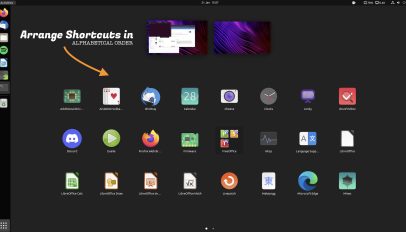 This GNOME extension rearranges the GNOME Shell application grid in alphabetically order, making it easier to find app shortcuts based on their name.
 Want to change Ubuntu's login screen background? I walk through the steps for changing GDM background to a solid colour, gradient, or custom image.