Linux Mint has confirmed it is switching to a longer development cycle, in order to give the team more time to ‘fix bugs and improve the desktop’. As a result, the Linux Mint 23 release is now slated to launch in December 2026. It will, among other planned changes, use the same installer as LMDE (Linux Mint Debian Edition) as this offers better OEM install, SecureBoot and LVM/LUKS support. Project lead Clement Lefebvre intimated that upending the distro’s standard twice-yearly release model was needed in February, noting that “…one of our strengths is that we’re doing things incrementally and changing […]
Linux Mint is known for being simple and beginner friendly. It works out of the box with most essential features ready to use, so you don’t have to spend time setting things up. One such basic task is taking screenshots, and Mint makes it very easy even if you are completely new to Linux.
In this beginner's guide, we will look at the built-in screenshot tool in Linux Mint and the keyboard shortcuts you can use right away.
📋
This article is part of the Linux Mint beginner's tutorial series.
The GUI screenshot tool that you don't want to miss
Linux Mint provides a simple graphical interface for those who prefer a GUI solution for taking screenshots.
Beyond the basic options, the tool also includes a few useful features. Let’s take a look at them next.
First, open the Screenshot tool by searching for it in the start menu.
Open Screenshot Tool
💡
You can pin the Screenshot app to the taskbar for quick access.
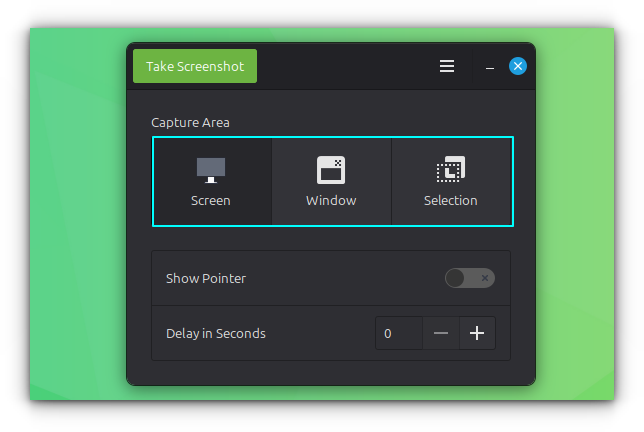
The interface is simple and easy to understand. There are three main options:
Capture Screen: Takes a screenshot of the entire screen
Capture Window: Captures the active window
Capture Selection: Lets you select a specific area using left-click and drag to capture.
Screenshot Tool Interface
After choosing the method, click the Take Screenshot button at the top left of the window.
Show mouse cursor in screenshot
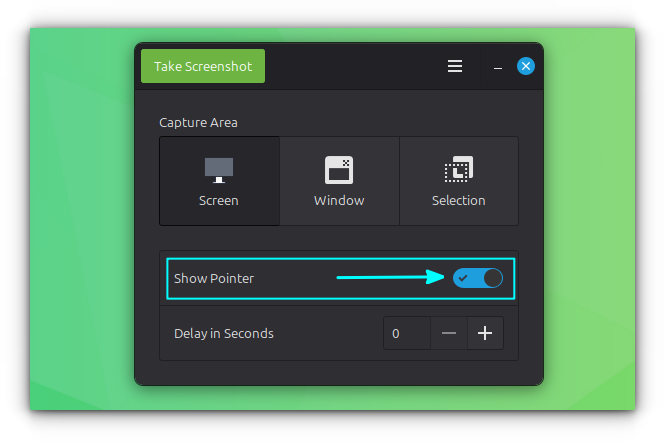
In the Screenshot tool, you will find an option called Show Pointer. Enable this if you want the mouse pointer to be visible in your screenshots.
Show Pointer
Take screenshot with a delay
You can also set a small delay before taking a screenshot.
🚧
This does not apply to keyboard shortcuts by default.
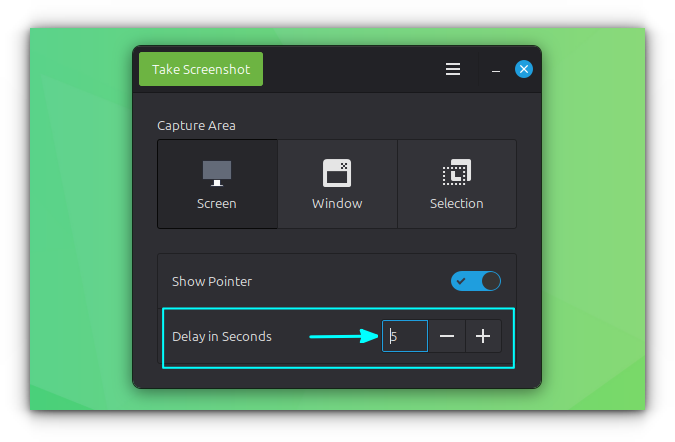
In the Screenshot tool, enter a value in seconds under the Delay in Seconds option.
Add a Delay to Screenshot
Once set, the tool will wait for the specified time before capturing the screenshot when using the GUI. For example, if you set it to 5 seconds, the screenshot will be taken after a 5 second delay.
💡
One common use case for delay is capturing the mouse cursor in window or area screenshots. Without a delay, the screenshot is taken instantly, so you do not get time to move the cursor from the Screenshot tool to the target application or position it properly.
Using keyboard shortcuts
If you prefer not to open a GUI app every time you take a screenshot, that is not a problem. Linux Mint provides keyboard shortcuts that let you quickly capture the screen in different ways.
Take the screenshot of entire screen
You can press the PrtScr key on your keyboard to capture the entire screen.
After taking the screenshot, you will be prompted to either save it with a name or copy it to the clipboard. This works well for basic use.
However, this can feel limited if you only want to capture a small part of the screen. The good news is that Linux Mint also provides an easy way to do that.
Take the screenshot of an area
To take the screenshot of a specific area, use the Shift + PrtScr shortcut.
Your screen will dim slightly and the cursor will change to a plus sign. Click, hold, and drag to select the area you want to capture.
Once you release the mouse button, you can choose to copy the screenshot or save it.
🚧
Keep in mind that you cannot adjust the selection after releasing the click, so make sure to select the area carefully.
Take screenshot of a window
Sometimes, you may want to capture only the currently active window. While you can do this using the area selection method, using a shortcut is much more convenient.
Press Alt + PrtScr to take a screenshot of the active window.
There are a few things to keep in mind. If a menu is open inside the window, like a top menu or a right-click context menu, this shortcut may not work.
🚧
In my case, I was not able to use any of the screenshot shortcuts if the window in focus has a menu opened. In this case, you need to set a delay to take the screenshot, which we will see in a later section.
Also, if a dialog box is open, the tool will capture whichever window is active at that moment, whether it is the main window or the dialog.
Record the screen
Many people do not realize that Linux Mint also includes a built-in screen recorder. It is not visible in the menus, so it is easy to miss.
Press Shift + Ctrl + Alt + R to start recording your screen. Use the same key when a recording is active to stop recording.
This is a basic tool, so do not expect features like those in dedicated applications such as OBS Studio or SimpleScreenRecorder. It simply records your entire screen.
When you stop the recording, the video file is saved in the Videos folder inside your Home directory.
Custom Shortcuts
In the previous section, we saw that the GUI tool offers options like delay and showing the mouse pointer, which are not available with the default keyboard shortcuts.
However, this does not mean you are limited. In Linux Mint, you can create custom shortcuts to include these actions as well.
The screenshot options
Before setting up custom screenshot shortcuts, it helps to understand the available options. Linux Mint uses the GNOME Screenshot tool for both the GUI and keyboard based screenshots.
GNOME Screenshot provides several useful options, along with many more that you can explore in its man page.
gnome-screenshot -w: Take the screenshot of current active window.
gnome-screenshot -a: Take the screenshot of a select region by click and drag.
gnome-screenshot -d 5: Add a 5 second delay before taking a screenshot of the entire screen.
gnome-screenshot -d 5 -p: Apply a 5 second delay and include pointer in the screenshot.
gnome-screenshot -d 5 -a, gnome-screenshot -d 5 -w: Take screenshot of select area/window respectively with a 5 second delay.
Setting custom screenshot shortcuts
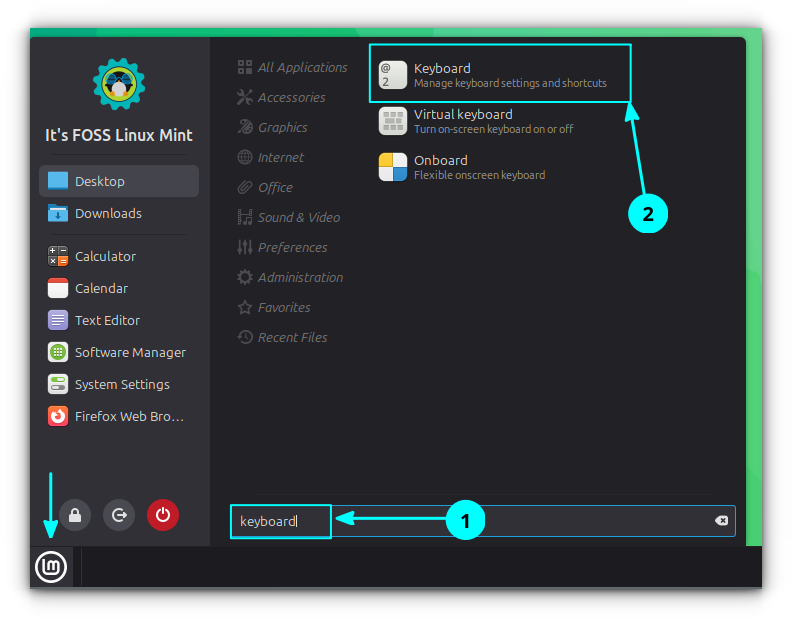
Search for and open Keyboard from the start menu.
Open Keyboard Application
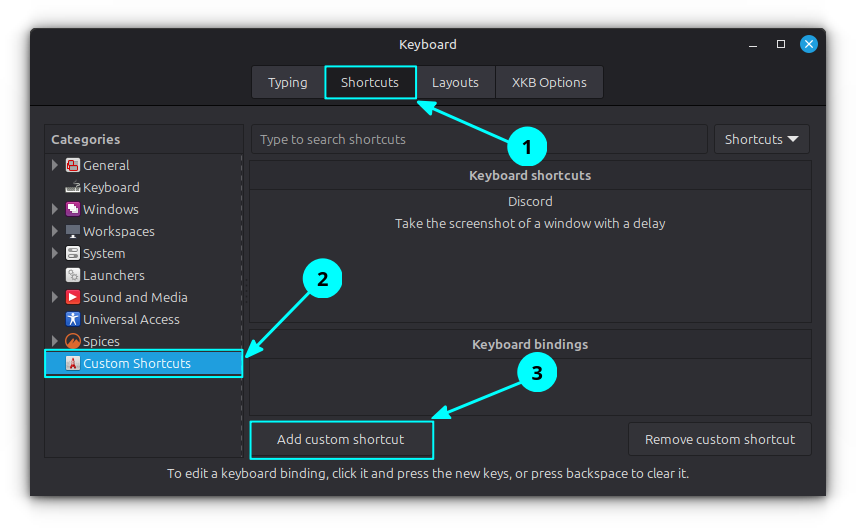
Go to the Shortcuts tab and then select Custom Shortcuts. Click on the Add custom shortcut button.
Add Custom Shortcut
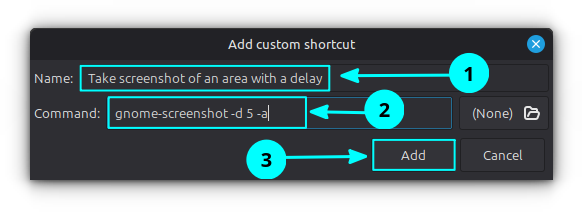
Now, enter a name for the shortcut. For example, you can use "Take screenshot of an area with a delay" in the Name field.
Enter name and command
In the command field, enter the required command. For example, use gnome-screenshot -d 5 -a, and then click the Add button.
The command will now be listed. To assign a shortcut, select it under Keyboard shortcuts and click on the Unassigned option in the Keyboard bindings section.
0:00
/0:13
Add the keybinding to the custom command.
You will be prompted to press a key combination. Press the shortcut you want to use.
You can repeat the same steps to create and assign shortcuts for other commands based on your needs.
Other screenshot tools
Sometimes, basic screenshots are not enough. You may want to annotate an image or add borders and other adjustments.
These are image editing features, and they are not available in the default Screenshot tool in Linux Mint.
For such needs, you can use third party screenshot tools that offer more control and customization.
We have a separate article that covers screenshot tools you can use in more detail. You can refer to it to find options that suit different needs and use cases.
As a quick note, Flameshot and Ksnip are two good screenshot tools you can use for editing and customization. You can also use Gradia that also provides basic editing.
Did you find it useful? Feel free to share your thoughts in the comments.
Linux Mint devs announced that they will adopt a longer development cycle starting with the upcoming Linux Mint 23 release, as well as other important changes to the distribution.
Archinstall 4.2 text-based installer for Arch Linux is now available with granular KDE Plasma configuration, a new Pacman settings submenu with Color and Parallel Downloads, and other changes.
The first point release to Zorin OS 18 is now available for download, arriving six months and some 3.3 million downloads after the original launch. Zorin OS 18.1 is a point release update. It’s still based on Ubuntu 24.04 LTS-based but adds a variety of desktop refinements, updated software and a new kernel (courtesy of the recent Ubuntu HWE from Canonical). A new Zorin OS Lite also launches today. This nimble edition is aimed at older, lower-spec hardware and is based around a customised Xfce desktop rather than the GNOME Shell desktop the main edition uses. If you already run […]
Der legendäre Urheberrechtsfall „Metall auf Metall“ geht in die letzte Runde. Der Europäische Gerichtshof hat gerade nach weitläufiger Auffassung das Recht auf Remix und Sampling gestärkt. Jetzt muss noch der Bundesgerichtshof final entscheiden.
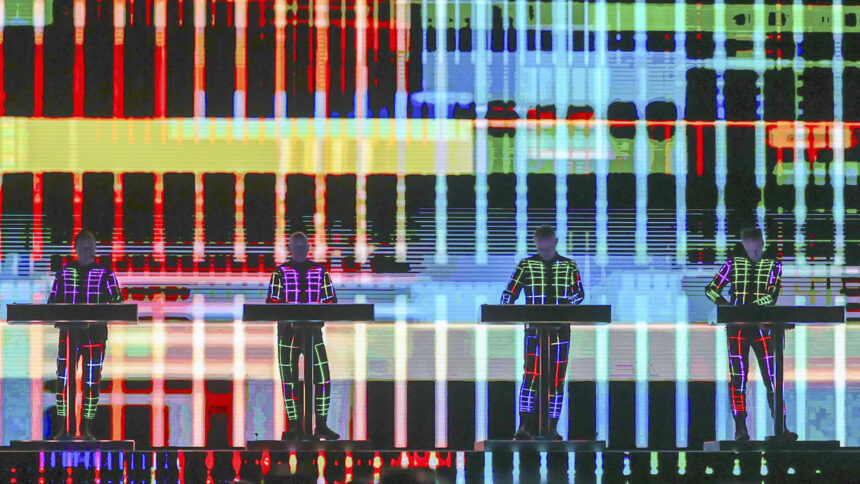
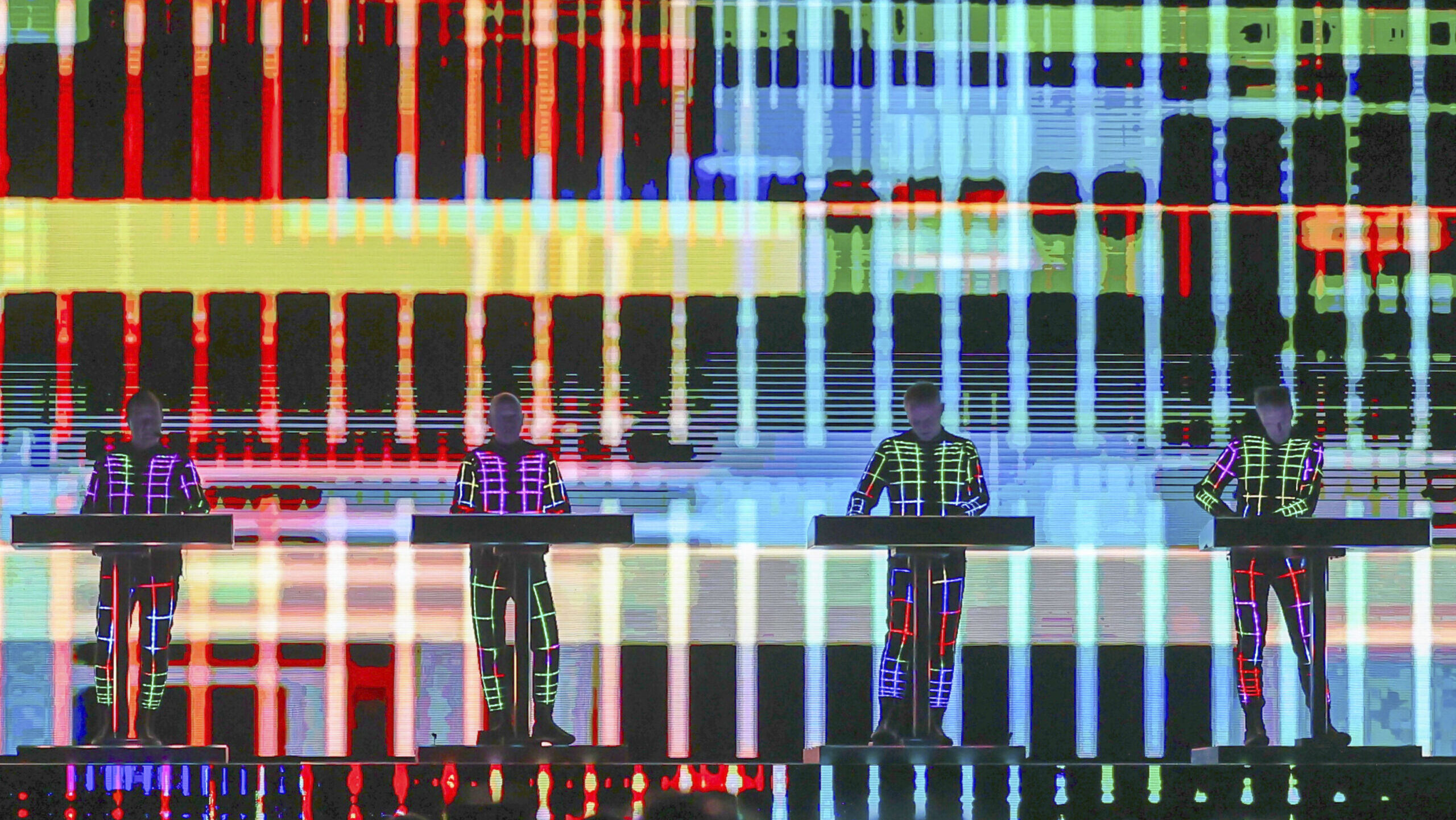
Kraftwerk live bei einem Konzert. Die Band hatte 1999 wegen eines Samples geklagt. – Alle Rechte vorbehalten IMAGO / Future Image
Der Europäische Gerichtshof hat eine Entscheidung präzisiert, die es ermöglicht, urheberrechtlich geschützte Werke ohne Zustimmung ihrer Rechtsinhaber:innen zu verwenden. Demnach müssen bestimmte Voraussetzungen zutreffen, damit ein Sample als erlaubtes „Pastiche“ gilt.
27 Jahre – so lange streiten sich der Musikproduzent Moses Pelham und die Band Kraftwerk bereits vor Gericht. Recht auf Sampling gegen Urheberrecht. Gestritten wird um einen zwei Sekunden langen Musikschnipsel aus dem Kraftwerk-Song „Metall auf Metall“. Der stammt aus 1977. Rund 20 Jahre später schnitt Pelham aus den zwei Sekunden die Dauerschleife für den Song „Nur mir“ von Sabrina Setlur. Kraftwerk klagte 1999 dagegen.
Das Oberlandesgericht Hamburg, der Bundesgerichtshof, das Bundesverfassungsgericht und der Europäische Gerichtshof – sie alle haben sich im letzten Vierteljahrhundert mit dem Fall beschäftigt. Derweil ist das Samplen gängige Kulturpraxis, nicht nur in HipHop und Techno.
Um eine Rechtsgrundlage zu schaffen, führte die EU 2019 eine „Pastiche-Regel“ ein, die 2021 im deutschen Urheberrecht verankert wurde. Dort heißt es in § 51a Karikatur, Parodie und Pastiche: „Zulässig ist die Vervielfältigung, die Verbreitung und die öffentliche Wiedergabe eines veröffentlichten Werkes zum Zweck der Karikatur, der Parodie und des Pastiches. Die Befugnis nach Satz 1 umfasst die Nutzung einer Abbildung oder sonstigen Vervielfältigung des genutzten Werkes, auch wenn diese selbst durch ein Urheberrecht oder ein verwandtes Schutzrecht geschützt ist.“
Wann ist Pastiche Pastiche?
Nun hat der Europäische Gerichtshof sich zur Tragweite der Ausnahme für „Pastiches“ im Zusammenhang mit dem Sampling geäußert. Demnach sei entscheidend, ob die Neuschöpfung im Zuge des Samplings mit den urheberrechtlich geschützten Werken einen „erkennbaren künstlerischen oder kreativen Dialog“ führe, „gleichzeitig aber wahrnehmbare Unterschiede“ aufweise. Beispielsweise in Form einer offenen Nachahmung des Stils oder kritischer Auseinandersetzung. Auf diese Weise solle ein angemessener Rechts- und Interessenausgleich zwischen Rechteinhaber:innen und der Kunstfreiheit gesichert werden. Eine Nachahmung ohne erkennbare Auseinandersetzung mit dem Original sei demnach kein zulässiges Pastiche.
Nach weitläufiger Interpretation hat der Europäische Gerichtshof damit das Recht auf Remix und Sampling gestärkt – und damit geht der Fall „Metall auf Metall“ in die letzte Runde und zurück an den Bundesgerichtshof in Karlsruhe: Dieser muss nun entscheiden, ob Pelham sich in dem Song von 1997 in einem ausreichenden Dialog mit „Metall auf Metall“ befindet und wahrnehmbare Unterschiede bestehen.
Das Oberlandesgericht Hamburg hatte bereits festgestellt, dass die Rhythmussequenz trotz leichter Abwandlung in „Nur mir“ als Anspielung auf das Original erkennbar bleibe – darauf weist der Europäische Gerichtshof hin. Fraglich ist jetzt, ob der Bundesgerichtshof dieser Auffassung folgen wird.
Die Arbeit von netzpolitik.org finanziert sich zu fast 100% aus den Spenden unserer Leser:innen. Werde Teil dieser einzigartigen Community und unterstütze auch Du unseren gemeinwohlorientierten, werbe- und trackingfreien Journalismus jetzt mit einer Spende.
XOrg Server 21.1.22 and Xwayland 24.1.10 have been released today to address a total of five security vulnerabilities. Users are urged to update their systems as soon as possible.
Ever wondered what a GTK4/libadwaita version of Linux music player Rhythmbox might look like? A new app in development imagines just that. Tributary is billed as a “high-performance, Rhythmbox-style media manager written in pure Rust with GTK4 and libadwaita”. It’s more than a way to play local audio files. Tributary can also access and stream music from Jellyfin, Plex, DAAP/iTunes shares, and Subsonic/Navidrome setups, and makes it easy to browse and play internet radio stations – all from a UI that looks like a GTK4 Rhythmbox. Explaining his decision to create ‘yet another music player’ (no longer a historical meme […]
Raspberry Pi OS 2026-04-13 is now available for download with a much-improved Control Center app, passwordless sudo disabled by default, Chromium enhancements, and many other changes.
Linus Torvalds hat Linux 7.0 freigegeben. Der neue Kernel verbessert die Fehlerberichterstattung bei Dateisystemen. XFS bietet selbstheilende Funktionen, die Korrekturen zur Laufzeit vornehmen können.
Quick Lofi is a GNOME Shell extension that puts a lofi radio player in your top bar. If you’ve ever opened a new browser tab to load a “lofi beats to study to” stream on YouTube — lofi girl, perhaps – to act as an ambient backdrop to work to, the appeal will be evident. If not, all you need to know is that mellow, lyric-free, low-tempo sounds are reputedly ideal for focus. A wedge of research backs up the benefits of playing background music (or ambient noise or frequencies, including binaural beats) when studying. A 2022 study showed students who […]
Linus Torvalds has released Linux 7.0, the kernel version that Ubuntu 26.04 LTS runs on. Linux 7.0 includes a new standardised filesystem error reporting system, faster swap performance and hardware video decoding for a crop of Rockchip ARM64 single-board computers. On the quirky side, Rock Band 4 Bluetooth controller support is now included. The shiny new version number does not, however, signify anything special. Linus has always been upfront that kernel version numbers tick up when the minor number gets a tad unwieldy, not because a ‘milestone’ has been reached. That said, there is plenty in this release worth talking […]
Die Bereitschaft, sich an Debatten in Sozialen Medien und in Online-Kommentarbereichen zu beteiligen, sinkt. Ein zentraler Grund dafür ist die Diskursqualität, die zunehmend als negativ wahrgenommen wird, so das Ergebnis einer Studie der Medienanstalten.
In Online-Debatten fliegen oft die Funken. – Alle Rechte vorbehalten IMAGO / Dreamstime
Plattformen-Nutzer:innen und Social-Media-Redakteur:innen sind sich offenbar gleichermaßen einig: Die Debattenkultur im digitalen Raum verschlechtert sich zunehmend. Zu diesem Ergebnis kommt die „Transparenz-Check“-Studie der Medienanstalten. Konstruktive Debatten seien online demnach „kaum noch möglich“ und würden zum Teil gar als unwillkommen wahrgenommen. Dennoch wünsche sich eine deutliche Mehrheit der Befragten einen konstruktiven Austausch.
Mit der als negativ wahrgenommenen Diskursqualität sinkt offenbar auch die Bereitschaft, in den Kommentarspalten mitzudiskutieren. Der häufigste Grund dafür sei die aggressive Stimmung. Dementsprechend werde der respektvolle Umgang miteinander als zentral dafür angesehen, sich mehr zu beteiligen.
Zur Meinungsfreiheit im digitalen Raum liegen bei den Befragten zwei gegensätzliche Wahrnehmungen vor. Eine Gruppe versteht darunter, ohne Sorge vor Hass und Abwertung sprechen zu können. Die andere Gruppe will dagegen grundsätzlich alles ungehindert sagen dürfen. Besonders Menschen, die der AfD zuneigten, hätten das Gefühl, in ihrer Meinungsäußerung eingeschränkt zu sein. Wähler:innen der Linken oder der Grünen gaben dagegen häufiger an, frei artikulieren zu können.
Vertrauen in Soziale Medien ist sehr gering
Der Studie nach gibt es zwischen den Plattformen große Unterschiede. Im Vergleich zu Instagram würden Facebook und Twitter/X als wesentlich problematischer wahrgenommen – insbesondere von ehemaligen Nutzenden der Plattformen. Die schlechte Diskursqualität dort sei demnach einer der Gründe, warum Nutzende den Plattformen den Rücken kehren.
Facebook sei die Plattform, die am zweithäufigsten genutzt werde. Gleichzeitig ist sie die meistgenutzte Plattform, auf der Nutzende journalistische Beiträge lesen und kommentieren. Trotz Klarnamen werde die Atmosphäre dort aber als „toxisch“ wahrgenommen.
Das Vertrauen in die Sozialen Medien fällt insgesamt sehr gering aus. Dennoch gibt etwa ein Drittel der Befragten an, in den Kommentaren unter journalistischen Beiträgen bei Facebook, Instagram und YouTube mitzulesen.
„Vertrauen und Laune sinken nach dem Lesen von Kommentaren“
Ein Viertel derer, die aktiv kommentieren, wollen zumeist nur ihre Meinung äußern; knapp ein Viertel von ihnen will andere überzeugen und etwa jede achte Person möchte lediglich ihren Ärger kundtun. „Insgesamt überwiegen die negativen Auswirkungen von Diskursen in den Sozialen Medien“, so ein Fazit der Studie. „Extreme Meinungen überwiegen, Vertrauen und Laune sinken nach dem Lesen von Kommentaren.“
Allerdings zeigten die durchgeführten Experimente, dass eine erkennbare Moderation entscheidend dafür sein kann, dass die Diskursqualität positiver wahrgenommen wird. Je strenger moderiert wird und je konstruktiver der Austausch ist, desto respektvoller und ausgewogener wird der Diskurs wahrgenommen. Allerdings sind die Ressourcen für ein konstruktives Community-Management oftmals knapp.
Bei den Befragten bleibt unterm Strich eine Grundskepsis: Sie bezweifeln, dass Online-Diskurse überhaupt funktionieren und Kommentare zu neue Perspektiven führen können. Eine Mehrheit hat laut Studie das Gefühl, dass Online-Diskussionen spalten.
Desinformation und Bots
Die Anforderungen an das Community-Management sind in den vergangenen Jahren gewachsen. Verantwortlich dafür sind die steigende Zahl an Kommentaren und der zunehmend raue Tonfall. Zudem nehme der Anteil an Desinformation und Fake News zu.
Auch die Bedeutung von Bots hat die Studie unter die Lupe genommen. Insgesamt wurden vier Prozent der Kommentare als „wahrscheinliche Bot-Kommentare“ klassifiziert. Bei kontroversen Themen seien deutlich höhere Werte zu verzeichnen.
Eine Mehrheit der Befragten ist der Ansicht, aufgrund der Bot-Aktivität könnten sie sich im Netz inzwischen kaum noch mit echten Menschen austauschen.
Eine noch größere Rolle als die Bots spielen Trolle, Fake-Accounts und koordinierte Kommentar-Ströme. Diese würden laut den befragten Moderator:innen dazu genutzt, um den Verlauf von Diskussionen in Kommentarspalten gezielt zu beeinflussen.
Vorgehen der Studie
Der „Transparenz-Check“ der Medienanstalten ist dreistufig aufgebaut: Inhaltsanalyse, qualitative Tiefeninterviews und quantitative repräsentative Befragung.
Die Inhaltsanalyse zur Ermittlung der Rolle von Bots beruht auf Tausenden von Kommentaren unter insgesamt 39 Beiträgen von Bild, Der Spiegel, Süddeutsche Zeitung, Die Zeit sowie auf den Plattformen Facebook, Instagram und YouTube.
Elf Tiefeninterviews haben die Forschenden mit Personen aus Social-Media-Redaktionen, aus dem Community-Management sowie mit weiteren Expert:innen durchgeführt. Die quantitative repräsentative Befragung fand mit mehr als 3000 Internetnutzenden statt.
Die Arbeit von netzpolitik.org finanziert sich zu fast 100% aus den Spenden unserer Leser:innen. Werde Teil dieser einzigartigen Community und unterstütze auch Du unseren gemeinwohlorientierten, werbe- und trackingfreien Journalismus jetzt mit einer Spende.
A clutch of new features are available in Dynamic Music Pill, the slick now playing and media controller extension for GNOME Shell. The “big” new addition is lyrics support. When you listen to a track with synced lyrics in a compatible player, you can view those lyrics by opening the applet controller and clicking on the album art inside of it: The lyrics are shown in a freely scrollable widget, with the active line bolder in white for more emphasis. You can scroll up and down whilst tracks are playing. If you click a lyric line, your music player jumps […]
Firefox recently added a free built-in VPN to its desktop browser, but access to the feature is rolling out gradually. It hit my Ubuntu machine last night – and I’m last to be invited to anything, so I thought I’d write a quick rundown of what it actually does, what it doesn’t, and how to set it – assuming you have it. If you’re waiting for it to roll out to you, there’s no special update or download to look out for as this is a progressive rollout feature – Mozilla enables it remotely, in stages. There was no fanfare […]
9to5Linux Weekly Roundup for March 8th, 2026, brings news about the age restriction law, Nitrux 6.0, Linux Mint's new screensaver, Armbian 26.2, IPFire 2.29 Core Update 200, KDE Plasma 6.6.2, KDE Gear 25.12.3, CachyOS snapshot for March 2026, T2 Linux 26.3, digiKam 9.0, HandBrake 1.11, and more.
TUXEDO Computers stellt dem InfinityBook Max 16 Intel jetzt ein Pendant mit AMD Ryzen AI 300 CPUs zur Seite. Das Notebook im Alu-Kleid eignet sich gleichermaßen für Business und Gaming.


 Linux Mint has confirmed it is switching to a longer development cycle, in order to give the team more time to ‘fix bugs and improve the desktop’. As a result, the Linux Mint 23 release is now slated to launch in December 2026. It will, among other planned changes, use the same installer as LMDE (Linux Mint Debian Edition) as this offers better OEM install, SecureBoot and LVM/LUKS support. Project lead Clement Lefebvre intimated that upending the distro’s standard twice-yearly release model was needed in February, noting that “…one of our strengths is that we’re doing things incrementally and changing […]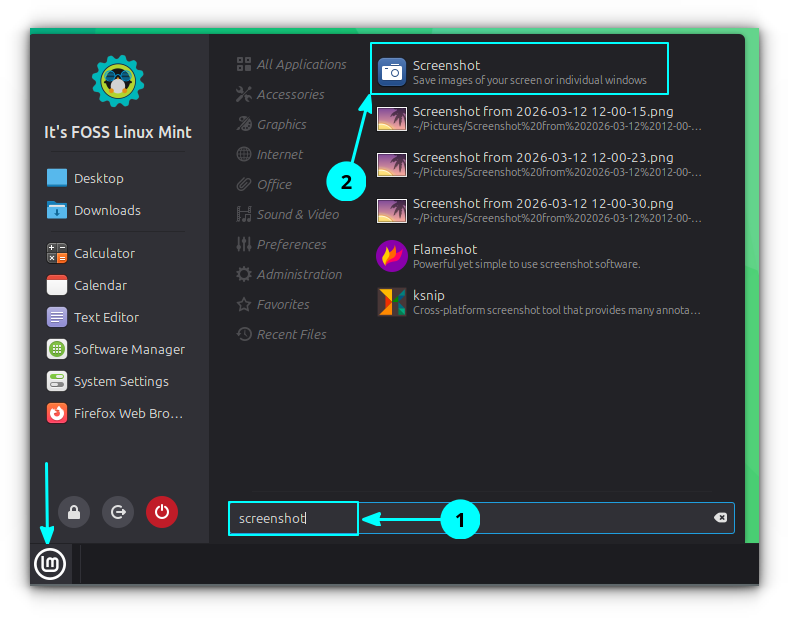



 The first point release to Zorin OS 18 is now available for download, arriving six months and some 3.3 million downloads after the original launch. Zorin OS 18.1 is a point release update. It’s still based on Ubuntu 24.04 LTS-based but adds a variety of desktop refinements, updated software and a new kernel (courtesy of the recent Ubuntu HWE from Canonical). A new Zorin OS Lite also launches today. This nimble edition is aimed at older, lower-spec hardware and is based around a customised Xfce desktop rather than the GNOME Shell desktop the main edition uses. If you already run […]

 Ever wondered what a GTK4/libadwaita version of Linux music player Rhythmbox might look like? A new app in development imagines just that. Tributary is billed as a “high-performance, Rhythmbox-style media manager written in pure Rust with GTK4 and libadwaita”. It’s more than a way to play local audio files. Tributary can also access and stream music from Jellyfin, Plex, DAAP/iTunes shares, and Subsonic/Navidrome setups, and makes it easy to browse and play internet radio stations – all from a UI that looks like a GTK4 Rhythmbox. Explaining his decision to create ‘yet another music player’ (no longer a historical meme […]
 Quick Lofi is a GNOME Shell extension that puts a lofi radio player in your top bar. If you’ve ever opened a new browser tab to load a “lofi beats to study to” stream on YouTube — lofi girl, perhaps – to act as an ambient backdrop to work to, the appeal will be evident. If not, all you need to know is that mellow, lyric-free, low-tempo sounds are reputedly ideal for focus. A wedge of research backs up the benefits of playing background music (or ambient noise or frequencies, including binaural beats) when studying. A 2022 study showed students who […]
 Linus Torvalds has released Linux 7.0, the kernel version that Ubuntu 26.04 LTS runs on. Linux 7.0 includes a new standardised filesystem error reporting system, faster swap performance and hardware video decoding for a crop of Rockchip ARM64 single-board computers. On the quirky side, Rock Band 4 Bluetooth controller support is now included. The shiny new version number does not, however, signify anything special. Linus has always been upfront that kernel version numbers tick up when the minor number gets a tad unwieldy, not because a ‘milestone’ has been reached. That said, there is plenty in this release worth talking […]

 A clutch of new features are available in Dynamic Music Pill, the slick now playing and media controller extension for GNOME Shell. The “big” new addition is lyrics support. When you listen to a track with synced lyrics in a compatible player, you can view those lyrics by opening the applet controller and clicking on the album art inside of it: The lyrics are shown in a freely scrollable widget, with the active line bolder in white for more emphasis. You can scroll up and down whilst tracks are playing. If you click a lyric line, your music player jumps […]
 Firefox recently added a free built-in VPN to its desktop browser, but access to the feature is rolling out gradually. It hit my Ubuntu machine last night – and I’m last to be invited to anything, so I thought I’d write a quick rundown of what it actually does, what it doesn’t, and how to set it – assuming you have it. If you’re waiting for it to roll out to you, there’s no special update or download to look out for as this is a progressive rollout feature – Mozilla enables it remotely, in stages. There was no fanfare […]

