

 Quick Lofi is a GNOME Shell extension that puts a lofi radio player in your top bar. If you’ve ever opened a new browser tab to load a “lofi beats to study to” stream on YouTube — lofi girl, perhaps – to act as an ambient backdrop to work to, the appeal will be evident. If not, all you need to know is that mellow, lyric-free, low-tempo sounds are reputedly ideal for focus. A wedge of research backs up the benefits of playing background music (or ambient noise or frequencies, including binaural beats) when studying. A 2022 study showed students who […]
You're reading Quick Lofi – a GNOME extension for chill beats to study to, a blog post from OMG! Ubuntu. Do not reproduce elsewhere without permission.
 A clutch of new features are available in Dynamic Music Pill, the slick now playing and media controller extension for GNOME Shell. The “big” new addition is lyrics support. When you listen to a track with synced lyrics in a compatible player, you can view those lyrics by opening the applet controller and clicking on the album art inside of it: The lyrics are shown in a freely scrollable widget, with the active line bolder in white for more emphasis. You can scroll up and down whilst tracks are playing. If you click a lyric line, your music player jumps […]
 Pigeon Email Notifier is a GNOME Shell extension that does one thing: show a desktop notification when new mail arrives in your Gmail, Microsoft Outlook or IMAP webmail account. If you don’t want to leave a webmail tab open in Firefox, the overhead of a desktop email app like Thunderbird, or your provider doesn’t offer a desktop Linux app (like Fastmail and Proton Mail now do), Pigeon provides a set-and-forget way to still get new mail alerts. Desktop email notifiers have been around for a long time. I’ve written about many standalone tools, like Unity Mail, Popper and Mail Nag over […]
 Ubuntu 26.04 LTS ships with two new extensions installed and active by default, both adding new search capabilities to the GNOME Shell Overview. The first new extension is Web Search Provider. This lets you initiate a web search on Google straight from the GNOME Shell Overview. ‘Initiate’ is the important term here as search terms made in GNOME Shell are not sent anywhere directly. Before you raise an eyebrow: this is not a revival of the Shopping Lens furore. That saw local file and app searches typed in Ubuntu’s then-Unity desktop piped off to third parties (anonymised, but still dodgy […]
 Add animated media controls to your GNOME panel or dock with Dynamic Music Pill, a slick GNOME Shell extension showing album art, waveforms and track info.
 The world isn’t short on keyboard-based Linux launchers. Albert, Ulauncher, rofi and GNOME Do (if you’re old enough to remember that one) are among those I’ve written about in the past. Rudra is a new spin on this old staple – albeit without the extensibility dedicated quick launchers provide. What’s different here is that it’s implemented as a GNOME Shell extension, not a standalone app. The developer of Rudra, Nark Agni, describes it as a “lightning-fast, keyboard-centric launcher […] designed for power users”. Though inspired by Mac apps like Alfred and Raycast, it is far less capable than those. To […]
 The 2 Wallpapers GNOME extension changes wallpaper when apps open, letting you fake blurred window look in apps that support transparency – clever!
 Control Spotify playback from top bar in Ubuntu using gSpotify, a slick GNOME extension that even changes colour based on the playing track's artwork.
 Floating Mini Panel GNOME extension now has a vertical panel option, an orientation which feel up (a bit of) screen space on widescreen displays.
 Tiling Shell v17 is out with a handful of new options for keyboard-driven workflows, including shorts to switch between tiling layouts. GNOME 49 support also added.
 If you want weather information displayed directly on your Ubuntu desktop, the Desktop Widgets GNOME Shell extension is worth checking out. See why inside.
 Image, PDF and other supported file thumbnails will once again appear on the Ubuntu 24.04 LTS desktop, after nearly a year of not showing.
 A new GNOME Shell extension that turns the top bar into a compact, movable panel, so you can customise your Ubuntu desktop to suit your workflow.
 A new GNOME Shell extension makes it easy to control the UxPlay AirPlay server on Ubuntu. Start and stop mirroring your iPhone or iPad screen with a click.
 'Burn My Windows' is the GNOME Shell extension that just keeps on giving. New effect and a much-request option included in its latest update.
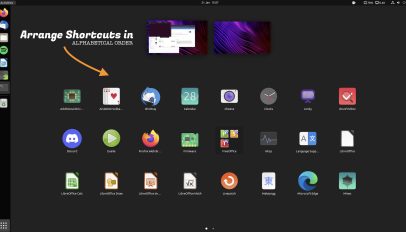 This GNOME extension rearranges the GNOME Shell application grid in alphabetically order, making it easier to find app shortcuts based on their name.