
🔒
Es gibt neue verfügbare Artikel. Klicken Sie, um die Seite zu aktualisieren.
Ältere BeiträgeLinux Uprising Blog

Hanabi Is A Live Wallpaper For GNOME Desktop

17. April 2023 um 19:53
Von: Logix
Hanabi gnome shell live wallpaper

Hanabi is a GNOME Shell extension that allows using a live wallpaper (video) on the GNOME desktop, with support for both X11 and Wayland.

According to the developer, the extension “is not even close to alpha quality”, but it's already usable, albeit you'll need to install it manually since it's not available on the GNOME Shell extensions website.

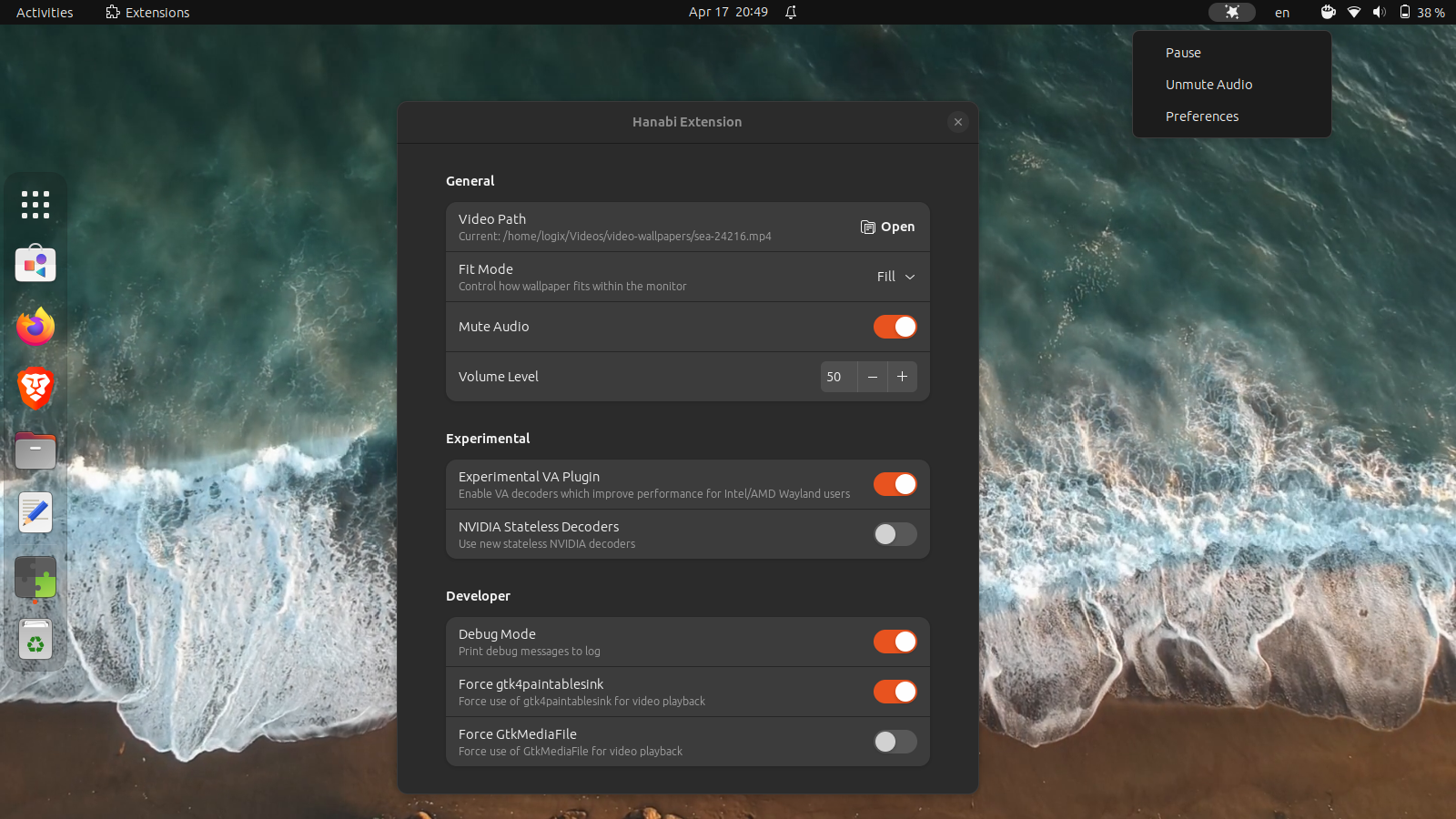
This live wallpaper GNOME extension currently supports playing a local video as your desktop background, with or without audio, and the ability to set the audio volume. From the extension top bar menu, you can pause the video and mute/unmute the audio.

To get the video playback to use less CPU, the extension comes with experimental support for VA-API hardware acceleration, as well as the ability to use the new Nvidia statless decoders. For best performance, the extension can utilize clappersink from Clapper (a GNOME media player that uses GStreamer as a media backend and renders everything via OpenGL)—this needs to be installed as a native package, and not as a Flatpak package. The extension GitHub page has a performance comparison on using Hanabi live wallpaper for GNOME with and without clappersink.

From the extension preferences, you can control how the live wallpaper fits within the monitor, allowing users to set the fit mode to fill, contain, cover and scale-down.

This is a short video I've recorded with Hanabi GNOME live wallpaper running on GNOME 44 (X11):


[[ This is a content summary only. Please visit Linux Uprising for the full article ]]

--------------------------------------------------------------------------
Originally posted on Linux Uprising Blog.

What's New In GNOME 44

22. März 2023 um 06:42
Von: Logix
GNOME 44 screenshot

After its usual 6-month release cycle, GNOME 44 will be released today. Read on to find out the new features and improvements in this release.


[[ This is a content summary only. Please visit Linux Uprising for the full article ]]

--------------------------------------------------------------------------
Originally posted on Linux Uprising Blog.

Pano Visual Clipboard Manager For GNOME Shell Adds UI Customization Options, Favorites, More

06. März 2023 um 11:47
Von: Logix
Pano visual gnome shell clipboard manager

Pano, a next-gen clipboard manager for GNOME Shell, has been updated with some major improvements such as user interface customization options, the ability to favorite items, content-aware notifications, as well as support for GNOME Shell 44.

This is a clipboard manager implemented as a GNOME Shell extension that displays previews of your clipboard items, with support for text, images, code blocks, color codes, links, files, and with the latest release, Emoji. It supports GNOME 42, 43 and 44.

Pano customization tab
The all-new Customization tab in Pano's settings

For the latest release, its developer has focused on implementing the most popular user requests. One such request was the ability to customize the look of Pano. So in this release, users can now customize many aspects of Pano's UI: window height, background color, active or hovered item border color, and the style of each item type (including colors, font face, etc.). It's not yet possible to move the Pano clipboard previews from the bottom of the screen though, this being a feature I'd like to see in Pano.

Another much requested feature was the ability to favorite items – this feature has now been included in the latest release of Pano clipboard manager. You'll now see a star in the upper right-hand side corner of each clipboard item:


[[ This is a content summary only. Please visit Linux Uprising for the full article ]]

--------------------------------------------------------------------------
Originally posted on Linux Uprising Blog.

Search, Install And Update GNOME Shell Extensions From The Command Line Using gnome-extensions-cli

16. Februar 2023 um 18:50
Von: Logix
gnome-extensions-cli

gnome-extensions-cli is an unofficial GNOME Shell extension manager for the command line. It can install, update, enable / disable, remove and search GNOME Shell extensions.

This command line tool is great if you don't want or can't use a web browser (which requires also installing an extension and a connector) to install GNOME Shell extensions, and you like using the command line. 

If you prefer using a graphical user interface to manage GNOME Shell extensions (including installing new extensions, searching extensions on the GNOME Extensions website, updating installed extensions, etc.), check out Extension Manager.


[[ This is a content summary only. Please visit Linux Uprising for the full article ]]

--------------------------------------------------------------------------
Originally posted on Linux Uprising Blog.

Extension Manager: Search And Install GNOME Shell Extensions Without Using A Web Browser

10. Januar 2022 um 10:39
Von: Logix

Extension Manager is a new, unofficial application to browse and install GNOME Shell extensions from your desktop, without having to use a web browser. 

Besides allowing users to search and install extensions from extensions.gnome.org, the tool can also enable or disable extensions (and display a list of installed extensions), access the extension settings, and uninstall extensions.

Read more »

[[ This is a content summary only. Please visit Linux Uprising for the full article ]]

--------------------------------------------------------------------------
Originally posted on Linux Uprising Blog.

Fly Pie Is A GNOME Shell Launcher For Users With One Hand On The Mouse Most Of The Time

06. Dezember 2021 um 11:09
Von: Logix
Fly Pie GNOME Shell

Fly Pie is a GNOME Shell launcher (available as an extension) designed for users who have one hand on the mouse most of the time. It can be used to launch applications, URLs, recent files, simulate hotkeys, access the clipboard, and more. It works under both X11 and Wayland.

With Fly Pie, you use a keyboard shortcut to open a menu, then use the mouse to do the rest. Once you open a menu, there are three alternative selection modes: point and click (select an item by clicking on it), marking mode (select items by drawing gestures) and turbo mode (draw gestures while holding Ctrl, Shift or Alt without having to press your mouse button).

Read more »

[[ This is a content summary only. Please visit Linux Uprising for the full article ]]

--------------------------------------------------------------------------
Originally posted on Linux Uprising Blog.
  • Es gibt keine weiteren Artikel
❌