🔒
Es gibt neue verfügbare Artikel. Klicken Sie, um die Seite zu aktualisieren.
Ältere BeiträgeHaupt-Feeds

How To Fix pipx: Fatal Error From pip Prevented Installation / No Module Named pip

04. Mai 2023 um 20:52
Von: Logix

After upgrading from Ubuntu 22.10 to 23.04, pipx broke on my laptop and fixing it was not exactly straight-forward, so I thought I'd write here about this, in case there are others running into this issue. While I ran into this issue on Ubuntu, this isn't Ubuntu-specific, and it can happen on other Linux distributions as well.

pipx is a tool that makes it easy to install (using PyPI as the package index) isolated Python applications. pip is a Python package installer for both libraries and apps, while pipx is made specifically for applications, creating an isolated environment for each app and its dependencies.


[[ This is a content summary only. Please visit Linux Uprising for the full article ]]

--------------------------------------------------------------------------
Originally posted on Linux Uprising Blog.

vtm Is A Text-Based Desktop Environment That Runs Inside A Terminal

16. März 2023 um 23:17
Von: Logix
vtm desktop environment in a terminal

vtm is a text-based desktop environment that runs inside a terminal, available for Linux, Microsoft Windows, macOS, and *BSD.

The tool can run TUIs (terminal user interface) applications in floating windows that can be moved, resized and closed (mouse support included) just like windows in a traditional desktop environment. 

vtm is a terminal multiplexer too, like tmux and screen, allowing users to detach and reattach sessions from a terminal, allow multiple computers to connect to the same session at once, etc. Just click the Disconnect button, and the vtm TUI is closed, but the process continues to run in the background, allowing you to re-open it later.

As for supported terminals, vtm should work with most of the popular terminal emulators, including GNOME Terminal, Konsole, Xfce4 Terminal, kitty, Alacritty, xterm, st, iTerm2, Windows Terminal, Windows Command Prompt, and Termux.

This is a very short vtm demo I've recorded to show its window management features:


[[ This is a content summary only. Please visit Linux Uprising for the full article ]]

--------------------------------------------------------------------------
Originally posted on Linux Uprising Blog.

How To Fix pip Install Error: externally-managed-environment

14. März 2023 um 20:38
Von: Logix
Python pip


The next Debian/Ubuntu releases will likely no longer allow pip install outside a virtual environment or separate Python installs because of conflicts between pip and the OS package manager. It can still be forced, but that's strongly not recommended.

Software shipped with a Linux distribution can be (quite easily, I might add) broken by installing packages using pip. All the user has to do is install a package (or some of its dependencies) that's newer and backwards-incompatible with a version that was installed from the Linux distribution official repositories. And this isn't even about breaking some application—because Python is so widely used nowadays, users can easily break critical distro packages.

The breakage can occur for both system-wide pip installations (sudo pip install), as well as user installations (pip install --user), but especially the latter, since trying to recover from this might result in removing (using pip, not the distro package manager) packages installed using the Linux distribution's package manager.

For this reason, the next Debian (Debian 12 Bookworm) and Ubuntu (Ubuntu 23.04 Lunar Lobster) releases will likely adopt PEP668 (PEP = Python Enhancement Proposal), marking the Python base environments as "externally managed", and no longer allowing regular pip install usage for both user and system installations. This can still be forced though, and obviously, there are alternatives—see below.

The change is already live in Debian Testing and Ubuntu 23.04 Lunar Lobster (which will have a beta release on March 30, with the final release expected on April 20). There's also a proposal to include this in Fedora 38 (which had a beta release today), but this has not landed in Fedora 38 for now.

I said "likely adopt" because, even though this change is already present in Debian Testing and Ubuntu 23.04 Lunar Lobster, Stefano Rivera, one of the Debian/Ubuntu Python maintainers, mentioned that "if necessary, we can roll back EXTERNALLY-MANAGED in our python3.11 for bookworm’s release, but I’d like to make this happen…". 

[[Edit]] This change has made it into the Ubuntu 23.04 Lunar Lobster release! When trying to install a Python package using pip, users will now see this message: "error: externally-managed-environment" / "This environment is externally managed".


So what are the alternatives to using pip install directly and solve this externally managed environment pip error? Take a look below:


[[ This is a content summary only. Please visit Linux Uprising for the full article ]]

--------------------------------------------------------------------------
Originally posted on Linux Uprising Blog.

yewtube Is A Feature Packed Terminal Based YouTube Player

01. März 2023 um 19:11
Von: Logix
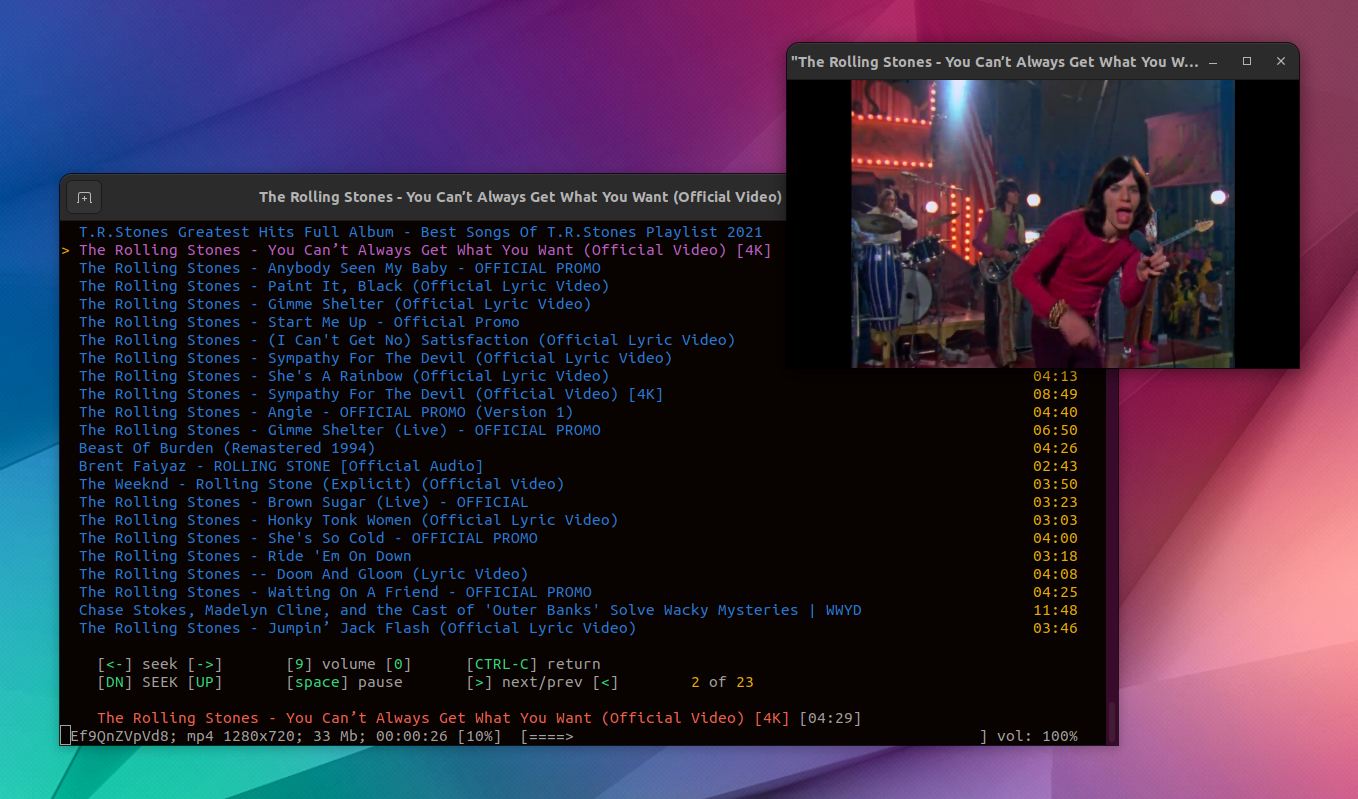
yewtube play youtube video from command line with mpv

yewtube is a command-line tool to search, browse, and play YouTube videos directly from your terminal, for Linux, macOS, and Microsoft Windows. It uses no API keys, and it can play audio only or audio/video using a third-party media player like VLC, mpv or mplayer, with lots of features on top.

yewtube is a fork of mps-youtube, which had its last release in back in 2018. This January, yewtube was merged back in mps-youtube, and its development continues at https://github.com/mps-youtube/yewtube. The fork is a year old, and it contains numerous bug fixes as well as some minor new features such as the ability to run yewtube over tor using torsocks, and the ability to set the mplayer cache.

The application's main purpose is to serve as a terminal YouTube music player, offering options to:

  • search and play audio
  • create and save local playlists
  • search and open YouTube playlists
  • local play history
  • set the default media formats

With extra options such as:

  • play video externally using mpv, mplayer, or vlc
  • audio/video download
  • view video information and comments
  • optional notifications on song change
  • optional MPRIS v2 support
  • last.fm scrobbling support


[[ This is a content summary only. Please visit Linux Uprising for the full article ]]

--------------------------------------------------------------------------
Originally posted on Linux Uprising Blog.

Search, Install And Update GNOME Shell Extensions From The Command Line Using gnome-extensions-cli

16. Februar 2023 um 18:50
Von: Logix
gnome-extensions-cli

gnome-extensions-cli is an unofficial GNOME Shell extension manager for the command line. It can install, update, enable / disable, remove and search GNOME Shell extensions.

This command line tool is great if you don't want or can't use a web browser (which requires also installing an extension and a connector) to install GNOME Shell extensions, and you like using the command line. 

If you prefer using a graphical user interface to manage GNOME Shell extensions (including installing new extensions, searching extensions on the GNOME Extensions website, updating installed extensions, etc.), check out Extension Manager.


[[ This is a content summary only. Please visit Linux Uprising for the full article ]]

--------------------------------------------------------------------------
Originally posted on Linux Uprising Blog.

Convert Plain English To Commands Using GPT-3 Powered Shell Genie

01. Februar 2023 um 21:48
Von: Logix
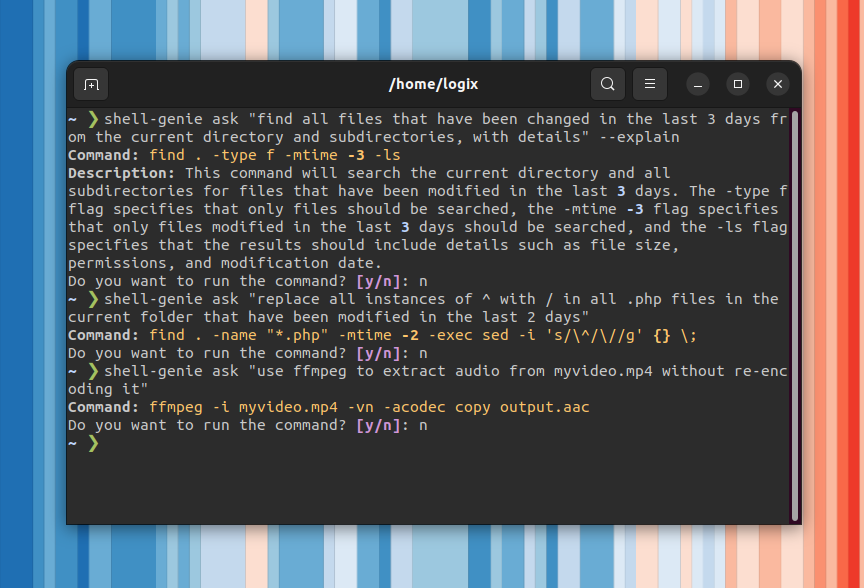
Shell Genie OpenAI GPT-3 plain english to terminal commands

Shell Genie is a new command line tool that can be used to ask in plain English how to perform various tasks, and it gives you the shell command you need. To generate the commands, it uses OpenAI's GPT-3 or Free Genie, a free to use backend provided by the Shell Genie developer.


[[ This is a content summary only. Please visit Linux Uprising for the full article ]]

--------------------------------------------------------------------------
Originally posted on Linux Uprising Blog.

Command Line Internet Radio Player PyRadio 0.9.0 Stable Released With www.radio-browser.info Support

30. Januar 2023 um 22:24
Von: Logix
pyradio radio-browser.info

PyRadio, a command line Internet radio player for Linux, Windows and macOS, has been updated to version 0.9.0 (stable) a couple of days ago, receiving new features such as support for Radio Browser (search, list and play https://www.radio-browser.info radio stations), remote control server, and more.

The command line Internet radio player features include a radio station editor, vi-like keys in addition to arrows and special keys, multiple playlist support, search, theming support, optional mouse support, and more. For playback, it uses mpv, VLC or MPlayer (without a GUI).

PyRadio 0.9 has been in beta for one year and a half, time during which it has received major new features, as well as some polish and bug fixes.

The most notable changes in PyRadio 0.9.0 (compared to the previous stable release) include:

  • Support for RadioBrowser
  • Added a remote control server
  • Desktop notifications
  • Ability to log played radio station titles to a file (~/.config/pyradio/pyradio-titles.log on Linux)
  • Themes:
    • theme Selection window partly rewritten, 
    • converted themes to use CSS colors
    •  updated / added new themes
    • implemented theme auto update
  • mpv support for Microsoft Windows
  • Install a desktop file on Linux and a Start Menu shortcut on Microsoft Windows
  • More


[[ This is a content summary only. Please visit Linux Uprising for the full article ]]

--------------------------------------------------------------------------
Originally posted on Linux Uprising Blog.

Theme.sh Is An Interactive Terminal Theme Selection Script (400+ Themes)

21. Dezember 2021 um 10:07
Von: Logix
theme.sh interactive terminal theme selector

theme.sh is a script to easily change the terminal theme. It comes with more than 400 themes, an optional interactive theme picker, and it's terminal agnostic.

Read more »

[[ This is a content summary only. Please visit Linux Uprising for the full article ]]

--------------------------------------------------------------------------
Originally posted on Linux Uprising Blog.
How To Run A Command Or Script As Root On Startup / Boot Using systemd or A Cron Job

16. Dezember 2021 um 12:28
Von: Logix
Linux run command or script as root (sudo) on startup / boot

This article explains how to run a command or script at startup / boot as root on Linux, in two ways: using systemd or a cron job.

Read more »

[[ This is a content summary only. Please visit Linux Uprising for the full article ]]

--------------------------------------------------------------------------
Originally posted on Linux Uprising Blog.
  • Es gibt keine weiteren Artikel
❌