
🔒
Es gibt neue verfügbare Artikel. Klicken Sie, um die Seite zu aktualisieren.
Ältere BeiträgeHaupt-Feeds

GPU Screen Recorder For Linux Adds Support For AMD And Intel GPUs

19. April 2023 um 19:07
Von: Logix
GPU Screen Recorder Linux

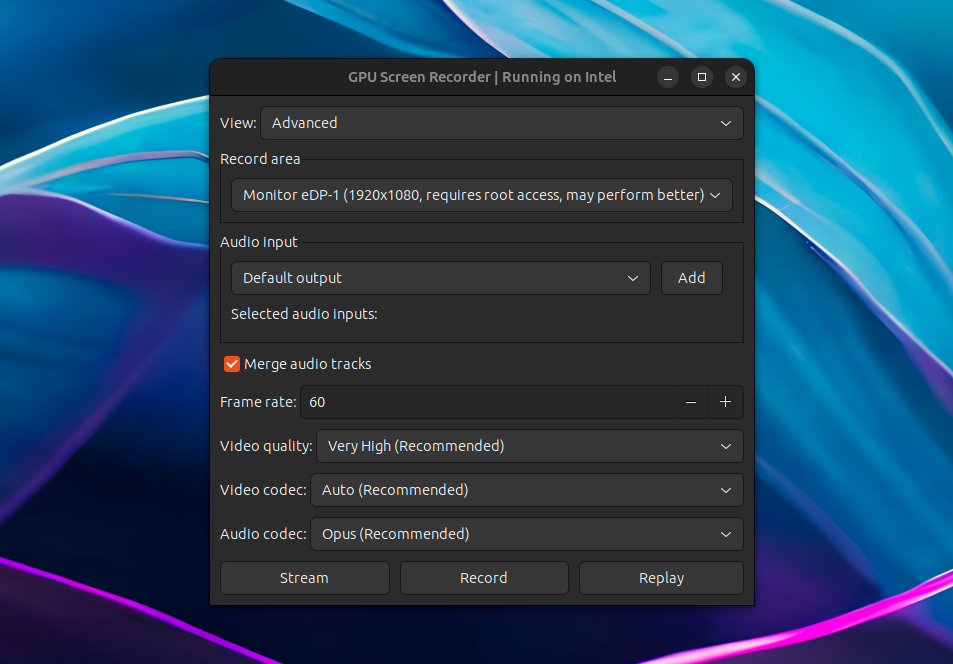
GPU Screen Recorder has been updated recently with AMD/Intel GPU support; previously it only worked on systems using an Nvidia graphics card.

GPU Screen Recorder is a screen recorder for Linux similar to ShadowPlay for Microsoft Windows, that makes use of the GPU to record the screen, having a minimal impact on the system performance (very low CPU usage). According to its developer, "this is the fastest screen recording tool for Linux". It currently only supports X11 sessions (Wayland and Xwayland are not supported).

The software is available as a command line tool, but there's also a graphical user interface built using GTK.

Using it, you can record a window, follow focused window, a monitor, or all monitors, with an option to choose the audio input. The resulting recording can be saved locally, it can live-stream to Twitch, YouTube or a custom service for which you can add the URL, and it supports Nvidia-like instant replay where only the last few seconds are saved.


[[ This is a content summary only. Please visit Linux Uprising for the full article ]]

--------------------------------------------------------------------------
Originally posted on Linux Uprising Blog.

Record Your Screen To GIF Or MP4, Take Screenshots And Insert Annotations With The New Peek

03. März 2023 um 21:14
Von: Logix
Peek fork pypeek

Peek, or pypeek, is a tool to record your screen / a part of the screen as an animated GIF or MP4, take screenshots, and annotate the GIF / MP4 / screenshot by drawing and adding arrows, shapes, lines, or text. It's available for Linux, Windows, and macOS.

This is a fork of Peek, a simple animated GIF (can also record video, but it's optimized for GIFs) screen recorder, which still works, but it has been declared deprecated by its developer. Peek the fork, or pypeek, is a cross-platform version of Peek written in Python and Qt with extra features.

The original Peek allows recording part of the screen as an animated GIF or video (MP4 / WebM) using a simple user interface, with features such as the ability to set the frame rate, start the recording with a delay, include or exclude the mouse cursor from the recording, and more. 

pypeek peek fork annotations
Peek fork has annotations for both screenshots and videos, and a built-in GIF/video trimmer

Compared to the original Peek, the Qt fork runs not only on Linux, but also on Microsoft Windows and macOS, and it includes extra features like:

  • take screenshots
  • annotations for both screenshots and videos / GIFs (though you cannot select the frames where the annotations should be displayed – the annotation is shown on all the frames): draw or add arrows, shapes, lines, or text
  • trim the resulting MP4 / GIF (set the start and stop time) without leaving the application
  • record the full screen, with the ability to minimize the app to the tray when recording full-screen
  • multiple display support
  • limit recording to a predefined number of seconds
  • choose between medium or high video quality


[[ This is a content summary only. Please visit Linux Uprising for the full article ]]

--------------------------------------------------------------------------
Originally posted on Linux Uprising Blog.
  • Es gibt keine weiteren Artikel
❌