🔒
Es gibt neue verfügbare Artikel. Klicken Sie, um die Seite zu aktualisieren.
Ältere BeiträgeLinux Uprising Blog

Guake Drop-Down Terminal Emulator Sees New Release

15. Mai 2023 um 20:02
Von: Logix
Guake terminal 3.10

Guake 3.10 has been released with the ability to choose which search engine to use with its “Search on Web” feature, a new pin button to temporarily prevent hiding, and more.

Guake is a drop-down terminal for the GNOME desktop which includes split terminal functionality, session save/restore, support for transparency, and many other features. While it doesn't support Wayland, it does run using Xwayland, but you'll need to manually set the hotkey to show/hide Guake.

The application is inspired by the famous Quake console—the terminal stays hidden until you press a key (default is F12). Execute a command, then press the same key again to hide the terminal, going back to your previous task without breaking your workflow.


[[ This is a content summary only. Please visit Linux Uprising for the full article ]]

--------------------------------------------------------------------------
Originally posted on Linux Uprising Blog.

Upscayl AI Image Upscaler 2.5 Adds Option To Import Custom Models, New Settings Tab

03. Mai 2023 um 21:47
Von: Logix
Upscayl AI image upscaler

Upscayl AI image upscaler has a new release, currently just for Linux, which adds some important new features and changes, like the ability to import your own models, a new settings tab, experimental scale option, and more.

This is a free and open source AI image upscaler for Linux, Microsoft Windows and macOS. It uses AI models to enhance images by guessing the details. It does this with the help of built-in models such as Real-ESRGAN, Remacri, UltraMix Balanced, UltraSharp and RealESRGAN_x4plus_anime_6B (optimized for anime images), on top of a simple, easy to use GUI.


[[ This is a content summary only. Please visit Linux Uprising for the full article ]]

--------------------------------------------------------------------------
Originally posted on Linux Uprising Blog.

GPU Screen Recorder For Linux Adds Support For AMD And Intel GPUs

19. April 2023 um 19:07
Von: Logix
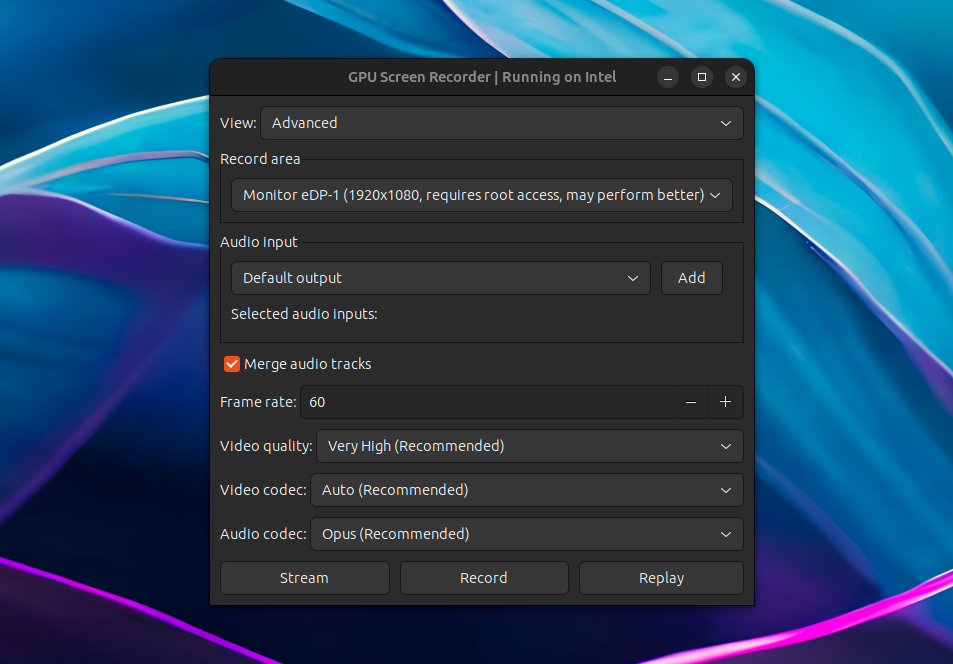
GPU Screen Recorder Linux

GPU Screen Recorder has been updated recently with AMD/Intel GPU support; previously it only worked on systems using an Nvidia graphics card.

GPU Screen Recorder is a screen recorder for Linux similar to ShadowPlay for Microsoft Windows, that makes use of the GPU to record the screen, having a minimal impact on the system performance (very low CPU usage). According to its developer, "this is the fastest screen recording tool for Linux". It currently only supports X11 sessions (Wayland and Xwayland are not supported).

The software is available as a command line tool, but there's also a graphical user interface built using GTK.

Using it, you can record a window, follow focused window, a monitor, or all monitors, with an option to choose the audio input. The resulting recording can be saved locally, it can live-stream to Twitch, YouTube or a custom service for which you can add the URL, and it supports Nvidia-like instant replay where only the last few seconds are saved.


[[ This is a content summary only. Please visit Linux Uprising for the full article ]]

--------------------------------------------------------------------------
Originally posted on Linux Uprising Blog.

What's New In GNOME 44

22. März 2023 um 06:42
Von: Logix
GNOME 44 screenshot

After its usual 6-month release cycle, GNOME 44 will be released today. Read on to find out the new features and improvements in this release.


[[ This is a content summary only. Please visit Linux Uprising for the full article ]]

--------------------------------------------------------------------------
Originally posted on Linux Uprising Blog.

How To Fix pip Install Error: externally-managed-environment

14. März 2023 um 20:38
Von: Logix
Python pip


The next Debian/Ubuntu releases will likely no longer allow pip install outside a virtual environment or separate Python installs because of conflicts between pip and the OS package manager. It can still be forced, but that's strongly not recommended.

Software shipped with a Linux distribution can be (quite easily, I might add) broken by installing packages using pip. All the user has to do is install a package (or some of its dependencies) that's newer and backwards-incompatible with a version that was installed from the Linux distribution official repositories. And this isn't even about breaking some application—because Python is so widely used nowadays, users can easily break critical distro packages.

The breakage can occur for both system-wide pip installations (sudo pip install), as well as user installations (pip install --user), but especially the latter, since trying to recover from this might result in removing (using pip, not the distro package manager) packages installed using the Linux distribution's package manager.

For this reason, the next Debian (Debian 12 Bookworm) and Ubuntu (Ubuntu 23.04 Lunar Lobster) releases will likely adopt PEP668 (PEP = Python Enhancement Proposal), marking the Python base environments as "externally managed", and no longer allowing regular pip install usage for both user and system installations. This can still be forced though, and obviously, there are alternatives—see below.

The change is already live in Debian Testing and Ubuntu 23.04 Lunar Lobster (which will have a beta release on March 30, with the final release expected on April 20). There's also a proposal to include this in Fedora 38 (which had a beta release today), but this has not landed in Fedora 38 for now.

I said "likely adopt" because, even though this change is already present in Debian Testing and Ubuntu 23.04 Lunar Lobster, Stefano Rivera, one of the Debian/Ubuntu Python maintainers, mentioned that "if necessary, we can roll back EXTERNALLY-MANAGED in our python3.11 for bookworm’s release, but I’d like to make this happen…". 

[[Edit]] This change has made it into the Ubuntu 23.04 Lunar Lobster release! When trying to install a Python package using pip, users will now see this message: "error: externally-managed-environment" / "This environment is externally managed".


So what are the alternatives to using pip install directly and solve this externally managed environment pip error? Take a look below:


[[ This is a content summary only. Please visit Linux Uprising for the full article ]]

--------------------------------------------------------------------------
Originally posted on Linux Uprising Blog.

scrcpy 2.0 Adds Audio Forwarding, H265 And AV1 Codec Support

12. März 2023 um 10:58
Von: Logix
scrcpy 2.0 linux

scrcpy, a tool to display control Android devices from the desktop, has been updated to version 2.0, receiving a major new feature: audio forwarding. But that's not all – this release also adds H265 and AV1 video codec support, along with other changes.


[[ This is a content summary only. Please visit Linux Uprising for the full article ]]

--------------------------------------------------------------------------
Originally posted on Linux Uprising Blog.

Pano Visual Clipboard Manager For GNOME Shell Adds UI Customization Options, Favorites, More

06. März 2023 um 11:47
Von: Logix
Pano visual gnome shell clipboard manager

Pano, a next-gen clipboard manager for GNOME Shell, has been updated with some major improvements such as user interface customization options, the ability to favorite items, content-aware notifications, as well as support for GNOME Shell 44.

This is a clipboard manager implemented as a GNOME Shell extension that displays previews of your clipboard items, with support for text, images, code blocks, color codes, links, files, and with the latest release, Emoji. It supports GNOME 42, 43 and 44.

Pano customization tab
The all-new Customization tab in Pano's settings

For the latest release, its developer has focused on implementing the most popular user requests. One such request was the ability to customize the look of Pano. So in this release, users can now customize many aspects of Pano's UI: window height, background color, active or hovered item border color, and the style of each item type (including colors, font face, etc.). It's not yet possible to move the Pano clipboard previews from the bottom of the screen though, this being a feature I'd like to see in Pano.

Another much requested feature was the ability to favorite items – this feature has now been included in the latest release of Pano clipboard manager. You'll now see a star in the upper right-hand side corner of each clipboard item:


[[ This is a content summary only. Please visit Linux Uprising for the full article ]]

--------------------------------------------------------------------------
Originally posted on Linux Uprising Blog.
Transmission BitTorrent Client 4.0 Released With Major Improvements

08. Februar 2023 um 12:08
Von: Logix
Transmission BitTorrent Client GTK

After almost 3 years since the previous release, Transmission BitTorrent client 4.0 has been released today. This major new release includes changes like code migration from C90 to C++, GTK 4 support, rewritten web client, support for BitTorrent v2 and hybrid torrents, performance improvements, and more.

Transmission is a lightweight, free and open source BitTorrent client for Microsoft Windows, macOS, and Linux. It comes with GTK+ and Qt GUIs on Linux and BSD, a Qt-based Windows GUI and a native macOS GUI. It can be used without a GUI too, using the headless daemon for servers and routers, and there's also a web UI for remote controlling both this headless daemon, and the GUIs.

The application user interface is designed to be easy to use, while also providing powerful features like speed limits and schedule, watch directories, bad peer blocklists, UPnP and NAT-PMP port forwarding, and much more.


[[ This is a content summary only. Please visit Linux Uprising for the full article ]]

--------------------------------------------------------------------------
Originally posted on Linux Uprising Blog.

Command Line Internet Radio Player PyRadio 0.9.0 Stable Released With www.radio-browser.info Support

30. Januar 2023 um 22:24
Von: Logix
pyradio radio-browser.info

PyRadio, a command line Internet radio player for Linux, Windows and macOS, has been updated to version 0.9.0 (stable) a couple of days ago, receiving new features such as support for Radio Browser (search, list and play https://www.radio-browser.info radio stations), remote control server, and more.

The command line Internet radio player features include a radio station editor, vi-like keys in addition to arrows and special keys, multiple playlist support, search, theming support, optional mouse support, and more. For playback, it uses mpv, VLC or MPlayer (without a GUI).

PyRadio 0.9 has been in beta for one year and a half, time during which it has received major new features, as well as some polish and bug fixes.

The most notable changes in PyRadio 0.9.0 (compared to the previous stable release) include:

  • Support for RadioBrowser
  • Added a remote control server
  • Desktop notifications
  • Ability to log played radio station titles to a file (~/.config/pyradio/pyradio-titles.log on Linux)
  • Themes:
    • theme Selection window partly rewritten, 
    • converted themes to use CSS colors
    •  updated / added new themes
    • implemented theme auto update
  • mpv support for Microsoft Windows
  • Install a desktop file on Linux and a Start Menu shortcut on Microsoft Windows
  • More


[[ This is a content summary only. Please visit Linux Uprising for the full article ]]

--------------------------------------------------------------------------
Originally posted on Linux Uprising Blog.

Ubuntu Yaru Theme To Lose Its Aubergine Accent Color For Ubuntu 22.04 Jammy Jellyfish

17. Dezember 2021 um 14:21
Von: Logix
Ubuntu Yaru orange recolor

For the upcoming Ubuntu 22.04 release, the Yaru developers are removing the aubergine (eggplant) color from the default Ubuntu theme, replacing it with orange, since libadwaita will only allow Ubuntu to use one accent color.

Read more »

[[ This is a content summary only. Please visit Linux Uprising for the full article ]]

--------------------------------------------------------------------------
Originally posted on Linux Uprising Blog.

Bottles Wine Prefix Manager Released With Stable Versioning Feature, New Console For Flatpak Users And A Bottles Runtime

14. Dezember 2021 um 10:40
Von: Logix
Bottles Wine Windows software on Linux

Bottles is a graphical tool that makes it easy to run Windows software and games on Linux, via Wine. 

For handling Wine prefixes, the tool uses environments, which is a combination of ready-to-use settings, libraries and dependencies. Wine / Proton, DXVK and the required dependencies are downloaded using a built-in download manager.

Bottles also features the ability to easily add environment variables, override DLLs, various gaming optimization options (esync, fsync, DXVK, cache, shader compiler, etc.), built-in task manager for Wine processes, import / export bottles, as well as an experimental installers database, among many other features.

A new Bottles version has been released (2021.12.14-treviso) today. The biggest change in this release is the versioning feature, which is now considered stable.

Read more »

[[ This is a content summary only. Please visit Linux Uprising for the full article ]]

--------------------------------------------------------------------------
Originally posted on Linux Uprising Blog.

Ventoy Multiboot USB Creator Adds A New WebUI Plugin Configurator

03. Dezember 2021 um 12:40
Von: Logix
Ventoy Plugson

Ventoy, a tool to create bootable USB drives by simply copying the ISO to the USB (with support for as many ISOs as you want, even mixed Linux and Windows ISO files), has been updated with a new webUI plugin configurator which makes it easy to configure the powerful Ventoy plugins.

You install this tool to a USB drive, then simply copy some ISO files to the USB drive, and you can boot from it with no other changes (so without having to reformat the USB drive every time you want to create a bootable USB drive, and without having to extract the ISO file contents). You can also continue using the USB stick for other things, and it will continue to work as a bootable USB. The application is available for Microsoft Windows and Linux.

Read more »

[[ This is a content summary only. Please visit Linux Uprising for the full article ]]

--------------------------------------------------------------------------
Originally posted on Linux Uprising Blog.
  • Es gibt keine weiteren Artikel
❌