🔒
Es gibt neue verfügbare Artikel. Klicken Sie, um die Seite zu aktualisieren.
Ältere BeiträgeHaupt-Feeds

Guake Drop-Down Terminal Emulator Sees New Release

15. Mai 2023 um 20:02
Von: Logix
Guake terminal 3.10

Guake 3.10 has been released with the ability to choose which search engine to use with its “Search on Web” feature, a new pin button to temporarily prevent hiding, and more.

Guake is a drop-down terminal for the GNOME desktop which includes split terminal functionality, session save/restore, support for transparency, and many other features. While it doesn't support Wayland, it does run using Xwayland, but you'll need to manually set the hotkey to show/hide Guake.

The application is inspired by the famous Quake console—the terminal stays hidden until you press a key (default is F12). Execute a command, then press the same key again to hide the terminal, going back to your previous task without breaking your workflow.


[[ This is a content summary only. Please visit Linux Uprising for the full article ]]

--------------------------------------------------------------------------
Originally posted on Linux Uprising Blog.

NormCap: Screen Capture Tool For Text Using OCR

11. Mai 2023 um 20:33
Von: Logix

NormCap is a free and open source screen capture tool for text. Instead of capturing an image of the screen, this application captures the text displayed on the screen using OCR, and copies it to the clipboard. It's available for Microsoft Windows, macOS and Linux.

Use this to extract text from screenshots or pictures, and copy unselectable text from anywhere on the screen (a webpage that doesn't allow selecting text, an application user interface, etc.).

The tool supports numerous languages, works offline, and it supports multiple monitors. Only English is installed by default, so when you want to use a new language, you'll need to download it from the application settings. It's also important to note that on Linux, NormCap supports both X11 and Wayland.

Under the hood, NormCap uses Tesseract open source OCR engine, with NormCap 0.4 requiring Tesseract 5.x.

Also see: Translate Selected Text With A Keyboard Shortcut Using Crow Translate (X11 + GNOME Wayland)—this also includes OCR, but that feature only works on X11.

Normcap OCR screenshot


[[ This is a content summary only. Please visit Linux Uprising for the full article ]]

--------------------------------------------------------------------------
Originally posted on Linux Uprising Blog.

How To Fix pipx: Fatal Error From pip Prevented Installation / No Module Named pip

04. Mai 2023 um 20:52
Von: Logix

After upgrading from Ubuntu 22.10 to 23.04, pipx broke on my laptop and fixing it was not exactly straight-forward, so I thought I'd write here about this, in case there are others running into this issue. While I ran into this issue on Ubuntu, this isn't Ubuntu-specific, and it can happen on other Linux distributions as well.

pipx is a tool that makes it easy to install (using PyPI as the package index) isolated Python applications. pip is a Python package installer for both libraries and apps, while pipx is made specifically for applications, creating an isolated environment for each app and its dependencies.


[[ This is a content summary only. Please visit Linux Uprising for the full article ]]

--------------------------------------------------------------------------
Originally posted on Linux Uprising Blog.

Upscayl AI Image Upscaler 2.5 Adds Option To Import Custom Models, New Settings Tab

03. Mai 2023 um 21:47
Von: Logix
Upscayl AI image upscaler

Upscayl AI image upscaler has a new release, currently just for Linux, which adds some important new features and changes, like the ability to import your own models, a new settings tab, experimental scale option, and more.

This is a free and open source AI image upscaler for Linux, Microsoft Windows and macOS. It uses AI models to enhance images by guessing the details. It does this with the help of built-in models such as Real-ESRGAN, Remacri, UltraMix Balanced, UltraSharp and RealESRGAN_x4plus_anime_6B (optimized for anime images), on top of a simple, easy to use GUI.


[[ This is a content summary only. Please visit Linux Uprising for the full article ]]

--------------------------------------------------------------------------
Originally posted on Linux Uprising Blog.

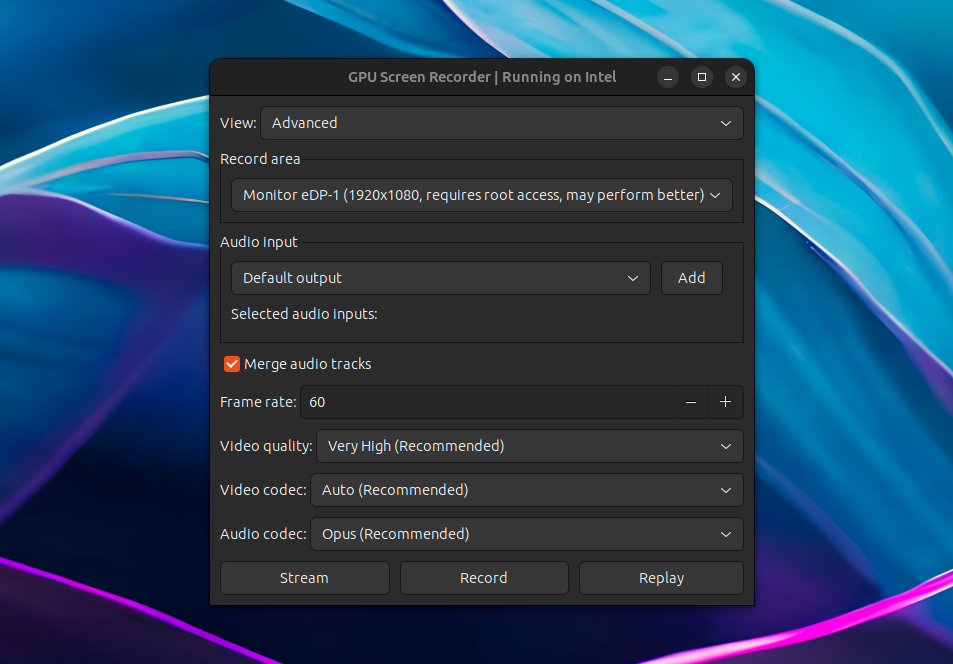
GPU Screen Recorder For Linux Adds Support For AMD And Intel GPUs

19. April 2023 um 19:07
Von: Logix
GPU Screen Recorder Linux

GPU Screen Recorder has been updated recently with AMD/Intel GPU support; previously it only worked on systems using an Nvidia graphics card.

GPU Screen Recorder is a screen recorder for Linux similar to ShadowPlay for Microsoft Windows, that makes use of the GPU to record the screen, having a minimal impact on the system performance (very low CPU usage). According to its developer, "this is the fastest screen recording tool for Linux". It currently only supports X11 sessions (Wayland and Xwayland are not supported).

The software is available as a command line tool, but there's also a graphical user interface built using GTK.

Using it, you can record a window, follow focused window, a monitor, or all monitors, with an option to choose the audio input. The resulting recording can be saved locally, it can live-stream to Twitch, YouTube or a custom service for which you can add the URL, and it supports Nvidia-like instant replay where only the last few seconds are saved.


[[ This is a content summary only. Please visit Linux Uprising for the full article ]]

--------------------------------------------------------------------------
Originally posted on Linux Uprising Blog.

Hanabi Is A Live Wallpaper For GNOME Desktop

17. April 2023 um 19:53
Von: Logix
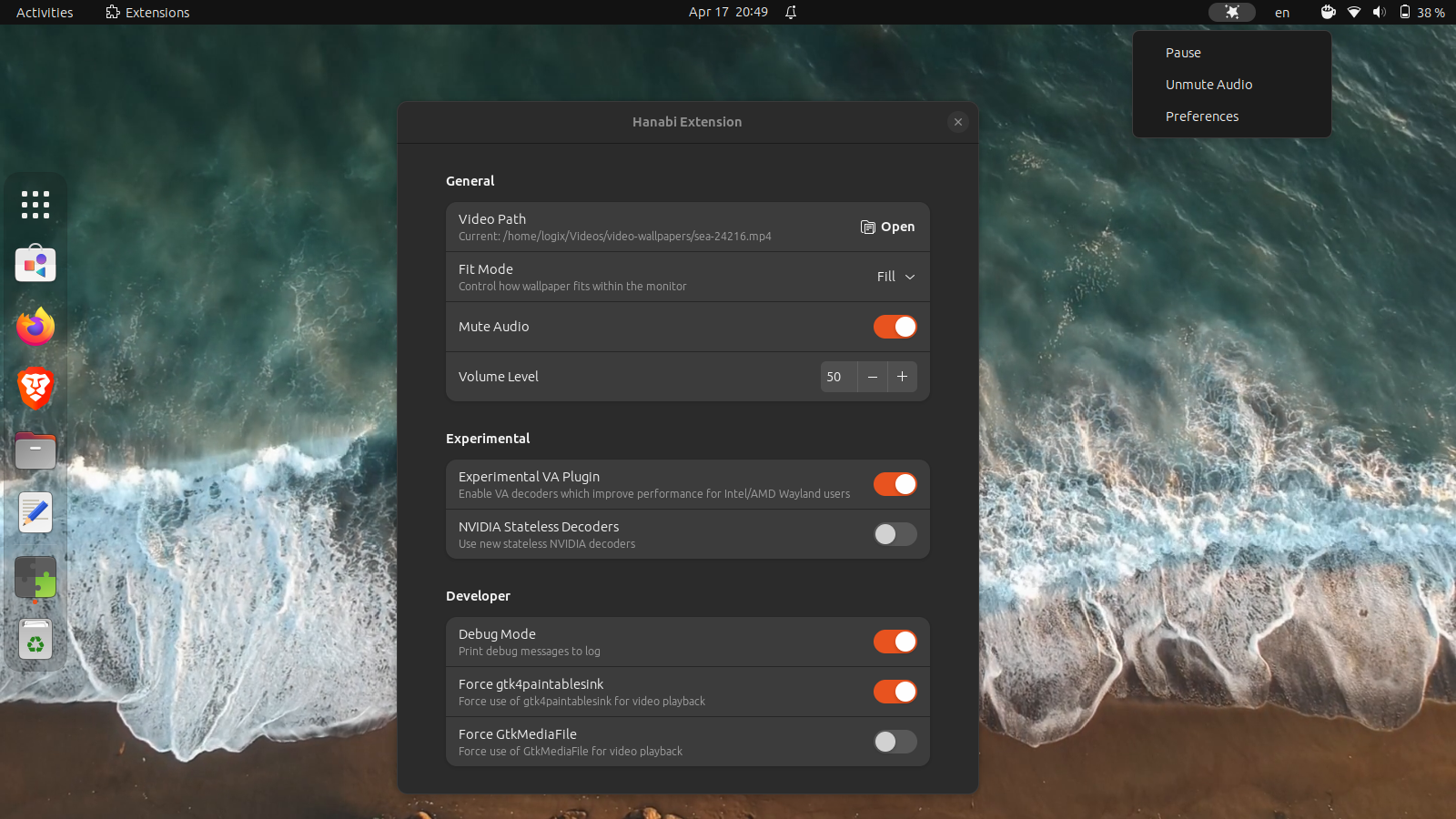
Hanabi gnome shell live wallpaper

Hanabi is a GNOME Shell extension that allows using a live wallpaper (video) on the GNOME desktop, with support for both X11 and Wayland.

According to the developer, the extension “is not even close to alpha quality”, but it's already usable, albeit you'll need to install it manually since it's not available on the GNOME Shell extensions website.

This live wallpaper GNOME extension currently supports playing a local video as your desktop background, with or without audio, and the ability to set the audio volume. From the extension top bar menu, you can pause the video and mute/unmute the audio.

To get the video playback to use less CPU, the extension comes with experimental support for VA-API hardware acceleration, as well as the ability to use the new Nvidia statless decoders. For best performance, the extension can utilize clappersink from Clapper (a GNOME media player that uses GStreamer as a media backend and renders everything via OpenGL)—this needs to be installed as a native package, and not as a Flatpak package. The extension GitHub page has a performance comparison on using Hanabi live wallpaper for GNOME with and without clappersink.

From the extension preferences, you can control how the live wallpaper fits within the monitor, allowing users to set the fit mode to fill, contain, cover and scale-down.

This is a short video I've recorded with Hanabi GNOME live wallpaper running on GNOME 44 (X11):


[[ This is a content summary only. Please visit Linux Uprising for the full article ]]

--------------------------------------------------------------------------
Originally posted on Linux Uprising Blog.

Reminders Is A GTK4 To-Do List App That Syncs With Microsoft To Do

05. April 2023 um 21:35
Von: Logix
Reminders Rememberance Linux GTK4 Microsoft To Do sync app

Reminders is a simple, GTK to-do list application for Linux. The application was recently updated with support for syncing with Microsoft To Do (beta), the ability to create and edit task lists, and more.

The application was originally called Remembrance, and it had it first stable release less than a month ago. It comes with a responsive user interface using GTK4 and libadwaita, and right now (including the latest release), Reminders features:

  • Add tasks (called reminders in the app) with a short description
  • Create and edit task lists
  • Task reminders
  • Recurring reminders
  • Display desktop notifications, a notification badge using e.g. Dash to Dock, and optionally play a sound when a task is due
  • Sort tasks by due date/time or title
  • Search tasks
  • Support for syncing with Microsoft To Do (beta), with the ability to sync all or only some task lists, and set the auto-sync interval

Reminders Rememberance responsive UI
Reminders responsive main UI, new reminder UI and Dash to Dock icon notification badge


[[ This is a content summary only. Please visit Linux Uprising for the full article ]]

--------------------------------------------------------------------------
Originally posted on Linux Uprising Blog.

Birdtray Ubuntu PPA Updated With Unread Email Count And Xwayland Fixes (Thunderbird Tray Icon)

24. März 2023 um 21:52
Von: Logix
Birdtray thunderbird tray Linux wayland

Birdtray is a system tray icon for Thunderbird, which shows the unread email count, with some extra features. 

The application has stopped working a while back—it no longer shows the unread email count with newer Thunderbird versions (both the latest Thunderbird 102.* stable and the latest beta—112 at the time I'm writing this article), and it doesn't work properly on Wayland either. I have updated the Linux Uprising Apps PPA for Ubuntu and derivatives (and Linux distributions based on it, like Linux Mint, Pop!_OS, etc.) with fixes/workarounds for these issues, and I'll also explain what I did so you can replicate this on other Linux distributions if you want to use Birdtray.


[[ This is a content summary only. Please visit Linux Uprising for the full article ]]

--------------------------------------------------------------------------
Originally posted on Linux Uprising Blog.

What's New In GNOME 44

22. März 2023 um 06:42
Von: Logix
GNOME 44 screenshot

After its usual 6-month release cycle, GNOME 44 will be released today. Read on to find out the new features and improvements in this release.


[[ This is a content summary only. Please visit Linux Uprising for the full article ]]

--------------------------------------------------------------------------
Originally posted on Linux Uprising Blog.
vtm Is A Text-Based Desktop Environment That Runs Inside A Terminal

16. März 2023 um 23:17
Von: Logix
vtm desktop environment in a terminal

vtm is a text-based desktop environment that runs inside a terminal, available for Linux, Microsoft Windows, macOS, and *BSD.

The tool can run TUIs (terminal user interface) applications in floating windows that can be moved, resized and closed (mouse support included) just like windows in a traditional desktop environment. 

vtm is a terminal multiplexer too, like tmux and screen, allowing users to detach and reattach sessions from a terminal, allow multiple computers to connect to the same session at once, etc. Just click the Disconnect button, and the vtm TUI is closed, but the process continues to run in the background, allowing you to re-open it later.

As for supported terminals, vtm should work with most of the popular terminal emulators, including GNOME Terminal, Konsole, Xfce4 Terminal, kitty, Alacritty, xterm, st, iTerm2, Windows Terminal, Windows Command Prompt, and Termux.

This is a very short vtm demo I've recorded to show its window management features:


[[ This is a content summary only. Please visit Linux Uprising for the full article ]]

--------------------------------------------------------------------------
Originally posted on Linux Uprising Blog.
How To Fix pip Install Error: externally-managed-environment

14. März 2023 um 20:38
Von: Logix
Python pip


The next Debian/Ubuntu releases will likely no longer allow pip install outside a virtual environment or separate Python installs because of conflicts between pip and the OS package manager. It can still be forced, but that's strongly not recommended.

Software shipped with a Linux distribution can be (quite easily, I might add) broken by installing packages using pip. All the user has to do is install a package (or some of its dependencies) that's newer and backwards-incompatible with a version that was installed from the Linux distribution official repositories. And this isn't even about breaking some application—because Python is so widely used nowadays, users can easily break critical distro packages.

The breakage can occur for both system-wide pip installations (sudo pip install), as well as user installations (pip install --user), but especially the latter, since trying to recover from this might result in removing (using pip, not the distro package manager) packages installed using the Linux distribution's package manager.

For this reason, the next Debian (Debian 12 Bookworm) and Ubuntu (Ubuntu 23.04 Lunar Lobster) releases will likely adopt PEP668 (PEP = Python Enhancement Proposal), marking the Python base environments as "externally managed", and no longer allowing regular pip install usage for both user and system installations. This can still be forced though, and obviously, there are alternatives—see below.

The change is already live in Debian Testing and Ubuntu 23.04 Lunar Lobster (which will have a beta release on March 30, with the final release expected on April 20). There's also a proposal to include this in Fedora 38 (which had a beta release today), but this has not landed in Fedora 38 for now.

I said "likely adopt" because, even though this change is already present in Debian Testing and Ubuntu 23.04 Lunar Lobster, Stefano Rivera, one of the Debian/Ubuntu Python maintainers, mentioned that "if necessary, we can roll back EXTERNALLY-MANAGED in our python3.11 for bookworm’s release, but I’d like to make this happen…". 

[[Edit]] This change has made it into the Ubuntu 23.04 Lunar Lobster release! When trying to install a Python package using pip, users will now see this message: "error: externally-managed-environment" / "This environment is externally managed".


So what are the alternatives to using pip install directly and solve this externally managed environment pip error? Take a look below:


[[ This is a content summary only. Please visit Linux Uprising for the full article ]]

--------------------------------------------------------------------------
Originally posted on Linux Uprising Blog.

How To Turn Your Current System To An Installable ISO (For Debian, Ubuntu, Arch Linux and Manjaro)

13. März 2023 um 22:09
Von: Logix

penguins-eggs is a command line tool to turn your current Debian, Ubuntu, Arch Linux or Manjaro system to a redistributable live ISO image. Debian / Ubuntu flavors are also supported (so you can also use this for Xubuntu, Kubuntu, etc.), as well as Linux distributions based on these, like Devuan, Linux Mint and elementary OS.

Using this, you can create an installable live ISO with your Debian / Devuan / Ubuntu-based, Arch Linux or Manjaro system, and include all installed applications as well as your home folder (personal files, configurations, etc.). If you're not creating the ISO for you, but instead you want to redistribute it, Eggs can completely remove the user and system data from the generated ISO.

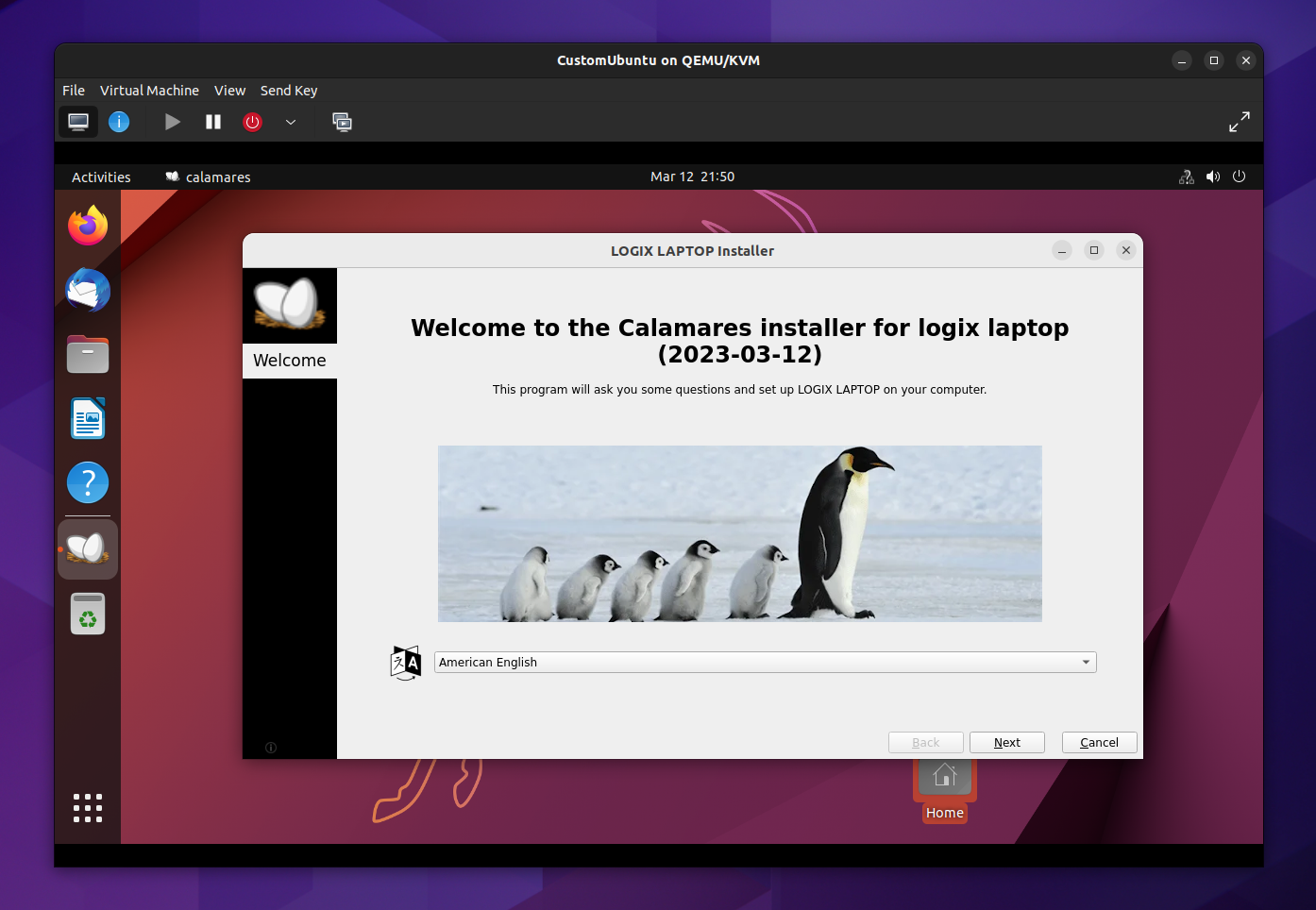
penguins-eggs custom Linux iso
A live ISO generated from my laptop using penguins-eggs; in the screenshot you can see the Calamares graphical installer

The live ISO image created by Eggs can be installed using a graphical user interface (Calamares) or from the command line, using a TUI tool especially created for penguins-eggs, called krill. This command line installer includes support for unattended installations.


[[ This is a content summary only. Please visit Linux Uprising for the full article ]]

--------------------------------------------------------------------------
Originally posted on Linux Uprising Blog.

scrcpy 2.0 Adds Audio Forwarding, H265 And AV1 Codec Support

12. März 2023 um 10:58
Von: Logix
scrcpy 2.0 linux

scrcpy, a tool to display control Android devices from the desktop, has been updated to version 2.0, receiving a major new feature: audio forwarding. But that's not all – this release also adds H265 and AV1 video codec support, along with other changes.


[[ This is a content summary only. Please visit Linux Uprising for the full article ]]

--------------------------------------------------------------------------
Originally posted on Linux Uprising Blog.

Automatically Take Versioned Steam Save-Game Snapshots Using Steamback

09. März 2023 um 20:52
Von: Logix
Steamback backup steam save games and restore snapshots later

Steamback is a Steam Deck plugin and desktop application which adds versioned save-game snapshots to Steam Cloud-enabled games.

Steamback waits for your Steam games with Steam Cloud support to exit, and it takes local snapshots when it sees updated game saves. The ten most recent snapshots are stored, so you can re-use any of them later.

To have Steamback take snapshots of your save-games, make sure to launch the application before playing any Steam games. On the left-hand side of its main window, Steamback shows a list of installed Steam games that are supported, and on the right, a list of save-game snapshots and the time they were taken. To revert to a save-game, click it and a button which allows reverting to this snapshot will be displayed.

The tool was initially started as a plugin for Steam Deck (Decky Loader). The developer has received requests for a desktop version, and they built one recently using Python and Tk for the GUI. The desktop version runs with a GUI, or it can run as a daemon, looking for game backups in the background.


[[ This is a content summary only. Please visit Linux Uprising for the full article ]]

--------------------------------------------------------------------------
Originally posted on Linux Uprising Blog.

Send Files Securely Over The Local Network With Cross-Platform LocalSend App

09. März 2023 um 12:06
Von: Logix

LocalSend is a free and open source, cross-platform alternative to AirDrop for sending files securely over the local network. The Flutter app runs on Linux, Microsoft Windows, macOS, Android / Android TV, iOS, and Fire TV / OS.

The application doesn't use any third-party servers and doesn't require an Internet connection to work. For communication in the local network, it makes use of its custom LocalSend Protocol and HTTPS encryption. The data is sent securely over HTTPS, and the TLS/SSL certificate is generated on the fly on each device.

LocalSend is new, having its first GitHub commit in December 2022, but it already packs quite a few features like the ability to send not only files but also text, automatically display nearby devices, send to multiple recipients, detailed file transfer information, received files history, Quick Save (auto accept file transfers until this is turned off), rename incoming files, and more. It cannot send folders, at least right now.

Localsend Airdrop FOSS alternative
LocalSend Linux application – Receive tab


[[ This is a content summary only. Please visit Linux Uprising for the full article ]]

--------------------------------------------------------------------------
Originally posted on Linux Uprising Blog.

Pano Visual Clipboard Manager For GNOME Shell Adds UI Customization Options, Favorites, More

06. März 2023 um 11:47
Von: Logix
Pano visual gnome shell clipboard manager

Pano, a next-gen clipboard manager for GNOME Shell, has been updated with some major improvements such as user interface customization options, the ability to favorite items, content-aware notifications, as well as support for GNOME Shell 44.

This is a clipboard manager implemented as a GNOME Shell extension that displays previews of your clipboard items, with support for text, images, code blocks, color codes, links, files, and with the latest release, Emoji. It supports GNOME 42, 43 and 44.

Pano customization tab
The all-new Customization tab in Pano's settings

For the latest release, its developer has focused on implementing the most popular user requests. One such request was the ability to customize the look of Pano. So in this release, users can now customize many aspects of Pano's UI: window height, background color, active or hovered item border color, and the style of each item type (including colors, font face, etc.). It's not yet possible to move the Pano clipboard previews from the bottom of the screen though, this being a feature I'd like to see in Pano.

Another much requested feature was the ability to favorite items – this feature has now been included in the latest release of Pano clipboard manager. You'll now see a star in the upper right-hand side corner of each clipboard item:


[[ This is a content summary only. Please visit Linux Uprising for the full article ]]

--------------------------------------------------------------------------
Originally posted on Linux Uprising Blog.

Record Your Screen To GIF Or MP4, Take Screenshots And Insert Annotations With The New Peek

03. März 2023 um 21:14
Von: Logix
Peek fork pypeek

Peek, or pypeek, is a tool to record your screen / a part of the screen as an animated GIF or MP4, take screenshots, and annotate the GIF / MP4 / screenshot by drawing and adding arrows, shapes, lines, or text. It's available for Linux, Windows, and macOS.

This is a fork of Peek, a simple animated GIF (can also record video, but it's optimized for GIFs) screen recorder, which still works, but it has been declared deprecated by its developer. Peek the fork, or pypeek, is a cross-platform version of Peek written in Python and Qt with extra features.

The original Peek allows recording part of the screen as an animated GIF or video (MP4 / WebM) using a simple user interface, with features such as the ability to set the frame rate, start the recording with a delay, include or exclude the mouse cursor from the recording, and more. 

pypeek peek fork annotations
Peek fork has annotations for both screenshots and videos, and a built-in GIF/video trimmer

Compared to the original Peek, the Qt fork runs not only on Linux, but also on Microsoft Windows and macOS, and it includes extra features like:

  • take screenshots
  • annotations for both screenshots and videos / GIFs (though you cannot select the frames where the annotations should be displayed – the annotation is shown on all the frames): draw or add arrows, shapes, lines, or text
  • trim the resulting MP4 / GIF (set the start and stop time) without leaving the application
  • record the full screen, with the ability to minimize the app to the tray when recording full-screen
  • multiple display support
  • limit recording to a predefined number of seconds
  • choose between medium or high video quality


[[ This is a content summary only. Please visit Linux Uprising for the full article ]]

--------------------------------------------------------------------------
Originally posted on Linux Uprising Blog.
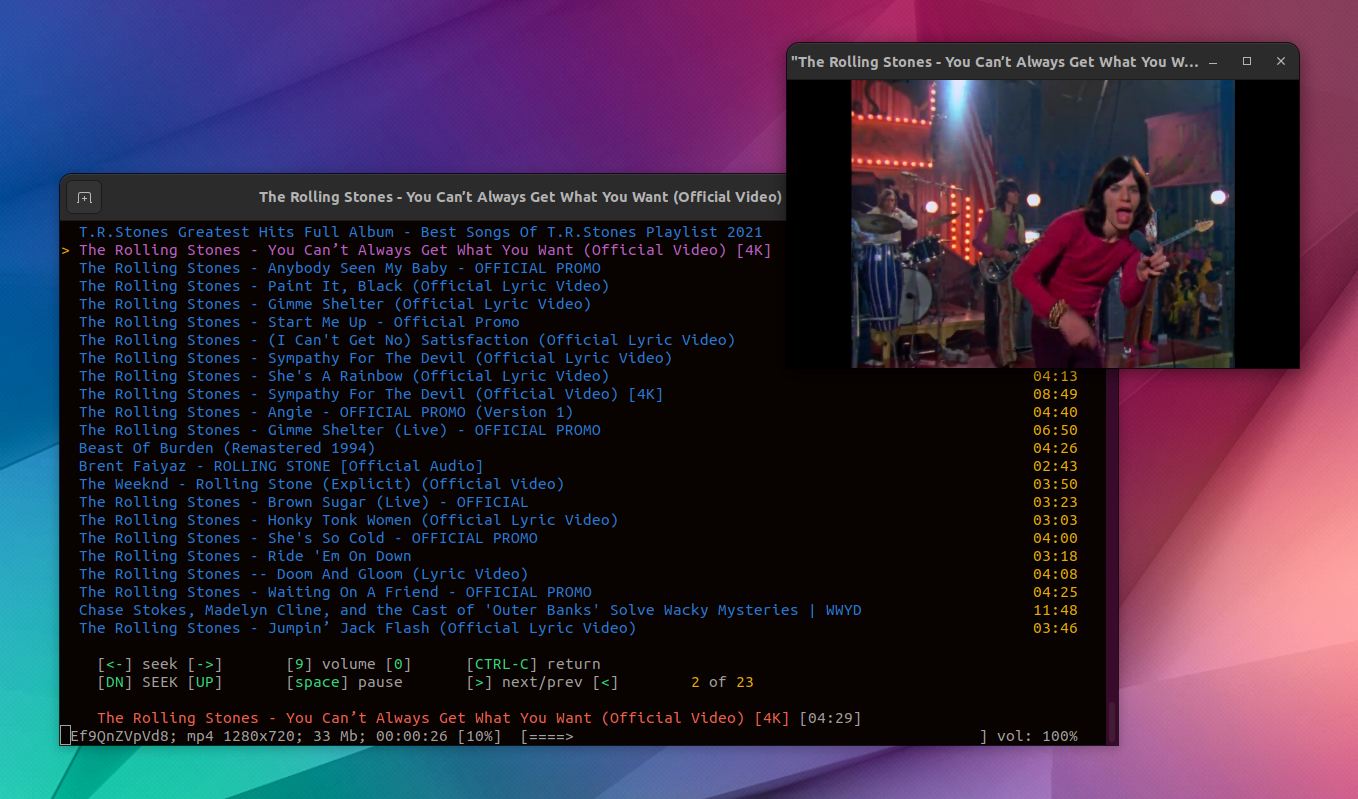
yewtube Is A Feature Packed Terminal Based YouTube Player

01. März 2023 um 19:11
Von: Logix
yewtube play youtube video from command line with mpv

yewtube is a command-line tool to search, browse, and play YouTube videos directly from your terminal, for Linux, macOS, and Microsoft Windows. It uses no API keys, and it can play audio only or audio/video using a third-party media player like VLC, mpv or mplayer, with lots of features on top.

yewtube is a fork of mps-youtube, which had its last release in back in 2018. This January, yewtube was merged back in mps-youtube, and its development continues at https://github.com/mps-youtube/yewtube. The fork is a year old, and it contains numerous bug fixes as well as some minor new features such as the ability to run yewtube over tor using torsocks, and the ability to set the mplayer cache.

The application's main purpose is to serve as a terminal YouTube music player, offering options to:

  • search and play audio
  • create and save local playlists
  • search and open YouTube playlists
  • local play history
  • set the default media formats

With extra options such as:

  • play video externally using mpv, mplayer, or vlc
  • audio/video download
  • view video information and comments
  • optional notifications on song change
  • optional MPRIS v2 support
  • last.fm scrobbling support


[[ This is a content summary only. Please visit Linux Uprising for the full article ]]

--------------------------------------------------------------------------
Originally posted on Linux Uprising Blog.

Valent Is A KDE Connect Client For GTK-Based Desktops (Cinnamon, Xfce, MATE, Pantheon)

24. Februar 2023 um 22:11
Von: Logix

Valent is a new KDE Connect protocol implementation built on GNOME platform libraries. Compared to GSConnect, which is implemented as a GNOME Shell extension, Valent doesn't need GNOME Shell to run (it's a standalone app), so it can be used on any GTK-based desktop environment like Xfce, Budgie, Cinnamon, Pantheon, MATE, etc. Both GSConnect and Valent are developed by Andy Holmes.

Valent KDE Connect for GNOME Xfce
Valent running on the Xfce desktop (Xubuntu)

It's important to note from the start that Valent is currently alpha software. There are missing features and bugs.

KDE Connect is created for use with KDE Plasma, but it does work on other desktop environments as well. However, you need to install quite a few KDE dependencies with it, and it doesn't integrate well with the system. This is where Valent comes in.

What can this do? Using Valent (and KDE Connect), you can:

  • receive Android phone notifications on your desktop and reply to messages
  • sync the clipboard between your Android or iOS device and desktop
  • control music playing on your desktop from your phone
  • share files between your desktop and phone, and browse your phone from the desktop
  • send SMS from your desktop
  • execute predefined commands from your phone to run on your desktop
  • control your desktop's mouse and keyboard from the Android/iOS device
  • browse your Android device filesystem from your desktop wirelessly
  • and more

KDE Connect initially only supported Android devices, but it later added support for iOS. It supports fewer features on iOS though, due to limitations.

This is a screenshot of all Valent plugins, showing everything it can do when paired with an Android device:


[[ This is a content summary only. Please visit Linux Uprising for the full article ]]

--------------------------------------------------------------------------
Originally posted on Linux Uprising Blog.
❌