
🔒
Es gibt neue verfügbare Artikel. Klicken Sie, um die Seite zu aktualisieren.
Ältere BeiträgeLinux Uprising Blog

Guake Drop-Down Terminal Emulator Sees New Release

15. Mai 2023 um 20:02
Von: Logix
Guake terminal 3.10

Guake 3.10 has been released with the ability to choose which search engine to use with its “Search on Web” feature, a new pin button to temporarily prevent hiding, and more.

Guake is a drop-down terminal for the GNOME desktop which includes split terminal functionality, session save/restore, support for transparency, and many other features. While it doesn't support Wayland, it does run using Xwayland, but you'll need to manually set the hotkey to show/hide Guake.

The application is inspired by the famous Quake console—the terminal stays hidden until you press a key (default is F12). Execute a command, then press the same key again to hide the terminal, going back to your previous task without breaking your workflow.


[[ This is a content summary only. Please visit Linux Uprising for the full article ]]

--------------------------------------------------------------------------
Originally posted on Linux Uprising Blog.

NormCap: Screen Capture Tool For Text Using OCR

11. Mai 2023 um 20:33
Von: Logix

NormCap is a free and open source screen capture tool for text. Instead of capturing an image of the screen, this application captures the text displayed on the screen using OCR, and copies it to the clipboard. It's available for Microsoft Windows, macOS and Linux.

Use this to extract text from screenshots or pictures, and copy unselectable text from anywhere on the screen (a webpage that doesn't allow selecting text, an application user interface, etc.).

The tool supports numerous languages, works offline, and it supports multiple monitors. Only English is installed by default, so when you want to use a new language, you'll need to download it from the application settings. It's also important to note that on Linux, NormCap supports both X11 and Wayland.

Under the hood, NormCap uses Tesseract open source OCR engine, with NormCap 0.4 requiring Tesseract 5.x.

Also see: Translate Selected Text With A Keyboard Shortcut Using Crow Translate (X11 + GNOME Wayland)—this also includes OCR, but that feature only works on X11.

Normcap OCR screenshot


[[ This is a content summary only. Please visit Linux Uprising for the full article ]]

--------------------------------------------------------------------------
Originally posted on Linux Uprising Blog.

Upscayl AI Image Upscaler 2.5 Adds Option To Import Custom Models, New Settings Tab

03. Mai 2023 um 21:47
Von: Logix
Upscayl AI image upscaler

Upscayl AI image upscaler has a new release, currently just for Linux, which adds some important new features and changes, like the ability to import your own models, a new settings tab, experimental scale option, and more.

This is a free and open source AI image upscaler for Linux, Microsoft Windows and macOS. It uses AI models to enhance images by guessing the details. It does this with the help of built-in models such as Real-ESRGAN, Remacri, UltraMix Balanced, UltraSharp and RealESRGAN_x4plus_anime_6B (optimized for anime images), on top of a simple, easy to use GUI.


[[ This is a content summary only. Please visit Linux Uprising for the full article ]]

--------------------------------------------------------------------------
Originally posted on Linux Uprising Blog.
GPU Screen Recorder For Linux Adds Support For AMD And Intel GPUs

19. April 2023 um 19:07
Von: Logix
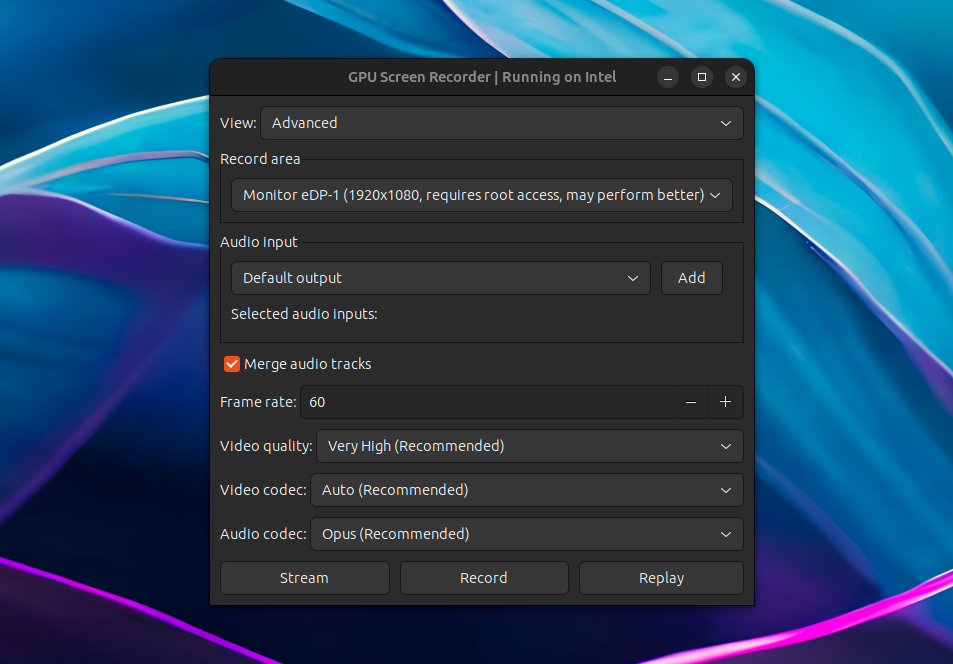
GPU Screen Recorder Linux

GPU Screen Recorder has been updated recently with AMD/Intel GPU support; previously it only worked on systems using an Nvidia graphics card.

GPU Screen Recorder is a screen recorder for Linux similar to ShadowPlay for Microsoft Windows, that makes use of the GPU to record the screen, having a minimal impact on the system performance (very low CPU usage). According to its developer, "this is the fastest screen recording tool for Linux". It currently only supports X11 sessions (Wayland and Xwayland are not supported).

The software is available as a command line tool, but there's also a graphical user interface built using GTK.

Using it, you can record a window, follow focused window, a monitor, or all monitors, with an option to choose the audio input. The resulting recording can be saved locally, it can live-stream to Twitch, YouTube or a custom service for which you can add the URL, and it supports Nvidia-like instant replay where only the last few seconds are saved.


[[ This is a content summary only. Please visit Linux Uprising for the full article ]]

--------------------------------------------------------------------------
Originally posted on Linux Uprising Blog.

Reminders Is A GTK4 To-Do List App That Syncs With Microsoft To Do

05. April 2023 um 21:35
Von: Logix
Reminders Rememberance Linux GTK4 Microsoft To Do sync app

Reminders is a simple, GTK to-do list application for Linux. The application was recently updated with support for syncing with Microsoft To Do (beta), the ability to create and edit task lists, and more.

The application was originally called Remembrance, and it had it first stable release less than a month ago. It comes with a responsive user interface using GTK4 and libadwaita, and right now (including the latest release), Reminders features:

  • Add tasks (called reminders in the app) with a short description
  • Create and edit task lists
  • Task reminders
  • Recurring reminders
  • Display desktop notifications, a notification badge using e.g. Dash to Dock, and optionally play a sound when a task is due
  • Sort tasks by due date/time or title
  • Search tasks
  • Support for syncing with Microsoft To Do (beta), with the ability to sync all or only some task lists, and set the auto-sync interval

Reminders Rememberance responsive UI
Reminders responsive main UI, new reminder UI and Dash to Dock icon notification badge


[[ This is a content summary only. Please visit Linux Uprising for the full article ]]

--------------------------------------------------------------------------
Originally posted on Linux Uprising Blog.

Birdtray Ubuntu PPA Updated With Unread Email Count And Xwayland Fixes (Thunderbird Tray Icon)

24. März 2023 um 21:52
Von: Logix
Birdtray thunderbird tray Linux wayland

Birdtray is a system tray icon for Thunderbird, which shows the unread email count, with some extra features. 

The application has stopped working a while back—it no longer shows the unread email count with newer Thunderbird versions (both the latest Thunderbird 102.* stable and the latest beta—112 at the time I'm writing this article), and it doesn't work properly on Wayland either. I have updated the Linux Uprising Apps PPA for Ubuntu and derivatives (and Linux distributions based on it, like Linux Mint, Pop!_OS, etc.) with fixes/workarounds for these issues, and I'll also explain what I did so you can replicate this on other Linux distributions if you want to use Birdtray.


[[ This is a content summary only. Please visit Linux Uprising for the full article ]]

--------------------------------------------------------------------------
Originally posted on Linux Uprising Blog.

scrcpy 2.0 Adds Audio Forwarding, H265 And AV1 Codec Support

12. März 2023 um 10:58
Von: Logix
scrcpy 2.0 linux

scrcpy, a tool to display control Android devices from the desktop, has been updated to version 2.0, receiving a major new feature: audio forwarding. But that's not all – this release also adds H265 and AV1 video codec support, along with other changes.


[[ This is a content summary only. Please visit Linux Uprising for the full article ]]

--------------------------------------------------------------------------
Originally posted on Linux Uprising Blog.

Automatically Take Versioned Steam Save-Game Snapshots Using Steamback

09. März 2023 um 20:52
Von: Logix
Steamback backup steam save games and restore snapshots later

Steamback is a Steam Deck plugin and desktop application which adds versioned save-game snapshots to Steam Cloud-enabled games.

Steamback waits for your Steam games with Steam Cloud support to exit, and it takes local snapshots when it sees updated game saves. The ten most recent snapshots are stored, so you can re-use any of them later.

To have Steamback take snapshots of your save-games, make sure to launch the application before playing any Steam games. On the left-hand side of its main window, Steamback shows a list of installed Steam games that are supported, and on the right, a list of save-game snapshots and the time they were taken. To revert to a save-game, click it and a button which allows reverting to this snapshot will be displayed.

The tool was initially started as a plugin for Steam Deck (Decky Loader). The developer has received requests for a desktop version, and they built one recently using Python and Tk for the GUI. The desktop version runs with a GUI, or it can run as a daemon, looking for game backups in the background.


[[ This is a content summary only. Please visit Linux Uprising for the full article ]]

--------------------------------------------------------------------------
Originally posted on Linux Uprising Blog.

Send Files Securely Over The Local Network With Cross-Platform LocalSend App

09. März 2023 um 12:06
Von: Logix

LocalSend is a free and open source, cross-platform alternative to AirDrop for sending files securely over the local network. The Flutter app runs on Linux, Microsoft Windows, macOS, Android / Android TV, iOS, and Fire TV / OS.

The application doesn't use any third-party servers and doesn't require an Internet connection to work. For communication in the local network, it makes use of its custom LocalSend Protocol and HTTPS encryption. The data is sent securely over HTTPS, and the TLS/SSL certificate is generated on the fly on each device.

LocalSend is new, having its first GitHub commit in December 2022, but it already packs quite a few features like the ability to send not only files but also text, automatically display nearby devices, send to multiple recipients, detailed file transfer information, received files history, Quick Save (auto accept file transfers until this is turned off), rename incoming files, and more. It cannot send folders, at least right now.

Localsend Airdrop FOSS alternative
LocalSend Linux application – Receive tab


[[ This is a content summary only. Please visit Linux Uprising for the full article ]]

--------------------------------------------------------------------------
Originally posted on Linux Uprising Blog.

Record Your Screen To GIF Or MP4, Take Screenshots And Insert Annotations With The New Peek

03. März 2023 um 21:14
Von: Logix
Peek fork pypeek

Peek, or pypeek, is a tool to record your screen / a part of the screen as an animated GIF or MP4, take screenshots, and annotate the GIF / MP4 / screenshot by drawing and adding arrows, shapes, lines, or text. It's available for Linux, Windows, and macOS.

This is a fork of Peek, a simple animated GIF (can also record video, but it's optimized for GIFs) screen recorder, which still works, but it has been declared deprecated by its developer. Peek the fork, or pypeek, is a cross-platform version of Peek written in Python and Qt with extra features.

The original Peek allows recording part of the screen as an animated GIF or video (MP4 / WebM) using a simple user interface, with features such as the ability to set the frame rate, start the recording with a delay, include or exclude the mouse cursor from the recording, and more. 

pypeek peek fork annotations
Peek fork has annotations for both screenshots and videos, and a built-in GIF/video trimmer

Compared to the original Peek, the Qt fork runs not only on Linux, but also on Microsoft Windows and macOS, and it includes extra features like:

  • take screenshots
  • annotations for both screenshots and videos / GIFs (though you cannot select the frames where the annotations should be displayed – the annotation is shown on all the frames): draw or add arrows, shapes, lines, or text
  • trim the resulting MP4 / GIF (set the start and stop time) without leaving the application
  • record the full screen, with the ability to minimize the app to the tray when recording full-screen
  • multiple display support
  • limit recording to a predefined number of seconds
  • choose between medium or high video quality


[[ This is a content summary only. Please visit Linux Uprising for the full article ]]

--------------------------------------------------------------------------
Originally posted on Linux Uprising Blog.

Valent Is A KDE Connect Client For GTK-Based Desktops (Cinnamon, Xfce, MATE, Pantheon)

24. Februar 2023 um 22:11
Von: Logix

Valent is a new KDE Connect protocol implementation built on GNOME platform libraries. Compared to GSConnect, which is implemented as a GNOME Shell extension, Valent doesn't need GNOME Shell to run (it's a standalone app), so it can be used on any GTK-based desktop environment like Xfce, Budgie, Cinnamon, Pantheon, MATE, etc. Both GSConnect and Valent are developed by Andy Holmes.

Valent KDE Connect for GNOME Xfce
Valent running on the Xfce desktop (Xubuntu)

It's important to note from the start that Valent is currently alpha software. There are missing features and bugs.

KDE Connect is created for use with KDE Plasma, but it does work on other desktop environments as well. However, you need to install quite a few KDE dependencies with it, and it doesn't integrate well with the system. This is where Valent comes in.

What can this do? Using Valent (and KDE Connect), you can:

  • receive Android phone notifications on your desktop and reply to messages
  • sync the clipboard between your Android or iOS device and desktop
  • control music playing on your desktop from your phone
  • share files between your desktop and phone, and browse your phone from the desktop
  • send SMS from your desktop
  • execute predefined commands from your phone to run on your desktop
  • control your desktop's mouse and keyboard from the Android/iOS device
  • browse your Android device filesystem from your desktop wirelessly
  • and more

KDE Connect initially only supported Android devices, but it later added support for iOS. It supports fewer features on iOS though, due to limitations.

This is a screenshot of all Valent plugins, showing everything it can do when paired with an Android device:


[[ This is a content summary only. Please visit Linux Uprising for the full article ]]

--------------------------------------------------------------------------
Originally posted on Linux Uprising Blog.

Transmission BitTorrent Client 4.0 Released With Major Improvements

08. Februar 2023 um 12:08
Von: Logix
Transmission BitTorrent Client GTK

After almost 3 years since the previous release, Transmission BitTorrent client 4.0 has been released today. This major new release includes changes like code migration from C90 to C++, GTK 4 support, rewritten web client, support for BitTorrent v2 and hybrid torrents, performance improvements, and more.

Transmission is a lightweight, free and open source BitTorrent client for Microsoft Windows, macOS, and Linux. It comes with GTK+ and Qt GUIs on Linux and BSD, a Qt-based Windows GUI and a native macOS GUI. It can be used without a GUI too, using the headless daemon for servers and routers, and there's also a web UI for remote controlling both this headless daemon, and the GUIs.

The application user interface is designed to be easy to use, while also providing powerful features like speed limits and schedule, watch directories, bad peer blocklists, UPnP and NAT-PMP port forwarding, and much more.


[[ This is a content summary only. Please visit Linux Uprising for the full article ]]

--------------------------------------------------------------------------
Originally posted on Linux Uprising Blog.

How To Add Desktop Icons On elementary OS 7 Horus

04. Februar 2023 um 18:46
Von: Logix
Desktop Icons elementary OS 7 Horus

Users wanting to add desktop icons on their elementary OS 7 Horus desktop can do it using the Desktop Folder tool. This should also work with other X11 desktop environments, but it's especially designed for elementary OS.

The software has not been updated to support the latest elementary OS 7 Horus. But luckily, since it's free and open source software, it was forked and the issue that prevented it from building on the latest elementary OS has been fixed.

Desktop Folder allows accessing folders, files, and application shortcuts from the desktop. You can add these using drag'n'drop, and there's also support to create files, folders, and links from the right click menu.

The tool can also organize icons on your desktop into panels, which can be resized and moved anywhere on the desktop, have different colors, etc.:


[[ This is a content summary only. Please visit Linux Uprising for the full article ]]

--------------------------------------------------------------------------
Originally posted on Linux Uprising Blog.

Command Line Internet Radio Player PyRadio 0.9.0 Stable Released With www.radio-browser.info Support

30. Januar 2023 um 22:24
Von: Logix
pyradio radio-browser.info

PyRadio, a command line Internet radio player for Linux, Windows and macOS, has been updated to version 0.9.0 (stable) a couple of days ago, receiving new features such as support for Radio Browser (search, list and play https://www.radio-browser.info radio stations), remote control server, and more.

The command line Internet radio player features include a radio station editor, vi-like keys in addition to arrows and special keys, multiple playlist support, search, theming support, optional mouse support, and more. For playback, it uses mpv, VLC or MPlayer (without a GUI).

PyRadio 0.9 has been in beta for one year and a half, time during which it has received major new features, as well as some polish and bug fixes.

The most notable changes in PyRadio 0.9.0 (compared to the previous stable release) include:

  • Support for RadioBrowser
  • Added a remote control server
  • Desktop notifications
  • Ability to log played radio station titles to a file (~/.config/pyradio/pyradio-titles.log on Linux)
  • Themes:
    • theme Selection window partly rewritten, 
    • converted themes to use CSS colors
    •  updated / added new themes
    • implemented theme auto update
  • mpv support for Microsoft Windows
  • Install a desktop file on Linux and a Start Menu shortcut on Microsoft Windows
  • More


[[ This is a content summary only. Please visit Linux Uprising for the full article ]]

--------------------------------------------------------------------------
Originally posted on Linux Uprising Blog.
Extension Manager: Search And Install GNOME Shell Extensions Without Using A Web Browser

10. Januar 2022 um 10:39
Von: Logix

Extension Manager is a new, unofficial application to browse and install GNOME Shell extensions from your desktop, without having to use a web browser. 

Besides allowing users to search and install extensions from extensions.gnome.org, the tool can also enable or disable extensions (and display a list of installed extensions), access the extension settings, and uninstall extensions.

Read more »

[[ This is a content summary only. Please visit Linux Uprising for the full article ]]

--------------------------------------------------------------------------
Originally posted on Linux Uprising Blog.

Bottles Wine Prefix Manager Released With Stable Versioning Feature, New Console For Flatpak Users And A Bottles Runtime

14. Dezember 2021 um 10:40
Von: Logix
Bottles Wine Windows software on Linux

Bottles is a graphical tool that makes it easy to run Windows software and games on Linux, via Wine. 

For handling Wine prefixes, the tool uses environments, which is a combination of ready-to-use settings, libraries and dependencies. Wine / Proton, DXVK and the required dependencies are downloaded using a built-in download manager.

Bottles also features the ability to easily add environment variables, override DLLs, various gaming optimization options (esync, fsync, DXVK, cache, shader compiler, etc.), built-in task manager for Wine processes, import / export bottles, as well as an experimental installers database, among many other features.

A new Bottles version has been released (2021.12.14-treviso) today. The biggest change in this release is the versioning feature, which is now considered stable.

Read more »

[[ This is a content summary only. Please visit Linux Uprising for the full article ]]

--------------------------------------------------------------------------
Originally posted on Linux Uprising Blog.

Quickly Create And Run Optimized Linux, macOS And Windows Virtual Machines With Quickemu (With Auto ISO Download)

07. Dezember 2021 um 13:27
Von: Logix
quickemu qemu virtual machine

Quickemu is a command line wrapper for QEMU that can be used to quickly create and run highly optimized Linux, macOS, *BSD and Windows desktop virtual machines. It's currently only intended for use on Linux hosts (it also works on WSL), but in the future it might also support macOS hosts.

Instead of expecting an exhaustive list of configuration options, Quickemu tries to automatically "do the right thing" and creates the VM configuration automatically for you. Besides this, the tool also automatically downloads the Linux, macOS or Windows image, so all you have to do is run and install the OS in the virtual machine.

Even though using Quickemu you don't need to configure anything, e.g. it automatically calculates the number of CPU cores and RAM it should allocate to a VM based on the host computer specifications, you can still use custom config options in the .conf file.

What's more, if using the command line is not your thing, there's also a third-party GUI for Quickemu written in Flutter, called Quickgui:

Read more »

[[ This is a content summary only. Please visit Linux Uprising for the full article ]]

--------------------------------------------------------------------------
Originally posted on Linux Uprising Blog.

Ventoy Multiboot USB Creator Adds A New WebUI Plugin Configurator

03. Dezember 2021 um 12:40
Von: Logix
Ventoy Plugson

Ventoy, a tool to create bootable USB drives by simply copying the ISO to the USB (with support for as many ISOs as you want, even mixed Linux and Windows ISO files), has been updated with a new webUI plugin configurator which makes it easy to configure the powerful Ventoy plugins.

You install this tool to a USB drive, then simply copy some ISO files to the USB drive, and you can boot from it with no other changes (so without having to reformat the USB drive every time you want to create a bootable USB drive, and without having to extract the ISO file contents). You can also continue using the USB stick for other things, and it will continue to work as a bootable USB. The application is available for Microsoft Windows and Linux.

Read more »

[[ This is a content summary only. Please visit Linux Uprising for the full article ]]

--------------------------------------------------------------------------
Originally posted on Linux Uprising Blog.

How To Install System Information Tool HardInfo 0.6 Alpha (GTK3) On Ubuntu, Pop!_OS Or Linux Mint From PPA

02. Dezember 2021 um 15:06
Von: Logix

HardInfo is a graphical system information (hardware, system info, software) and benchmark tool. Since there have not been any new HardInfo releases since 2009 (but the tool is still under development), I have created a PPA to easily install HardInfo 0.6 alpha (from Git) built with GTK3 on Ubuntu, Pop!_OS and Linux Mint. At the end of the post, you'll also find links with newer, third-party HardInfo packages for Arch Linux and Fedora.

Hardinfo system hardware information Linux

The application can display system hardware information such as CPU (cores, frequencies, cache, etc.), RAM (available RAM, memory sockets, etc.), motherboard and BIOS, GPU, disks, peripherals, temperatures and much more.

What's more, the tool can also show software information like the used Linux distribution and version, kernel information and loaded modules, installed development tools versions, as well as system information like boot history, memory usage, filesystem usage, display (e.g. the screen resolution, the session type: X11 or Wayland, etc.), and more.

Besides all of this, HardInfo can perform various system benchmarks such as CPU Blowfish, CPU Fibonacci, FPU Raytracing, Sysbench CPU and SysBench Memory.

Read more »

[[ This is a content summary only. Please visit Linux Uprising for the full article ]]

--------------------------------------------------------------------------
Originally posted on Linux Uprising Blog.
❌